Claude vs ChatGPT for small business is a choice between two fundamentally different AI assistants — Anthropic’s Claude and OpenAI’s ChatGPT — each built for distinct workflow types. Both cost the same. Both handle business writing, summarization, and analysis. But Claude is optimized for long documents, precise writing, and financial tool integrations, while ChatGPT is built for breadth: image generation, real-time web research, and the widest app ecosystem available. Picking the wrong one doesn’t mean choosing a bad tool — it means spending weeks adapting to the wrong one.
If you’ve tested both by now, you’ve probably seen both tools perform impressively in demos. The friction shows up later — when you realize Claude can’t pull live competitor pricing because it has no web browser, or when ChatGPT drops context halfway through your 80-page franchise contract. These aren’t quality failures. They’re workflow mismatches that a better upfront decision would have prevented.
The comparison gets muddied because most reviews treat this as a quality race. It isn’t. 66% of senior executives report significant operational productivity gains from AI adoption (IBM Institute for Business Value, 2025) — and the gap between those who gained and those who didn’t is almost never about model quality. It’s about tool-workflow fit.
This article skips the benchmarks. Instead, it gives you a decision framework by workflow type: what your business does every day, which chatgpt vs claude for business choice matches that work, and when it makes sense to pay for both.
Which AI is Better for Small Business Writing and Client Communication
Claude produces cleaner business writing than ChatGPT. Proposals, client emails, SOPs, and formal reports come out with better tone control, fewer clichés, and more reliable brand voice consistency across a long document. If your team’s primary AI use is client-facing content, Claude has a clear edge — and multiple independent benchmarks in 2026 confirm this across different industries and writing types.
The difference is most visible in writing that requires restraint. Claude is less likely to open a paragraph with “In today’s fast-paced business environment” or pad a client email with unnecessary hedging. It follows multi-step instructions more precisely, which matters when you’re asking it to match your firm’s specific communication style or maintain a particular register across a long document.
For client-facing business writing — proposals, emails, and formal reports — Claude consistently produces more natural prose that requires less editing than ChatGPT. ChatGPT is faster and handles quick-turn drafts well, but its default output tends toward generic phrasing that needs rework before it sounds like your business. For internal documents where speed matters more than polish, either tool performs comparably.
ChatGPT’s writing advantage is volume and speed. Quick social posts, rapid internal memos, bullet-point summaries, and casual first drafts are all territory where ChatGPT’s faster output cadence is genuinely useful. Business productivity often requires speed over precision, and ChatGPT serves that use case well.
The practical dividing line: if the output goes to a client, partner, or any external audience — use Claude. If it’s internal and a fast first draft matters more than polish — either tool works fine.
How Claude Compares to ChatGPT for Reviewing Long Business Documents
How Claude compares to ChatGPT for reviewing long business documents comes down to a single number: Claude’s context window holds 200,000 tokens (roughly 500 pages); ChatGPT’s standard paid tier handles 128,000 tokens (about 300 pages). For most small business documents — contracts under 50 pages, financial reports, policy docs — both tools handle the full document in a single pass without any difference.
The gap shows up when documents are unusually long. Multi-year franchise agreements, full compliance audits, detailed business plans with extensive financial appendices, or 150-page merger documents — at this length, ChatGPT requires you to process sections sequentially and manually track cross-references. Claude reads the entire document at once and can reference any section in any answer.
Claude context window for business is the most underrated practical advantage for professional services firms: consultants reviewing long RFPs, accountants working through full financial histories, or legal teams analyzing complex contracts. For retail, hospitality, or service businesses whose documents typically stay under 30 pages, this distinction is mostly invisible.
A useful rule: if your document is under 60 pages, either tool handles it identically. Over 60 pages regularly, Claude’s larger context window eliminates real workflow friction.
Claude vs ChatGPT Financial Tool Integrations for Small Business Owners
Claude vs ChatGPT financial tool integrations for small business owners diverged significantly in May 2026 when Anthropic launched Claude for Small Business — 15 pre-built agentic workflows and direct integrations with QuickBooks, PayPal, HubSpot, Xero, DocuSign, Canva, Stripe, Square, and Google Workspace, all included in Claude Team plans at no extra cost. For small businesses running their operations on any of those tools, this changes the integration calculation entirely.
Yes — as of May 2026, Claude for Small Business includes a native QuickBooks integration that lets Claude pull P&L statements, cash flow summaries, invoice status, and reconciliation data in real time. Claude can then generate plain-English financial summaries, flag cash flow anomalies, or draft month-end reports. This is available on Claude Team plans and above — not on the free tier or Claude Pro.
The DocuSign integration deserves special mention. Claude can ingest a contract, flag non-standard clauses relative to your stated norms, draft a plain-English summary of obligations, and queue it for DocuSign signature — all in a single workflow. For professional services firms that handle high volumes of client agreements, this is the kind of integration that replaces a recurring 2-hour task. Similarly, the HubSpot connector lets Claude pull contact records, draft follow-up sequences, and log activity — compressing the CRM work that typically falls between client calls.
ChatGPT’s integration strength runs in a different direction. Its 60+ connectors favour developer and enterprise workflows: Slack (natively), GitHub, Atlassian (Jira and Confluence), Salesforce, and Microsoft 365. If your CRM is Salesforce or your team works daily in GitHub or Atlassian, ChatGPT’s native connectors eliminate an entire category of friction that Claude can’t match.
Claude small business integrations make the strongest case in finance-heavy and HubSpot-driven businesses. ChatGPT’s ecosystem case is strongest for tech-adjacent businesses using developer tools or enterprise SaaS. For many small business owners, the existing tool stack makes this decision without any further analysis needed.
| Integration Category | Claude (Claude for Small Business, May 2026) | ChatGPT (60+ connectors) |
|---|---|---|
| Accounting | QuickBooks, Xero | None native |
| CRM | HubSpot | Salesforce |
| Payments | PayPal, Stripe, Square | None native |
| Contracts / Docs | DocuSign, Google Workspace, Microsoft 365 | Google Drive, SharePoint, Microsoft 365 |
| Design | Canva | DALL-E (built-in) |
| Dev / Project Mgmt | None native | GitHub, Jira, Confluence, Notion |
| Communication | Slack | Slack (native + deeper) |
Pricing Breakdown — Claude vs ChatGPT for Small Business Teams (2026)
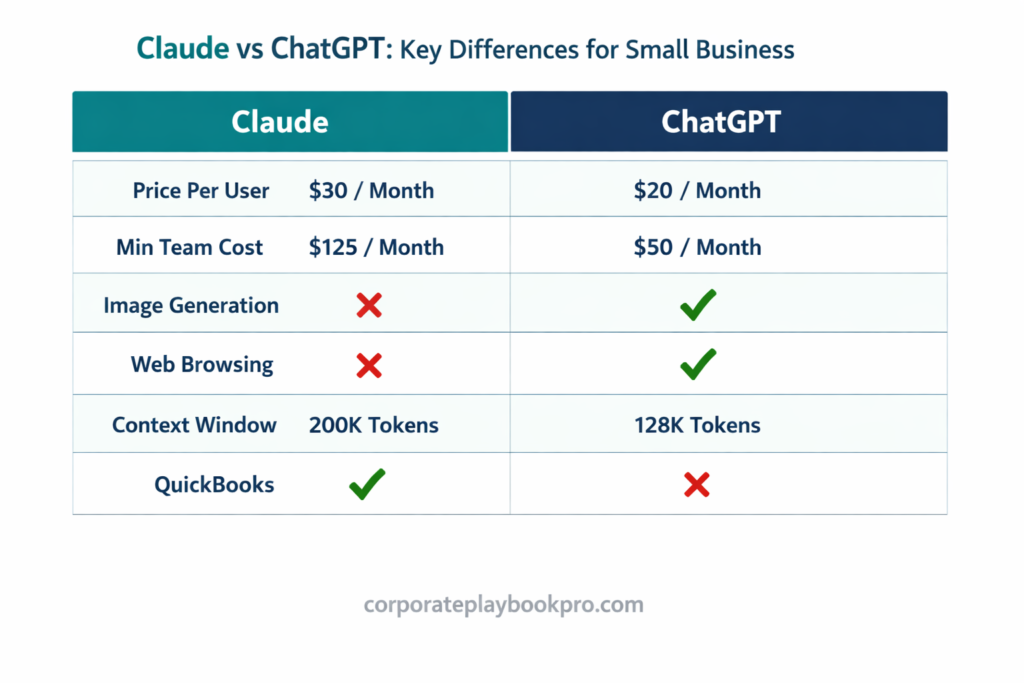
The headline pricing for chatgpt vs claude pricing breakdown for small business teams 2026 is identical: both cost $20/user/month on individual paid plans (Claude Pro and ChatGPT Plus) and $25/user/month on Team plans with annual billing. The critical — and widely overlooked — difference is minimum seat requirements.
| Claude Pro | ChatGPT Plus | Claude Team | ChatGPT Team | |
|---|---|---|---|---|
| Price | $20/user/mo | $20/user/mo | $25/user/mo (annual) | $25/user/mo (annual) |
| Min seats | 1 | 1 | 5 seats minimum | 2 seats minimum |
| Min monthly cost | $20 | $20 | $125/mo | $50/mo |
| Data privacy guarantee | No | No | Yes — not used for training | Yes — not used for training |
| Admin controls | No | No | Yes | Yes |
| Small Biz workflows | No | No | Yes (15 pre-built) | No |
For a 2–4 person business, the minimum seat difference is material. A two-person team pays $50/month for ChatGPT Team versus $125/month for Claude Team — for the same data privacy and admin controls. If you need a governed team setup but your team is small, ChatGPT’s 2-seat minimum makes it the accessible entry point. The chatgpt vs claude for business cost only equalises when you have 5+ seats, where both plans land at the same per-user rate.
For sole operators or individual users, start with the $20/month individual plans and upgrade only when you need admin controls and data privacy guarantees for the full team.
Claude vs ChatGPT for Small Business Teams: Workspaces, Collaboration, and Admin Controls
Claude vs ChatGPT for small business teams looks different at the individual-user level versus the organized-team level. Both tools have invested heavily in making AI work organized and collaborative — but through different product philosophies. Understanding how each handles team workspaces, context sharing, and admin oversight helps you choose the tool your team will actually adopt, not just the one that performs best in solo demos.
Claude Projects are the primary collaboration unit in Claude. Each Project functions as a persistent, organized workspace: you upload a knowledge base (documents, SOPs, client briefs, brand guidelines), set custom instructions, and every conversation within that Project pulls from the same shared context. A consulting team can run a separate Project for each client — keeping the deliverables, source documents, and working style instructions for Client A completely isolated from Client B. Changes to the Project knowledge base are reflected immediately for all team members on that Project. There’s no manual syncing, and context doesn’t reset between sessions.
ChatGPT’s Team workspace uses a shared interface with centrally managed GPTs (custom chatbot configurations). Admins can publish GPTs to the team — a “Proposal Writer” GPT with specific instructions and attached templates, a “Research Assistant” GPT with browsing enabled, a “Social Media Manager” GPT with brand voice instructions. Team members access these GPTs without needing to configure them individually. The advantage is standardization: everyone uses the same GPT, reducing the configuration variability that makes shared AI adoption inconsistent. The disadvantage is that GPTs are more rigid than Projects — they handle predefined tasks well but less suited to fluid, open-ended team workflows.
On admin controls, both Team plans let administrators add and remove users, review usage, and control access. ChatGPT Team offers slightly more granular controls — admins can restrict which GPTs team members can access and configure conversation data retention periods. Claude Team focuses control at the Project level, where project access determines who sees what. For most small businesses, both approaches are adequate; the difference only matters once your team exceeds 20+ people with strict information barrier requirements.
The practical team-adoption difference: Claude Projects work best when your team’s AI use is organized around clients or matters — each engagement gets its own workspace. ChatGPT Team works best when your AI use is organized around functions or roles — your marketing team shares a content GPT, your sales team shares a CRM GPT. Match the structure to how your team already thinks about its work.
ChatGPT Features Claude Doesn’t Have — What Small Businesses Need to Know
Three ChatGPT features Claude does not have that small businesses need to weigh are: built-in image generation via DALL-E, real-time web browsing, and voice mode. Whether these gaps matter depends entirely on what your business does most.
Image generation is the most practical gap for small businesses. ChatGPT Plus gives you DALL-E image creation — generate a product visual, a marketing graphic, or a presentation slide from a text prompt, without leaving the interface. Claude has no native image generation. It connects to Canva for template editing, but it can’t create original images from a prompt. For any business running its own social media, advertising, or visual content, this is a real functional difference that affects daily workflow.
Real-time web browsing matters when your work requires current data — competitor pricing, market trends, live regulation updates, recent case law, or news-dependent decisions. ChatGPT Team and Pro plans browse the web during a conversation. Claude works from its training data and files you upload. For research-intensive workflows, this is a meaningful limitation.
Advanced Data Analysis is ChatGPT’s third underrated advantage. You can upload a spreadsheet, ask it to run a regression, plot a chart, or flag anomalies — and it executes code in a sandboxed environment to produce the output. Claude can analyze data you paste in text form, but it doesn’t execute code against uploaded spreadsheets the way ChatGPT’s data analysis mode does. For businesses that regularly work through raw numbers — sales data, operational metrics, survey responses — this is a practical productivity gap.
ChatGPT capabilities vs Claude across these features all point the same direction: if your primary workload is document-heavy, writing-intensive, or finance-driven via structured integrations, you’ll rarely notice these gaps. If your primary workload is visual content creation, market research, or ad hoc data analysis, the gaps are daily friction.
Should a Small Business Owner Start with Claude or ChatGPT First
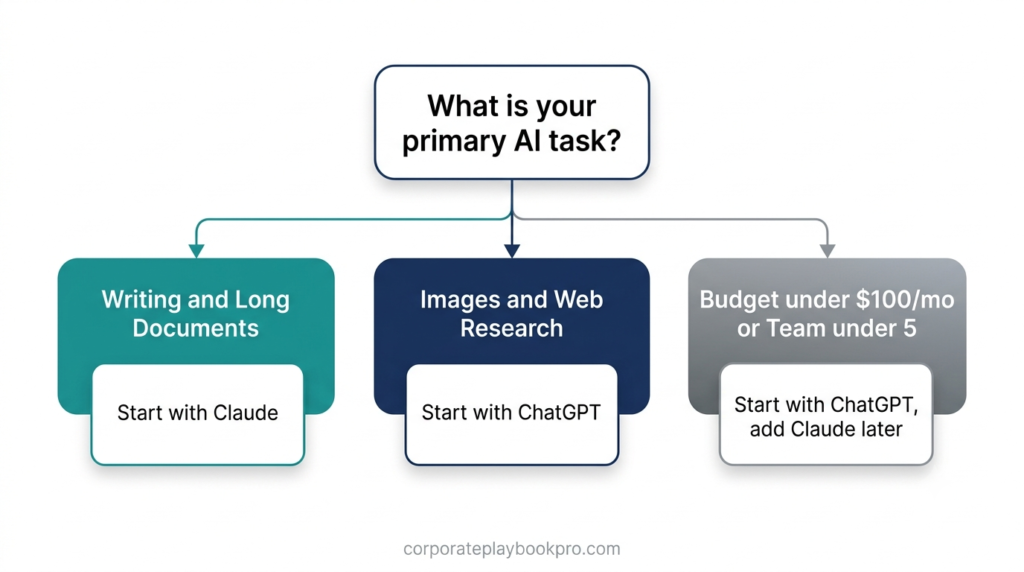
It depends on your business type. For service businesses — consulting, legal, accounting, agencies — Claude is the stronger starting point, because writing quality and document handling are the primary daily workloads. For retail, e-commerce, or content-driven businesses, ChatGPT’s image generation and web research make it the better first choice. Neither is universally superior; the right pick is the one that solves your most time-consuming daily task.
Start with Claude if:
- Your primary AI tasks are client-facing writing, document review, or financial reporting
- You use QuickBooks, HubSpot, PayPal, Xero, or DocuSign
- Your team is 5+ people and needs admin controls and data privacy at the Team tier
- You’re in consulting, legal, accounting, professional services, or a writing-heavy agency
Start with ChatGPT if:
- You need image generation for marketing, social media, or presentations
- You research competitors, market trends, or regulatory changes regularly
- Your team is 2–4 people and the $125/month Claude Team minimum is a budget constraint
- You use Salesforce, GitHub, Jira, or Confluence as primary tools
- Your work is varied (a mix of writing, data, images, and web research daily)
Start with either if you’re a solopreneur using AI primarily for individual productivity — the difference between $20/month individual plans is marginal, and your specific daily tasks matter more than any general recommendation.
Best AI for Small Business by Industry: A Direct Verdict for Each Business Type
The best AI for small business writing and operations in 2026 depends less on a universal ranking and more on what industry you’re in. The same comparison that makes Claude the obvious choice for a law firm makes ChatGPT the obvious choice for a product photography studio. Here’s a direct verdict by business type, based on primary workflow requirements — not benchmark scores.
Consulting and Professional Services → Claude. The daily workflow is document-heavy: client reports, RFP responses, stakeholder presentations, research synthesis. Claude’s writing quality, 200K context window, and ability to hold the full project brief in memory across a long conversation make it the right tool. Pair with Claude Projects to organize work by client engagement. If your firm also uses HubSpot, the Claude for Small Business integration handles the CRM layer. ChatGPT adds value as a secondary tool for competitor research via web browsing — but Claude should be the primary.
Creative and Marketing Agencies → ChatGPT primary, Claude secondary. Image generation, quick ideation, varied creative formats (ad copy, social posts, video scripts, presentations with visuals) — this is ChatGPT’s territory. DALL-E integration means the tool that writes the ad concept can also generate the image for the brief, without switching apps. Claude earns a secondary role for longer-form deliverables — brand strategy documents, detailed content briefs, client proposals — where writing quality matters more than output speed.
Accountants and Bookkeepers → Claude. The QuickBooks integration alone justifies the choice. Claude can pull live P&L data, identify anomalies, draft month-end narratives, and produce client-ready financial summaries without manual data export and re-entry. For accountants running 20+ client files simultaneously, this integration compresses hours of reporting into minutes. The 200K context window also means you can paste a full year of transactions and analyze them in a single session.
Retail and E-Commerce → ChatGPT. Product description writing at scale, visual content for listings, real-time competitor price monitoring via web browsing, and social media images from text prompts — ChatGPT’s breadth matches the varied, high-volume demands of a product business. Claude has no advantage here unless your operations involve complex supplier contracts or detailed compliance documentation.
Legal and Compliance Practices → Claude. Long contracts, regulatory filings, compliance frameworks, due diligence documents — these are Claude’s strongest use cases. The 200K context window handles a full employment agreement or commercial lease in a single pass. The DocuSign integration closes the loop from analysis to execution. Claude’s conservative accuracy posture (flagging uncertainty rather than guessing) is also the right default when the cost of a confident wrong answer is high.
Solopreneurs (knowledge-based — coaching, consulting, freelancing) → Claude. Client deliverables, proposal writing, long-form content, and document-intensive operations are the core workflow. Claude Projects let a solo operator maintain separate workspaces for each client without context bleed. Add ChatGPT as a second tool once AI is genuinely central to your workflow — the additional $20/month pays for itself quickly when image generation or web research becomes a recurring need.
Solopreneurs (content creators, online businesses) → ChatGPT primary. Images, video scripts, social content, and research-backed articles are ChatGPT’s strengths. Add Claude once your deliverables demand higher writing quality — particularly if your clients or readers are sophisticated enough to notice the difference.
When Small Businesses Should Use Both Claude and ChatGPT Together
When small businesses should use both Claude and ChatGPT together is simpler than most think: at $40–50/month combined (two individual paid plans), using both is affordable for any business where AI tools are a meaningful part of daily operations. The workflow split is clear once you know both tools well.
If AI is driving significant daily productivity in your business, yes — the combined $40/month is justified by the workflow gains. Claude handles long documents, client writing, and financial integrations. ChatGPT handles image generation, web research, and quick multi-format tasks. They don’t overlap on what they do best, which is exactly what makes the combination rational rather than redundant.
The trigger for adding the second tool is usually a concrete workflow the first tool genuinely can’t handle. If you’re running Claude and repeatedly blocked by the lack of image generation or real-time market data — add ChatGPT. If you’re on ChatGPT and finding document quality underwhelming or financial analysis frustratingly shallow — add Claude. Most businesses reach this inflection point within two to three months of consistent AI use.
Using both Claude and ChatGPT isn’t indecision — it’s optimisation. The same way you wouldn’t use a spreadsheet for writing proposals or a word processor for financial modelling, you use each AI tool for what it does best. For a business spending $5,000–$10,000 per month on professional labour costs, an additional $20/month for the second tool is not a budget decision.
Once you’ve decided on Claude, getting the configuration right matters. Our complete guide covers Projects, Skills, connectors, and workflow setup:
→ How to Use Claude AI for Business
The Verdict
Claude vs ChatGPT for small business comes down to one question: what does your team do most? Document-heavy, writing-intensive, or finance-driven work → Claude, especially if QuickBooks, HubSpot, or Xero are in your stack. Image creation, web research, or a wider tool ecosystem → ChatGPT. Budget under $100/month with a team of fewer than 5 → ChatGPT’s $50 minimum seat cost makes it the accessible entry point.
Both are worth having once your AI adoption scales. But pick the one that solves your biggest daily pain first, learn it properly, and add the second tool when you hit a wall the first one can’t clear. That’s a better investment of $20 than spending weeks trying to force either tool to cover every use case.
→ Ready to set up Claude for your business? How to Use Claude AI for Business — complete 2026 guide
More from CorporatePlaybookPro.com
→ Business Analysis Techniques: The Complete Guide for Business Leaders and Teams
→ The Art of Business Process Optimization: A Systematic Approach to Operational Excellence
→ What is Six Sigma: The Complete Guide to Quality Excellence (2025)
→ Agentic AI in Business Process Optimization: How Autonomous Agents Are Replacing Rigid Workflows?
→ The AI Maturity Assessment Framework Every Business Leader Needs
→ What Is Digital Transformation? The Complete Guide for Business Leaders
→ Digital Transformation Frameworks Compared: Which Model Fits Your Business
→ How to Use Claude AI for Business: The Complete 2026 Guide
Frequently Asked Questions
Is Claude better than ChatGPT for small business?
Claude is better for document-heavy, writing-intensive, and finance-driven small businesses — especially those using QuickBooks, HubSpot, or Xero. ChatGPT is better for businesses needing image generation, real-time web research, or a wider integration ecosystem. Neither is universally superior; the right choice matches your primary daily workflows, not a benchmark score.
What are the main differences between Claude and ChatGPT?
The key differences are: context window (Claude 200,000 tokens vs ChatGPT 128,000 tokens), media capabilities (ChatGPT has DALL-E image generation and web browsing; Claude has neither), integrations (Claude connects to QuickBooks and HubSpot; ChatGPT connects to Salesforce and GitHub), and team plan minimum cost (Claude $125/month minimum; ChatGPT $50/month minimum for 2 seats).
Is Claude free for small business?
Claude has a free tier at claude.ai with limited daily usage — adequate for testing but not for consistent business work. Claude Pro ($20/month per user) gives access to the latest models with higher usage limits. Claude Team ($25/user/month, 5-seat minimum at $125/month) adds admin controls, data privacy guarantees, and the Claude for Small Business workflows including QuickBooks and HubSpot integrations.
Is Claude more accurate than ChatGPT?
Both Claude and ChatGPT can produce inaccurate outputs — no AI assistant is reliably accurate without human review. Claude is generally more conservative: it’s more likely to flag uncertainty than guess confidently, which reduces confident-sounding errors. For any business-critical output — financial figures, legal language, medical information — treat both tools as a strong first draft that requires verification.
Is ChatGPT or Claude better for customer communication?
Claude is the stronger choice for customer communication. Its business writing quality is consistently rated higher — proposals, follow-up emails, and client-facing content require less editing and sound more natural. For internal communications where speed matters more than polish, both tools perform comparably.
Which AI should a service-based small business use for client proposals in 2026?
Claude is the stronger choice for service businesses writing client proposals. Its tone control, instruction-following accuracy, and 200,000-token context window mean you can paste an entire project brief and receive a first-draft proposal that sounds like your firm. Claude for Small Business adds HubSpot integration for an end-to-end proposal workflow from creation to CRM tracking.
Should a small business with fewer than 5 employees pay for Claude Team or ChatGPT Team?
For a team of 2–4 people, ChatGPT Team ($50/month minimum, 2 seats) is significantly more accessible than Claude Team ($125/month minimum, 5 seats). At the individual Pro/Plus level, both cost $20/month — adequate for most sole operators. Only move to a Team plan when you genuinely need admin controls and data privacy guarantees across multiple team members.
Can Claude pull QuickBooks data and summarize cash flow for a small business owner?
Yes, through the Claude for Small Business integration launched in May 2026. On Claude Team plans, Claude connects directly to QuickBooks to pull P&L statements, cash flow summaries, invoice status, and reconciliation data — then generates plain-language summaries, flags anomalies, or drafts month-end reports. This requires a Claude Team subscription (minimum 5 seats) and an active QuickBooks account.
Is Claude or ChatGPT better for a solopreneur managing client content and daily operations?
For a solopreneur managing client deliverables and business operations, Claude is the stronger primary tool. Writing quality, long document handling, and precise instruction-following make it the more reliable daily assistant for client-facing work. Add ChatGPT as a second subscription ($20/month) if you regularly need images or real-time research. At $40/month combined, most active solopreneurs find the second tool pays for itself within a few weeks.
What does Claude do better than ChatGPT for business?
Claude outperforms ChatGPT in four key business areas: business writing quality (more natural tone, less editing required), long document analysis (200,000 vs 128,000 token context window), small business financial integrations (QuickBooks, HubSpot, Xero, PayPal via Claude for Small Business), and conservative accuracy (less likely to state incorrect information confidently).
How does ChatGPT compare to Claude for small business productivity?
ChatGPT is the stronger productivity tool when your business needs breadth: DALL-E image generation, real-time web research, voice mode, Advanced Data Analysis for spreadsheet work, and 60+ app integrations including Salesforce and GitHub. Claude is the stronger productivity tool for writing-intensive, document-heavy, or finance-driven operations — especially those with QuickBooks or HubSpot in the stack.
Which AI is safer for small business data — Claude or ChatGPT?
Both Claude Team and ChatGPT Team plans exclude your business data from model training by default. Both are SOC 2 compliant with GDPR and CCPA support. Claude’s privacy posture is slightly more conservative by design. Neither Team plan is HIPAA-compliant out of the box; healthcare businesses need Enterprise plans with Business Associate Agreements from both providers.