Every business leader reading this already knows that Google has AI tools. Most have also sat through at least one presentation where a vendor or internal champion walked them through a list of those tools — Gemini, Vertex AI, Google Cloud, AI Studio — with each one described as transformative and each one immediately raising the same practical question: which of these is actually relevant to my organisation right now?
That question almost never gets a direct answer. The reason is that most coverage of Google AI for business treats all organisations as if they are at the same stage of readiness. They are not. A 12-person professional services firm and a 12,000-person financial services group face completely different AI adoption challenges, have completely different technical capacities, and need completely different tools from Google’s ecosystem.
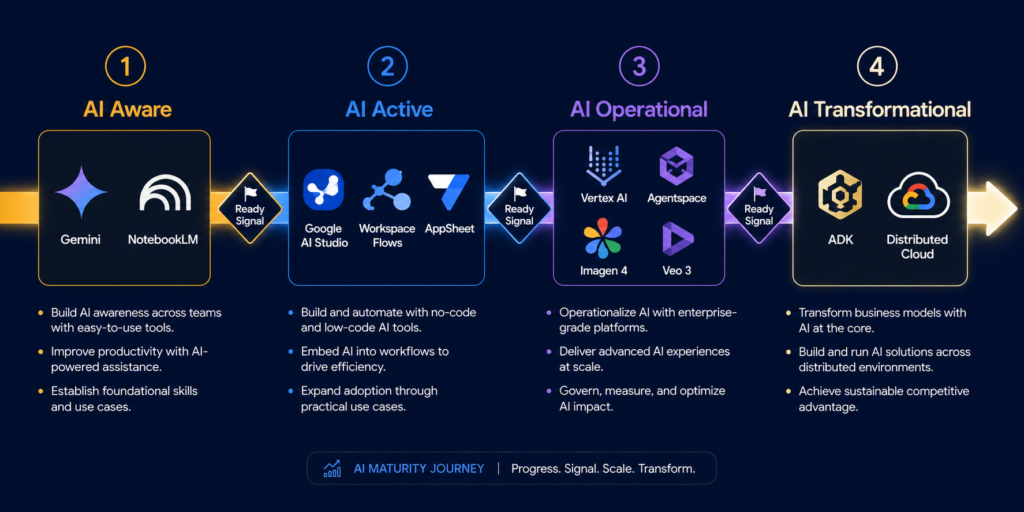
This guide maps Google’s full AI toolkit — including tools most business leaders have never heard of, like Google AI Studio, Agentspace, Imagen 4, Veo 3, Jules, and Gemini Code Assist — to a four-stage maturity model. By the end, you will know exactly which Google AI tools your organisation needs at its current maturity stage, what the realistic investment looks like, and what to prioritise to move to the next level.
Why Do Most Google AI Adoption Projects Fail — And How Do Business Leaders Avoid It?
The failure is structural. Google’s AI ecosystem has expanded from a handful of products in 2023 to over 600 documented enterprise use cases across 11 industries as of 2025. Covering that breadth without an organising framework produces exactly the kind of initiative that leaves leaders more confused than when they started — and produces the statistic that 70% of enterprise AI projects fail to reach production.
The second failure is the assumption that AI adoption is primarily a technology problem. It is not. IMD research across 300 global companies reveals that successful AI leaders align five forces: committed leadership, responsible governance, cross-functional talent, deep ecosystem ties, and outcome-focused scaling. The tools are the last part of that equation, not the first.
The third failure is treating “Google AI” as a single product. Google’s AI ecosystem spans four fundamentally different product layers — each requiring different technical capabilities, different budget levels, and different organisational readiness. The wrong tool at the wrong maturity stage produces failed pilots, wasted investment, and executive disillusionment that sets back AI adoption across the entire organisation.
The maturity framework below solves all three problems simultaneously.
What Is a Google AI Implementation Roadmap for Enterprise — and Why Does Every Business Need One?
Before mapping tools to stages, it is useful to locate where most organisations actually are. According to McKinsey’s 2025 AI report, 78% of companies now use AI somewhere in their business — up from just 55% a year earlier. However, using AI somewhere is very different from having a coherent AI implementation roadmap with measurable business outcomes at each stage.
Google’s own AI Adoption Framework, developed from experience with cloud customers across industries from startups to global enterprises, builds the roadmap across four dimensions: people, process, technology, and data. The interplay between these dimensions defines six themes critical to implementation success: Lead, Learn, Access, Scale, Automate, and Secure.
For the purposes of this guide, those dimensions translate into four practical maturity stages that business leaders can immediately recognise in their own organisations — and act on without a consultant.
How to Start Using Google AI Tools for Business With No Technical Team: Stage 1 Guide
Your organisation uses some AI features — perhaps ChatGPT for drafting, perhaps basic autocomplete in emails — but there is no defined AI strategy, no measurable outcomes, no designated ownership, and no clear picture of what the next step looks like. AI is discussed in leadership meetings but described in aspirational terms rather than operational ones.
At Stage 1, organisations recognise AI’s potential but have little practical adoption. AI strategy is still conceptual. Technical competencies and organisational data readiness are limited. This stage is more common than most leaders admit publicly.
Which Google AI Tools Work Without a Technical Team?
The Gemini App (Google AI Pro) This is where every Stage 1 organization should begin — not with infrastructure, not with a cloud contract, but with a live AI assistant requiring no setup, no technical team, and no procurement process. Google AI Pro includes access to Gemini 2.5 Pro — currently one of the highest-scoring reasoning models available — with a 1 million token context window, Google Search integration for real-time research, and Deep Research mode for synthesizing complex topics across multiple sources.
For a Stage 1 business leader, the highest-value immediate use cases are: synthesizing industry research before major meetings, drafting strategic communications faster, and stress-testing your own strategic arguments against AI counterpoints before presenting to the board.
Google Workspace with Gemini (Included in All Paid Business Plans) Google made the decision to include Gemini AI in all Workspace Business and Enterprise plans without requiring a separate add-on — meaning organisations already on paid Workspace plans have Stage 1 AI capabilities available today without additional budget. Gemini embedded in Gmail, Docs, Sheets, Meet, and Drive handles the high-frequency tasks that produce immediate time savings: email summarisation, meeting notes, document drafting, formula assistance.
For a complete breakdown of every Workspace AI feature by department, see: How to Use Google Workspace AI Tools for Business: The Complete Department-by-Department Guide
NotebookLM (Included in Workspace — Free Tier Available) NotebookLM is the Stage 1 research tool most organisations discover last and immediately wish they had found first. Upload strategy documents, competitor reports, industry analyses, and regulatory filings into a private notebook. The AI creates a grounded model from only those sources — every answer cited back to the specific document. For leaders managing information overload across high-stakes decisions, this is the fastest path from document library to actionable insight with zero technical setup.
What Google AI Tools Should a Small Business Use Before Spending on Cloud Infrastructure?
The answer is unambiguous: Gemini in Workspace, NotebookLM, and Google AI Pro cover the full value-creation surface for Stage 1 organisations without any cloud spend. Vertex AI, Google Agentspace, and Google Cloud enterprise contracts are the wrong investment at Stage 1. The organisational conditions required to extract value from them — clean data, defined processes, technical capacity, governance frameworks — do not yet exist. Buying enterprise AI infrastructure before organisational readiness is the most common and most expensive mistake in Google AI adoption.
Signal that you are ready for Stage 2: One measurable outcome documented over 60 days. “Gemini in Gmail saves our communications team 90 minutes per day” is a Stage 2 entry credential. Without it, advancing is premature.
How to Use Google AI Studio for Business Without a Developer or Data Scientist: Stage 2 Guide
Your organisation has moved from curiosity to experimentation. One or two teams are using AI tools consistently and generating results. Leadership is supportive but adoption is uneven — some departments are engaged, others are waiting. You have a general sense of where AI could help but no systematic process for prioritising opportunities or measuring outcomes.
In the Active stage, organisations launch pilot projects in areas like customer support automation or data analysis. Challenges include inconsistent data quality, limited workflow integration, and difficulty connecting AI activity to business KPIs.
What Is Google AI Studio Used for in Business — and How Is It Different From Gemini?
This is the question Stage 2 organisations most frequently ask, and it has a precise answer.
Gemini is the AI model — the intelligence you interact with through the Gemini app, Gmail, Docs, and Sheets. It is the end-user product designed for consuming AI capability. Google AI Studio is the building environment — a browser-based platform where business teams and developers design, test, and prototype AI behaviour that can be deployed into products, internal tools, and automated workflows. Google AI Studio is not about getting answers. It is about building AI behaviour that can be reused, scaled, and integrated into your business systems.
For Stage 2 businesses, Google AI Studio bridges the gap between “our team uses Gemini for drafting” and “we have deployed a custom AI workflow that automates a specific business process.” A marketing team builds a prompt chain that generates campaign briefs in a consistent format automatically. An operations team prototypes a document classification workflow. A finance team tests AI-powered invoice data extraction against real sample data — all within AI Studio, without writing production code. The free tier allows Stage 2 organisations to prototype and validate before any significant cloud spend.
Google Workspace Flows and AppSheet with Gemini Stage 2 is where process automation becomes the next value lever after individual productivity. Workspace Flows connects triggers and actions across Google Workspace and third-party tools (Jira, Asana, Salesforce) without code. AppSheet with Gemini builds mobile and desktop applications for specific business processes by describing them in natural language. Early customers including Karcher SE reduced manual planning time by as much as 90% using Workspace Studio agents.
Gemini Enterprise The front door for agentic AI in the workplace — includes a no-code Agent Designer that allows any employee, regardless of technical expertise, to create custom AI agents for sales, marketing, finance, HR, and IT workflows.
Workspace Studio Announced in late 2025, Workspace Studio allows business users to build and deploy AI agents through conversational prompts with no engineering support. Early Alpha customers executed more than 20 million tasks in 30 days, with use cases ranging from meeting reminders to complex legal document triage and customer service routing.
Which Google AI Tools Are Too Advanced for a Business Just Starting With AI?
Full Vertex AI custom model training, BigQuery ML, and dedicated Google Cloud AI infrastructure are Stage 3 investments. At Stage 2, the organisation is still building the data discipline, process clarity, and governance structures these platforms require to deliver ROI. Purchasing them before those foundations are in place produces expensive, underused infrastructure — and the organisational frustration that kills AI programmes before they reach maturity.
Signal that you are ready for Stage 3: Three or more AI workflows running consistently with documented outcomes linked to business KPIs. A designated AI owner with formal responsibility. Data that is accessible, reasonably clean, and centralised enough to build models on.
How Do Large Enterprises Use Google Cloud AI in Day-to-Day Operations? Stage 3 Guide
AI is no longer a project at Stage 3 — it is infrastructure. Multiple functions use AI tools daily with measurable impact on KPIs. Your organisation has an AI governance framework, a process for evaluating new AI opportunities, and enough accumulated data and process clarity to start building custom models and deploying intelligent agents at scale.
The focus at Stage 3 turns to scale and systematisation. AI is now connected to real business KPIs — customer retention, margin improvement, operational throughput. Tooling must support repeatable, auditable, and observable deployments.
What Is Google Agentspace and Who Is It For?
Google Agentspace gives every employee a secure AI assistant that knows the organisation’s tools, content, and workflows — and acts on them. Using Google’s proven search technology, Agentspace finds exactly what teams need whether it is buried in a document, hidden in an email, or spread across internal systems. Agentspace plugs into Google Drive, Jira, Confluence, SharePoint, Salesforce, Box, and other platforms — so instead of just surfacing data, agents complete tasks across all connected systems.
Where Gemini Enterprise focuses on individual productivity and basic agent workflows, Agentspace focuses on organisational knowledge — making institutional data searchable, synthesisable, and actionable at scale. Wells Fargo is using Agentspace to transform how individuals and teams work, collaborate, and serve customers across a workforce of tens of thousands.
Vertex AI Vertex AI offers the widest model variety — Gemini, Imagen, Veo, Lyria, Chirp first-party; Anthropic’s Claude third-party; Gemma, Llama open models — all accessible in one platform natively integrated with BigQuery. For Stage 3 organisations, Vertex AI is where AI moves from productivity enhancement to competitive differentiation: custom demand forecasting, churn prediction, fraud detection, supply chain optimisation, and personalisation engines. Vertex AI usage increased 20x in the past year alone.
What Is Imagen 4 and Veo 3 Used for in Business Content Creation?
Most business leaders are unaware that Google’s image and video generation models are available as enterprise-grade APIs through Vertex AI. Imagen 4 generates high-quality, photorealistic images from text descriptions — retail teams use it to produce product imagery at scale, marketing teams generate campaign visuals without production resources. Veo 3 produces video content for marketing, training, e-commerce, and internal communications from text prompts. Both include built-in SynthID watermarking for responsible commercial use. For Stage 3 organisations in content-intensive industries, these capabilities represent a structural shift in content production economics — eliminating production cycles that previously took days.
How Does Google Gemini Code Assist Help Software Development Teams in Business?
Stage 3 organisations with software development functions have access to two tools that fundamentally change engineering productivity.
Gemini Code Assist offers 180,000 free monthly completions — 90 times more than GitHub Copilot’s free tier — powered by Gemini 2.5 Flash with Agent Mode that autonomously plans complex refactoring across dozens of files, executes comprehensive test generation, and debugs complex issues by tracing full call stacks. Jules is a new autonomous AI coding agent in public beta that integrates with existing repositories and operates asynchronously — developers assign a task and Jules completes it in the background while they focus on higher-order work. For Stage 3 organisations managing technical debt or accelerating product development cycles, these tools produce measurable throughput improvements within weeks of deployment.
BigQuery Data Insights Agent Provides structured insights from BigQuery data without requiring users to write a single line of SQL — democratising data-driven decision making across business functions that previously depended entirely on data analyst availability.
Signals for Stage 4 readiness: Custom model fine-tuning on proprietary data, multi-agent orchestration needs, cross-vendor agent collaboration requirements, or on-premises deployment constraints from regulatory requirements.
How Do Enterprises Build a Google AI Strategy That Creates Sustainable Competitive Advantage? Stage 4 Guide
At Stage 4, AI is not a layer on top of your business — it is embedded in your products, services, decision-making processes, and organisational structure. Your organisation does not adopt AI tools; it builds AI capabilities that define how you compete.
At the highest maturity level, AI drives innovation in new products, services, and business models, and informs decision-making at every level. Organisations at this stage invest heavily in proprietary datasets, specialised talent, and AI-native architecture to maintain leadership.
Full Google Cloud AI Stack:
Custom fine-tuned Gemini models on proprietary data, Vertex AI for the full ML lifecycle, and Google’s TPU infrastructure for training and inference at enterprise scale.
Google’s Agent Development Kit (ADK) and Agent2Agent (A2A) Protocol:
ADK is an open-source framework for building and governing multi-agent systems. A2A provides a common language for agents to collaborate regardless of framework or vendor — enabling supply chain agents to communicate with compliance agents which trigger financial reporting agents across a single automated workflow.
Google DeepMind Research Applications:
MedGemma for healthcare AI applications, AlphaFold for protein structure prediction, and purpose-built research models for scientific discovery at scale in life sciences, climate, and materials science.
Google Distributed Cloud:
Brings Gemini and Agentspace to on-premises and air-gapped environments for regulated industries, government, and defence — the complete Google AI stack operating entirely within your physical infrastructure.
The Stage 4 Reality Check:
Genuinely transformational AI organisations are rare. The goal for most business leaders reading this is not to reach Stage 4 immediately — it is to make decisions at Stage 2 and Stage 3 that do not create architectural debt preventing Stage 4 later. The organisations that reach Stage 4 are those that measured outcomes at every earlier stage, not those that spent the most on AI fastest.
How Do I Know Which Google AI Maturity Stage My Organisation Is At? (Four Diagnostic Questions)
Four questions produce an honest maturity assessment without a formal engagement:
Question 1: Do you have a documented AI use case with a measured outcome?
No → Stage 1. Yes, for one or two teams → Stage 2. Yes, across multiple functions with KPI linkage → Stage 3.
Question 2: Is your organisational data accessible, reasonably clean, and centralised?
No → you cannot extract value from Vertex AI or custom model training regardless of budget. Fix data infrastructure before advancing past Stage 2.
Question 3: Do you have a designated AI owner with formal accountability and executive mandate?
No → AI adoption will remain fragmented across disconnected pilots. A single owner with executive sponsorship is the most important organisational condition for moving between stages.
Question 4: Does your organisation have a documented AI governance policy?
No → you are operating without the guardrails that allow AI usage to scale safely. Many enterprises discover they lack the ethical frameworks and accountability structures needed to deploy AI responsibly at enterprise scale — typically at the moment a compliance problem emerges.
What Is the Difference Between Gemini, Vertex AI, and Google AI Studio for Business?
This single question causes more misaligned purchasing decisions than any other in the Google AI ecosystem.
Gemini is Google’s AI model — the intelligence underneath everything. When you use Gemini in Gmail, the Gemini app, or Google AI Studio, you are interacting with the same underlying model family (Gemini 2.5 Flash for speed-optimised tasks, Gemini 2.5 Pro for complex reasoning). Think of Gemini as the engine.
Google AI Studio is the browser-based building environment for Gemini. Where Gemini is for using AI, Google AI Studio is for building with AI — designing, testing, and prototyping repeatable AI behaviours that can be deployed into products or workflows. Free to access. Requires some technical comfort but not deep engineering expertise. Think of AI Studio as the workshop.
Vertex AI is Google Cloud’s full enterprise AI platform — the infrastructure for training, deploying, monitoring, and governing AI models at production scale. Includes a model garden with first-party, third-party, and open-source options, AutoML for no-code model training, and BigQuery integration for data-intensive deployments. Think of Vertex AI as the factory.
The decision framework: Stage 1–2 organisations use Gemini. Stage 2 organisations with technical ambition build in Google AI Studio. Stage 3–4 enterprises deploy and scale on Vertex AI.
Is Google AI Studio Free for Businesses — and What Do the Paid Tiers Actually Unlock?
Yes — with specifics that matter for planning. Google AI Studio provides free access to Gemini models via API with usage limits generous enough for prototyping and small-scale deployment. The free tier includes Gemini 2.5 Flash with a 1 million token context window, multimodal inputs (text, images, video, audio, code), and the ability to build and test AI workflows and prompt chains.
Paid tiers via Google Cloud billing remove rate limits and unlock production-grade deployment, Gemini 2.5 Pro access, higher throughput, and enterprise compliance features including HIPAA-eligible configurations and VPC Service Controls. For organisations moving from prototype to production, the transition from free to paid Google AI Studio is the natural and predictable inflection point.
Google AI Tools Comparison for Small, Medium, and Enterprise Business: Full Decision Matrix
| Tool | Best For | Maturity Stage | Technical Requirement | Approximate Cost |
|---|---|---|---|---|
| Gemini App (AI Pro) | Individual productivity, deep research | Stage 1 | None | $19.99/user/month |
| Gemini in Workspace | Team productivity across all functions | Stage 1–2 | None | Included in Workspace plans |
| NotebookLM | Research synthesis, private knowledge bases | Stage 1–2 | None | Included in Workspace |
| Google AI Studio | Custom AI workflow prototyping via API | Stage 2 | Low-medium | Free tier + usage-based |
| Workspace Flows | No-code business process automation | Stage 2 | None | Included in Workspace |
| AppSheet + Gemini | No-code app building, document automation | Stage 2 | None | From $10/user/month |
| Gemini Enterprise | Custom agents, enterprise-scale deployment | Stage 2–3 | Low | From $30/user/month |
| Google Agentspace | Enterprise knowledge + cross-system agents | Stage 3 | Medium | Contact Google Cloud |
| Vertex AI | Custom ML models, production AI deployment | Stage 3–4 | High | Usage-based |
| Gemini Code Assist | Developer productivity, autonomous coding | Stage 3 | High (developers) | Free tier + $19/user/month |
| Imagen 4 / Veo 3 | Enterprise content creation at scale | Stage 3–4 | Medium | Usage-based via Vertex |
| Jules (AI coding agent) | Autonomous asynchronous coding tasks | Stage 3–4 | High (developers) | Public beta |
| Google Distributed Cloud | On-premises AI for regulated environments | Stage 4 | Very high | Enterprise contract |
How to Build a Google AI Implementation Roadmap That Delivers Measurable ROI Without a Large IT Team
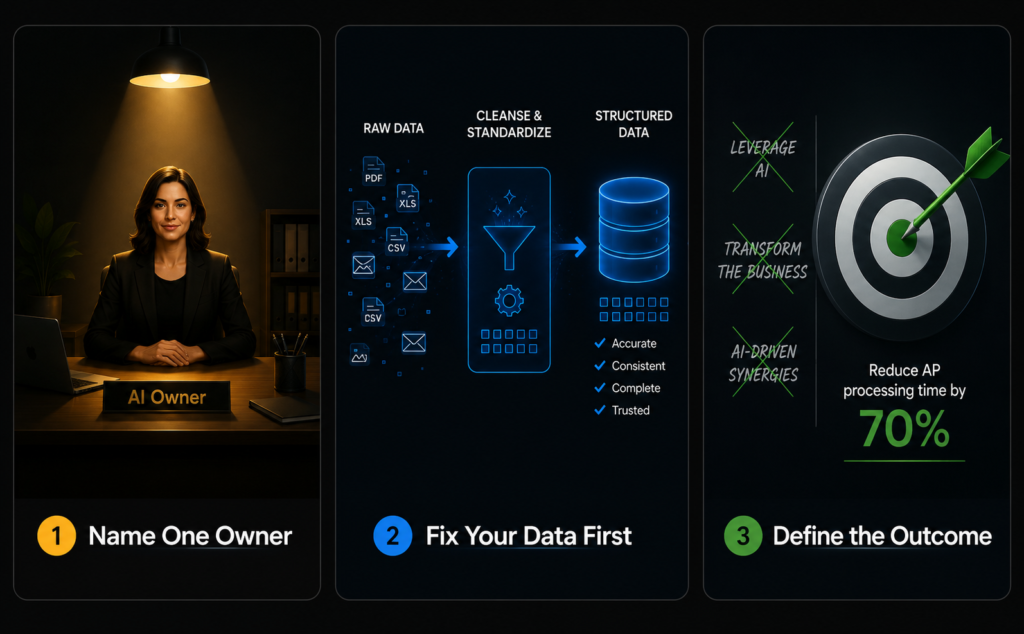
The tools are rarely the reason Google AI initiatives fail. The reason is almost always one of three organisational decisions made — or not made — before any tool is selected.
Decision 1: Who owns Google AI in your organisation?
Not IT. Not a committee. One named person with executive mandate, budget authority, and accountability for outcomes. Every organisation that scales Google AI successfully has this person. Every organisation producing disconnected pilots and disappointing ROI does not.
Decision 2: What is your data strategy?
Google AI is only as good as the data it works with. Before any investment beyond Stage 1, answer: where is your data? Is it accessible? Is it clean enough to be useful? Is it centralised or fragmented across legacy systems? The answer determines which Google AI tools can deliver value — and which ones will consume budget without producing outcomes.
Decision 3: What specific outcome are you measuring?
Not “we want to leverage AI across the business.” A specific, quantifiable outcome: reduce proposal generation time from 4 hours to 45 minutes. Reduce manual data entry in accounts payable by 70%. Increase sales team capacity by 20% without additional headcount. The organisations that extract real value from Google AI tools are the ones that defined the outcome before they selected the tool.
Google AI for Business Leaders: Which Maturity Stage Should You Start From?
The most costly mistake in AI adoption is investing at the wrong maturity stage — buying Vertex AI infrastructure when your team is still figuring out how to use Gemini in Gmail, or deploying enterprise agentic platforms before the data and governance foundations are in place to make them work.
Google’s AI ecosystem covers every maturity stage from individual productivity tools accessible in minutes to enterprise AI infrastructure that took Google itself decades to build. The breadth is an advantage only if you enter at the right point for your organisation’s actual — not aspirational — current state.
Start with the Stage 1 tools today. Measure one outcome. Use that outcome to justify the next investment. The organisations that will define their industries through Google AI in 2027 and 2028 are the ones that started that disciplined sequence in 2025 — not with the most ambitious plan, but with the most honest assessment of where they actually were. To get that assessment for your own organisation, use the free AI maturity assessment calculator.
More from CorporatePlaybookPro.com
→ The AI Maturity Assessment Framework Every Business Leader Needs
→ Agentic AI for Small Business: Use Cases & Roadmap
→ Top 10 AI Use Cases Transforming Small & Medium Business
→ Top 9 Affordable Agentic AI Platforms for Small Businesses
→ What is Agentic AI? Complete Guide with Real-World Examples
→ Types of AI Agents : Guide for Business Leaders
→ How to Use Claude AI for Business: The Complete 2026 Guide
→ How To Use Google AI For Business : Business Functions By Business Functions
Frequently Asked Questions
What Google AI tools are available for business leaders in 2025?
Google’s business AI ecosystem spans four maturity layers: Stage 1 productivity tools (Gemini app, Gemini in Workspace, NotebookLM), Stage 2 workflow automation (Workspace Flows, AppSheet, Google AI Studio, Gemini Enterprise, Workspace Studio), Stage 3 cloud AI infrastructure (Vertex AI, Google Agentspace, BigQuery ML, Imagen 4, Veo 3, Gemini Code Assist), and Stage 4 transformational tools (ADK, A2A Protocol, Google Distributed Cloud, DeepMind research applications). The right tools depend entirely on your organisation’s current maturity stage.
What is the difference between Gemini, Google AI Studio, and Vertex AI for business?
Gemini is the AI model — the intelligence. Google AI Studio is the free browser-based environment for prototyping custom AI workflows and building with the Gemini API. Vertex AI is Google Cloud’s full enterprise platform for training, deploying, and governing AI models at production scale. Stage 1–2 businesses use Gemini. Stage 2 businesses with technical ambition prototype in AI Studio. Stage 3–4 enterprises deploy on Vertex AI.
Which Google AI tools work without a technical team?
Gemini in Workspace (Gmail, Docs, Sheets, Meet), the Gemini app, NotebookLM, Workspace Flows, and AppSheet with Gemini all require no coding knowledge or technical team. Google AI Studio requires some technical comfort but not engineering expertise. Vertex AI, Gemini Code Assist, and Jules require technical staff.
Is Google AI Studio free for businesses?
Yes. Google AI Studio provides free access to Gemini 2.5 Flash with a 1 million token context window, multimodal inputs, and API-based workflow building and testing. Paid tiers remove rate limits and unlock Gemini 2.5 Pro, production-grade deployment, and enterprise compliance configurations.
What is Google Agentspace and who is it for?
Google Agentspace is an enterprise knowledge and multi-tool workflow platform connecting AI agents across all organisational systems — Google Drive, Jira, Confluence, SharePoint, Salesforce, Box. It is designed for Stage 3 organisations where the bottleneck is cross-system knowledge management and workflow automation at scale, not individual productivity.
What is Google AI Studio used for in business versus just using Gemini?
Gemini is for using AI. Google AI Studio is for building with AI — designing repeatable AI behaviours, prompt chains, and document processing automations that are deployed consistently across a product or business process. It is the step between using Gemini informally and running Vertex AI at enterprise scale.
What is Imagen 4 used for in business?
Imagen 4 is Google’s enterprise image generation model on Vertex AI, used for generating product imagery at scale, marketing visuals, training materials, and image-based applications from text descriptions. It includes SynthID watermarking for responsible commercial use in content-intensive industries.
What is Veo 3 used for in business?
Veo 3 is Google’s video generation model on Vertex AI, producing marketing videos, e-commerce content, and internal training videos from text prompts — without traditional production resources. It supports enterprise deployment with safety filters and watermarking built in.
How does Google Gemini Code Assist help software development teams?
Gemini Code Assist offers 180,000 free monthly code completions, Agent Mode for autonomous multi-file coding tasks, and a 1 million token context window for full codebase understanding. Jules, the autonomous coding agent, operates asynchronously on assigned tasks while developers focus on other work.
How do I know which Google AI maturity stage my organisation is at?
Four diagnostic questions: Do you have a documented AI use case with a measured outcome? Is your data accessible, clean, and centralised? Do you have a designated AI owner with executive mandate? Does your organisation have an AI governance policy? Your honest answers place you on the maturity model more accurately than any formal assessment.
What should a non-technical CEO know about Google AI tools for business in 2025?
Three things. First, the AI tools already included in your Workspace subscription are almost certainly underused — check your Admin Console before buying anything new. Second, your organisation’s maturity stage determines which Google AI tools will deliver ROI and which will fail — be honest about where you actually are. Third, the biggest bottleneck in Google AI adoption is not technology or budget — it is the absence of a named owner with accountability for AI outcomes.
How do I build a Google AI adoption roadmap without an IT department?
Start with the four-question maturity assessment in this article. Identify your stage. Select the tools that match that stage from the decision matrix — all Stage 1 and most Stage 2 tools require zero IT involvement. Define one measurable outcome. Run a 60-day pilot. Report the specific result. Use that evidence to justify the next investment tier. Do not skip stages.
What is the Google AI Adoption Framework?
Google’s AI Adoption Framework is a whitepaper published by Google Cloud providing a structured guide for building AI capability. It organises adoption across four dimensions — people, process, technology, and data — and defines six critical themes: Lead, Learn, Access, Scale, Automate, and Secure. It is freely available at cloud.google.com and forms the conceptual foundation for the maturity model used in this article.
How does Google AI compare for small versus enterprise business?
Small businesses at Stage 1 get immediate value from Gemini in Workspace and NotebookLM — both included in existing Workspace plans with no additional technical complexity. Mid-size businesses at Stage 2 add Google AI Studio for custom workflows and Workspace Flows for automation. Enterprises at Stage 3–4 deploy Vertex AI for custom model training and Agentspace for cross-system knowledge management.
What are the three most important Google AI tools for business leaders to understand in 2025?
First, Gemini in Workspace — included in your subscription and the fastest path to measurable productivity gains with zero technical barrier. Second, Google AI Studio — the free building environment that bridges informal Gemini use and serious AI deployment, giving any team the ability to prototype custom workflows. Third, Vertex AI — the enterprise platform that makes custom AI a competitive capability relevant at Stage 3 maturity and beyond.