Introduction
Most AI guides for solopreneurs are written by people who have never actually run a one-person business. They talk about “productivity boosts” and “streamlining your workflow” without ever telling you which specific Claude feature handles which specific problem — and why.
For Business leaders who need broad business deployment picture, the How to Use Claude AI for Business guide covers the whole Claude AI Product Eco system from a Management persprctive . This guide tells are different story that is, what that setup looks like when you are the entire team yourself!
This guide is different. It is written for the solopreneur who already understands the basics of Claude and wants to know exactly how to configure it, which products to use in which order, and how to build a system where Claude carries the operational weight that would otherwise require a team.
Here is the core idea before we go any further: Claude is not a productivity tool for solopreneurs. It is the team they cannot afford to hire.
That reframe matters. When you use Claude as a productivity layer — pasting things in, getting outputs, moving on — you get marginal gains. When you use Claude as a structured, configured operating system for your business — with Projects holding your context, Skills encoding your processes, and Cowork running your recurring work — you get an entirely different scale of leverage. Functions that were not possible for a one-person business become possible. Roles you would have needed to hire for disappear.
This guide walks you through exactly how to build that system, feature by feature, workflow by workflow.
What this article covers:
- How Claude AI is structurally different for a solopreneur vs a larger business
- Whether Claude can replace hiring a virtual assistant (and when it cannot)
- Exact setup instructions for Claude Projects in a solopreneur context
- How Claude Skills work and which ones to build first
- Claude Cowork: Dispatch, Scheduled Tasks, Computer Use — and whether you actually need it
- Complete workflow breakdowns by business function: writing, proposals, email, bookkeeping, research
- Plan comparison: Free vs Pro vs Max for a one-person business
- The 2026 Claude for One Person Business launch and what it means for solopreneurs
- Real time-saving benchmarks

Why Solopreneurs Need a Different Claude Setup Than Teams?
If you’ve read about how enterprise teams deploy Claude, you already know that setup doesn’t translate to a one-person operation. Here’s why your architecture needs to look different: Existing roles handle strategy, judgment, and accountability. Claude accelerates execution. That is a meaningful use case, but it is fundamentally different from what a solopreneur needs.
A solopreneur is the strategy department, the marketing team, the finance function, the sales rep, the customer support queue, and the person who takes out the metaphorical trash. There are no other humans to absorb the work that Claude cannot do. There is no junior to hand off the first draft to. Every hour spent on administration is an hour not spent on client work or revenue generation.
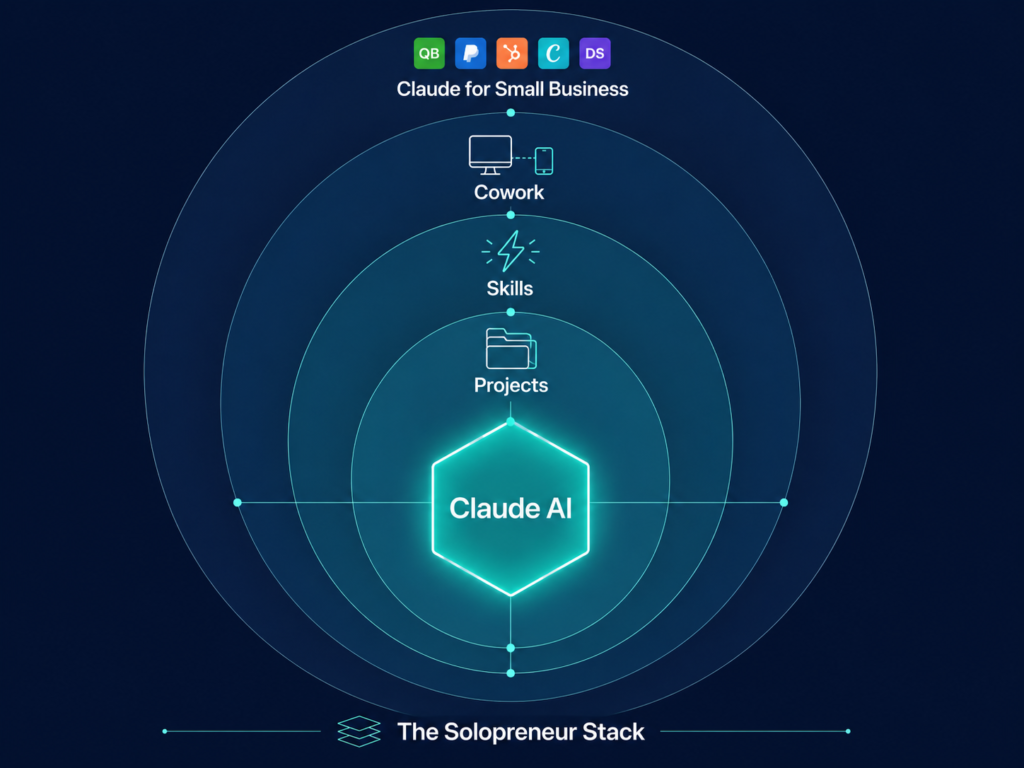
The design implication is significant. For a larger business, Claude is additive — it speeds things up. For a solopreneur, Claude is substitutive — it takes on whole functions that would otherwise be either done by the founder at a personal cost, outsourced at a financial cost, or simply not done at all.
This is why the architecture of a solopreneur’s Claude setup looks fundamentally different from a corporate deployment:
Claude ai Corporate deployment architecture:
- Claude used in chat mode by individual contributors
- Projects organised by department or project
- Skills standardise outputs across teams
- Cowork handles team-level automation
Claude ai Solopreneur deployment architecture :
- Claude Projects replace the client briefing process and institutional memory
- Claude Skills replace the style guides and SOPs that a manager would normally enforce
- Claude Cowork replaces the virtual assistant and the operations coordinator
- Claude replaces the bookkeeping software, the campaign manager, and the part-time finance person
The net result is that a properly configured Claude setup genuinely allows a solo founder to run a business at a scale and output quality that previously required multiple hires. Fortune reported in May 2026 that solo founders are increasingly using AI agents to automate workflows that would previously have required dedicated hires — replacing both the labour of individuals and some of the expertise those roles carried.
The question is never “can Claude help my business?” The question is “have I configured Claude correctly so that it functions as an operating system rather than a chat window?” Everything that follows answers that question in practical, technical detail.
Can Claude AI Replace Hiring a Virtual Assistant for a One-Person Business?
This is one of the most-searched questions among solopreneurs evaluating Claude in 2026, and the honest answer is: partially yes, but the boundary matters enormously.
What Claude handles better than a VA
A skilled virtual assistant costs between $1,500 and $5,000 per month depending on experience and geography. Claude Pro costs $20 per month ($17 if billed annually via the API). On pure cost grounds, there is no comparison. But cost is not the right frame — capability is.
Here is where Claude genuinely outperforms or replaces a virtual assistant for a solopreneur:
Writing and content creation with Claude ai
Claude produces first drafts of blog posts, newsletters, client proposals, onboarding documents, case studies, and social copy faster than any human VA, and the output quality — particularly Claude’s reasoning, tone consistency, and structural logic — is materially better than most offshore VA work. A Q1 2026 blind evaluation found Claude’s writing preferred over ChatGPT’s 47% vs 29% of the time among human judges.
Research and synthesis with Claude ai
Give Claude a question, a set of URLs, or a file, and it will synthesise a structured analysis. This replaces the research tasks most VAs perform: competitor analysis, market scans, topic outlines, source summaries.
Document review and extraction using claude ai
Upload a contract, a brief, a statement of work, or a set of meeting notes. Claude extracts what matters, flags inconsistencies, summarises obligations, and produces action lists. For a solopreneur managing multiple client relationships, this is a genuinely high-value VA replacement.
Template and process execution with Claude ai
This is where Claude Skills become critical (covered in full below). Once you have built Skills for your recurring tasks — proposals, onboarding emails, client reports, invoice summaries — Claude executes those processes consistently every time without needing to be reminded how your business operates.
What Claude cannot do (yet, without additional tools)
A vanilla Claude.ai subscription does not replace a VA for tasks requiring autonomous action on external systems. Specifically:
- Managing your calendar (booking, rescheduling, sending invites)
- Sending emails on your behalf without an MCP connector
- Filing documents automatically to cloud storage
- Interacting with client portals in real time
- Making purchases or payments
The important caveat: Several of these limitations dissolve with Claude Cowork and the right plugin or MCP connector. The Cowork ecosystem — covered in detail below — enables Claude to interact with Google Workspace, Microsoft 365, HubSpot, QuickBooks, PayPal, and more. With Computer Use (currently in research preview for Pro and Max plans), Claude can physically operate your screen, which removes most remaining barriers.
The practical conclusion for a solopreneur: Claude replaces the writing, research, analysis, and document-handling functions of a VA immediately and comprehensively. It replaces scheduling, email sending, and system interaction functions once you have Cowork and the relevant connectors set up. At full configuration, a solopreneur running Claude Pro + Cowork + Claude for Small Business can legitimately eliminate or significantly reduce the need for a human VA for most administrative functions.
Relevant Anthropic links:
Setting Up Claude AI Projects for Client Work as a Solopreneur (Step-by-Step)
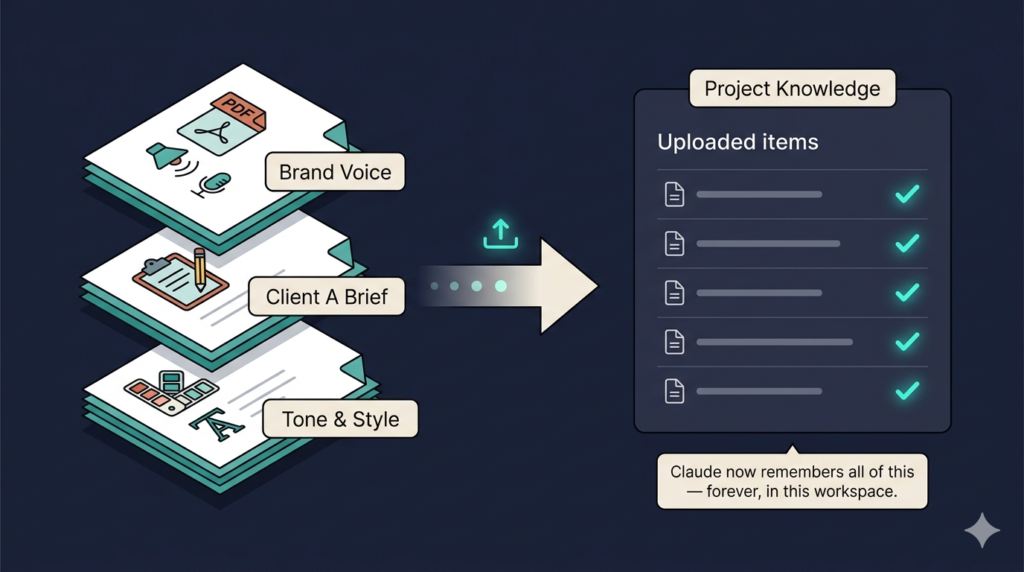
Claude Projects are persistent workspaces inside claude.ai. Each Project holds a knowledge base — files, instructions, and context — that Claude loads automatically in every conversation within that workspace. You do not repeat yourself. You do not re-explain your brand voice. Claude already knows, because you uploaded it once.
For a solopreneur, Projects are the single highest-leverage configuration step in the entire Claude stack. According to Anthropic’s support documentation, Projects use Retrieval-Augmented Generation (RAG) to handle large knowledge bases efficiently — loading only the relevant content into the context window at each step, which is why they perform well even with extensive documentation uploaded.
How many Projects should a solopreneur create?
The optimal architecture for most solopreneurs is one Project per client or engagement type. Here is a practical breakdown:
| Project | What to upload | Primary use |
|---|---|---|
| Client A | Brand guide, past deliverables, their brief, key terminology | All client-facing work |
| Client B | Same structure | All client-facing work |
| Content & SEO | Your site’s brand voice, topic clusters, target personas, competitor notes | Blog posts, articles, social content |
| Business Operations | Pricing structure, proposal templates, onboarding checklist, T&Cs | Proposals, contracts, admin |
| Research | No fixed upload — used for ad-hoc deep research sessions | Competitor analysis, market research |
The practical benefit is immediate: Claude stops producing generic outputs and starts producing outputs already calibrated to each client’s terminology, tone, and context — without you re-explaining anything at the start of each session.
How do you upload your brand voice and guidelines into a Claude Project?
Navigate to claude.ai → click Projects in the left sidebar → + New project → name it → click Add content in the Project knowledge section.
You can upload:
- PDF, Word, or text files (brand guidelines, style documents, SOPs)
- Paste raw text directly (e.g. a copied brand voice description)
- Google Drive files (via the Google Drive connector — available on Pro and above)
What to include in a solopreneur’s Project knowledge base:
- Voice document — 300–500 words describing how you write. Tone (direct vs warm), vocabulary you avoid, sentence length preferences, phrases that are on-brand and off-brand.
- Audience document — Who your client’s customer is. Job title, pain points, sophistication level, what they care about.
- Process notes — How you structure deliverables. For a content writer: article structure preferences, heading style, how you handle statistics. For a consultant: how you open proposals, how you present recommendations.
- Examples — One or two examples of outputs you consider excellent. Claude learns from examples more effectively than from abstract instructions.
- Constraints — Things Claude should never do. Topics to avoid, formatting it should not use, claims it should not make without verification.
Critical setup step: Write your Project instructions in the dedicated Instructions field (not in the knowledge base). This is the persistent system prompt for that Project. Keep it under 500 words and focused on Claude’s role, not background information. Background information goes in the knowledge base. Role and constraints go in instructions.
Relevant Anthropic links:
Does Claude AI remember things between conversations?
Yes — but the mechanism is important to understand, because it works differently across Claude.ai and Cowork.
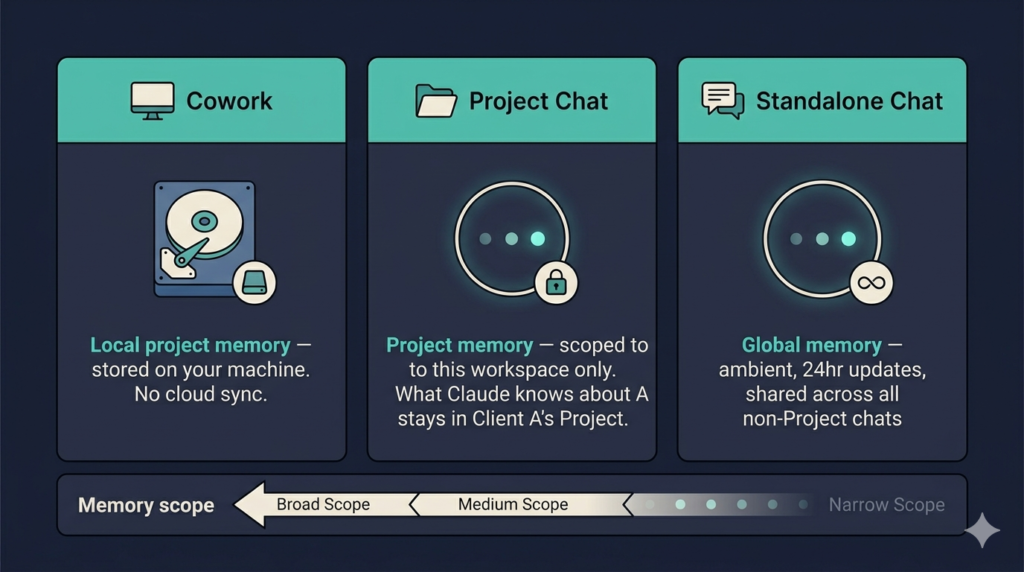
In Claude.ai chat (standalone conversations):
Claude generates a memory synthesis from your non-Project conversations and updates it every 24 hours. This memory carries forward into future conversations automatically. You can view and edit it under Settings → Capabilities → “View and edit your memory.” This is available to Pro, Max, Team, and Enterprise users. Free users now also have access to this feature as of early 2026.
In Claude.ai Projects:
Claude maintains a separate memory summary per Project based on conversations within that Project. This memory is scoped — what Claude learns about Client A inside Client A’s Project does not carry into Client B’s Project or your standalone chats.
In Claude Cowork:
Memory is only retained within Cowork Projects (not standalone Cowork tasks). A Cowork Project’s memory is stored locally on your desktop.
The practical implication for a solopreneur: use Projects for all client work and recurring content work. Do not rely on standalone chat memory for anything mission-critical — it is a useful ambient layer, not a reliable operational one.
Relevant Anthropic links:
What Is a Claude Skill and How Do You Build One for a One-Person Business?
Skills are one of the most powerful and least understood features in the Claude stack. They are not chatbot personas or simple system prompts. They are dynamic instruction sets that Claude loads when a specific type of task is triggered — teaching Claude exactly how to execute a recurring process, every time, without variation.
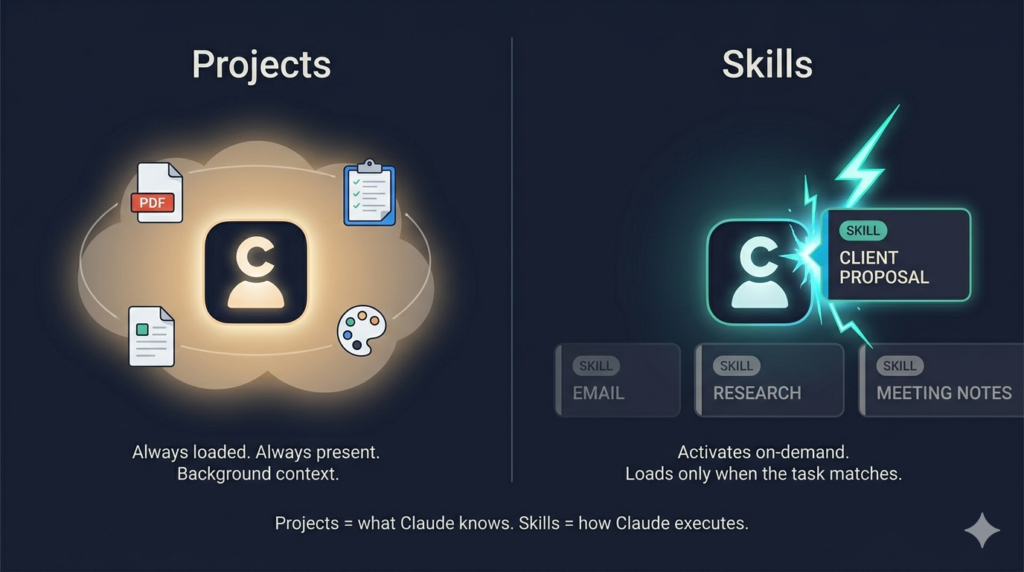
Anthropic’s official definition: Skills are folders of instructions, scripts, and resources that Claude loads dynamically to improve performance on specialised tasks. They differ from Projects in a critical way: Project knowledge is always loaded. Skills activate contextually — only when the relevant task is happening.
This distinction matters operationally. You do not want Claude loading your full proposal-writing protocol every time you ask it a simple research question. Skills ensure the right protocol fires at the right moment.
What recurring solopreneur tasks should have a dedicated Claude Skill?
Every task you do more than twice a week and that has a predictable structure is a Skill candidate. For most solopreneurs, the highest-priority Skills to build are:
1. Proposal/Scope of Work Skill
Encodes your proposal structure: executive summary format, scope section layout, pricing presentation, standard terms language, call-to-action phrasing. Once built, every proposal Claude drafts follows your exact template — you fill in the specifics, Claude handles the structure and language.
2. Client Email Skill
Covers your tone for different email types: initial outreach, follow-up, project update, invoice reminder, difficult feedback delivery. Most solopreneurs significantly underinvest in email tone consistency — a Skill fixes this systematically.
3. Content Writing Skill
For solopreneurs producing regular content: your heading structure, intro formula, how you handle statistics (citation style, preferred sources), your CTA approach, word count targets by content type.
4. Meeting Notes / Debrief Skill
Converts raw notes or a transcript into a structured debrief: decisions made, action items with owners, open questions, next steps. Define the format once; execute it every time in seconds.
5. Research Brief Skill
Defines how Claude should structure research outputs: key findings first, then supporting evidence, then sources, then open questions. Solopreneurs doing regular competitive research or market analysis benefit enormously from output consistency.
6. Invoice / Financial Summary Skill
(particularly useful with Claude for Small Business connectors) Defines how Claude should present financial summaries: what to highlight, how to flag anomalies, what format the output should follow for your accountant.
Writing a Claude Skill instruction set from scratch?
Skills are created through the Claude interface under Settings → Skills, or can be built as SKILL.md files for Claude Code users. For non-technical solopreneurs, the interface builder is the right path.
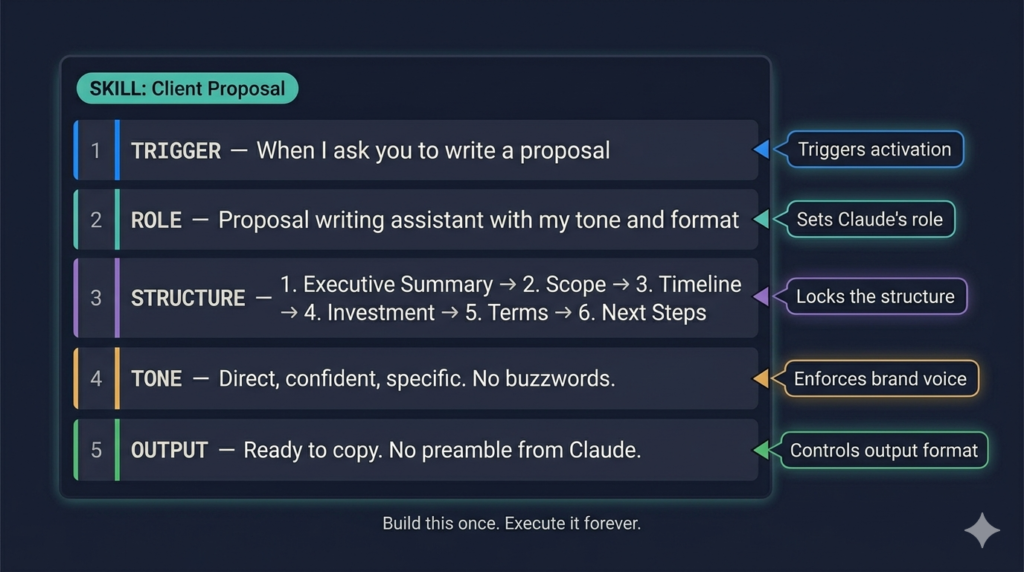
The anatomy of an effective Skill instruction set:
SKILL NAME: Client Proposal
TRIGGER: When I ask you to write a proposal, scope of work, or engagement letter

ROLE: You are my proposal writing assistant. You know my business, my pricing approach, and my preferred structure.

STRUCTURE:
1. Executive Summary (2 paragraphs max — problem + my solution)
2. Scope of Work (bullet list, specific deliverables, no vague language)
3. Timeline (phased if applicable)
4. Investment (single clear number or tiered options)
5. Terms (3–4 bullet points from the standard terms in my Project)
6. Next Steps (single clear CTA)

TONE: Direct, confident, specific. No buzzwords. No passive voice. Never use the word "leverage" as a verb.

OUTPUT FORMAT: Ready to copy into a document. No preamble from you, no explanation of what you did.
The key discipline: write Skills for outputs, not for general guidance. The more specific the output format, the more consistently useful the Skill becomes.
Relevant Anthropic links:
What Is Claude Cowork and Does a Solopreneur Actually Need It?
Claude Cowork is Anthropic’s agentic desktop tool, built directly into Claude Desktop (available for macOS and Windows). It is fundamentally different from claude.ai in one critical way: it takes an outcome and handles the execution end-to-end, rather than waiting for you to prompt each step.
Anthropic’s product page describes it precisely: Claude Cowork handles tasks autonomously — give it a goal and Claude works on your computer, local files, and applications to return a finished deliverable. The phrase “finished deliverable” is important. Not a draft for you to continue. Not a partial output to paste elsewhere. A completed piece of work.
For a solopreneur, this distinction is the difference between Claude as a capable assistant and Claude as a capable autonomous worker.
Do you need Claude Cowork?
The honest answer depends on your workflow. If your work is primarily text-based — writing, research, client communication, content creation — you will get enormous value from claude.ai alone (with proper Project and Skill configuration). Cowork adds the most value when:
- You have repetitive multi-step tasks that you currently do manually (compiling weekly reports, organising files, processing data from multiple sources)
- You want to offload tasks to Claude while you are away from your desk
- You are working with local files that need to be accessed, processed, and saved without you orchestrating each step
- You want recurring automations (daily briefings, weekly summaries) without building a no-code stack
Cowork is available on Pro, Max, Team, and Enterprise plans. It requires Claude Desktop to be installed and running.
Download Claude Desktop: claude.com/download Get started with Cowork: support.claude.com/en/articles/13345190-get-started-with-claude-cowork
Using Claude Dispatch work for a one-person company?
Dispatch is Cowork’s mobile-to-desktop handoff feature — and for a solopreneur who moves between locations or wants to offload tasks without being at their desk, it is genuinely transformative.
How it works mechanically:
- You open the Claude mobile app (iOS or Android)
- Navigate to Cowork → Dispatch
- Assign a task in natural language: “Compile this week’s client deliverables from my Documents/Client A folder into a single PDF summary. Flag anything that looks incomplete.”
- Claude executes the task on your desktop computer — accessing your local files, running the necessary steps, and completing the work
- You receive a push notification when the task is done or when Claude needs your approval on something
- You come back to a finished output
The key technical requirement: your desktop computer must be awake and the Claude Desktop app must be running. For most solopreneurs who leave their machine on during the day, this is not a practical barrier.
Most valuable Dispatch Claude ai use cases for solopreneurs:
- Generating a client report from local data files while you are in a meeting or commuting
- Organising and renaming a folder of downloaded files to a consistent naming convention
- Compiling research from multiple local documents into a single briefing
- Processing and formatting a batch of expense receipts or invoices
Relevant Anthropic link: Assign tasks from anywhere in Cowork
Setting up Scheduled Tasks in Claude Cowork?
Scheduled Tasks are recurring automations — the feature that most closely replaces what solopreneurs currently either do manually every week or pay a VA to handle.
Setup process (step by step):
- Open Claude Desktop → click Cowork in the sidebar
- Click + New task to start a fresh task session
- Type
/schedulein the chat input — this triggers the Schedule Skill - Describe the task in natural language. Example: “Every Monday morning at 8am, check my Downloads/Invoices folder, compile any new invoices from the past week, and generate a summary table with client name, invoice amount, due date, and status. Save the output as a Markdown file in Documents/Weekly Reports.”
- Claude may ask clarifying questions (frequency, what counts as “new”, output format) via multiple choice
- Once satisfied, Claude outputs the task name, schedule, and description of what it will do
- Confirm by clicking Schedule
- The task appears in the Scheduled section of your Cowork sidebar
Important operational note from Anthropic’s safety documentation: Scheduled tasks only run while your computer is awake and the Claude Desktop app is open. They do not run on a cloud server — they run locally. If your machine is asleep at the scheduled time, the task does not execute. For solopreneurs who shut down their computers at night, schedule recurring tasks during working hours.
Practical Scheduled Task stack for a solopreneur:
| Task | Frequency | What Claude does |
|---|---|---|
| Weekly client status | Every Monday 9am | Compiles updates from project folders into a status summary |
| Invoice check | Every Friday 4pm | Scans invoices folder, flags any approaching due dates |
| Content calendar review | Every Wednesday 10am | Summarises upcoming content slots and flags gaps |
| Expense log | Daily 6pm | Checks designated folder for new receipts and appends to monthly log |
Relevant Anthropic links:
Can Claude complete tasks on your computer without you watching?
Yes — this is the Computer Use feature, currently available as a research preview for Pro and Max plan subscribers on both macOS and Windows.
Computer Use lets Claude physically operate your screen: opening applications, clicking buttons, filling forms, navigating dashboards, and interacting with any software that does not have a dedicated MCP connector. For a solopreneur, this is significant — it means Claude can automate work inside tools that have no official Claude integration.
What Computer Use enables for solopreneurs:
- Logging into a client portal and downloading the latest reports
- Navigating a project management tool to update task statuses
- Operating your accounting software to pull specific financial data
- Filling in repetitive forms or data entry tasks across any desktop application
What you need to know before enabling it:
Anthropic’s safety guidance on Computer Use is explicit and worth understanding fully. When Claude uses your computer, it interacts directly with your apps, browser, and desktop. Unlike file operations (which go through permission checks) or code execution (which runs in a virtual machine), Computer Use has no sandbox between Claude and what it can access.
The practical implication: only enable Computer Use for well-defined, repeatable tasks where you understand exactly what Claude will do. Anthropic recommends starting with low-stakes tasks (pulling a report from a fixed URL, filling a standard form) before moving to anything consequential.
Relevant Anthropic link: Let Claude use your computer in Cowork
Does Claude Cowork work on Windows for solopreneurs?
Yes. Cowork is available for both macOS and Windows (x64). Windows support for Cowork launched in February 2026. Computer Use on Windows is available as a research preview on Pro and Max plans.
Requirements:
- Latest version of Claude Desktop (download at claude.com/download)
- Pro, Max, Team, or Enterprise subscription
- For Dispatch: Claude mobile app (iOS or Android) also installed
The Complete Claude AI Workflow for Solopreneurs: Every Business Function Covered
This section is the operational core of the article. Each subsection covers a specific business function, explains the problem it solves for a solopreneur, and gives a concrete Claude workflow — including which product to use (claude.ai chat, Projects, Skills, or Cowork).
How solopreneurs use Claude for content creation and writing
Content is the single highest-ROI use case for most solopreneurs, and Claude’s advantage over other AI tools here is measurable. Its long context window (200K tokens on Sonnet 4.6, 1M in beta) means it can hold an entire editorial strategy, brand voice document, and multiple article drafts in a single working session without losing coherence.
The recommended content workflow for a solopreneur:
Step 1 — Project setup (one-time)
Create a Content & SEO Project in claude.ai. Upload: your brand voice document, your target audience profile, your content calendar (even a simple spreadsheet), your top 3–5 existing articles as style references.
Step 2 — Article briefing (per article)
Open a new chat inside your Content Project. Paste the target keyword, the PAA questions you are targeting, and any specific research you have gathered. Ask Claude to produce an outline before the full draft — this is a quality gate that catches structural problems before they compound through 3,000 words.
Step 3 — Draft production
With the outline approved, ask Claude to write each section individually. This is intentional — full-article prompts produce more generic outputs than section-by-section drafting where you can correct the direction as you go.
Step 4 — Fact-checking and statistics
For any statistic Claude includes, verify it independently before publishing. Claude’s web search tool (available in claude.ai) can locate current sources, but you should confirm the specific number at the source URL. Never publish a Claude-generated statistic without clicking through to the original study.
Step 5 — Publishing preparation
Ask Claude (using your Content Writing Skill if you have built one) to generate the meta title, meta description, slug, and FAQ schema block. These take Claude about 90 seconds and take a human content writer 15–20 minutes.
Time saved per article (conservative estimate):
3–5 hours on a 2,000-word article for a solopreneur who was previously writing everything from scratch.
Using Claude AI for client proposals and onboarding
Proposal writing is one of the tasks that solopreneurs consistently underinvest in because it is non-billable time. The result: rushed proposals that leave conversion on the table, or a templated proposal that feels impersonal to the client.
The Claude proposal workflow:
Build your Proposal Skill (structure described in the Skills section above) and store your standard terms, pricing tiers, and case study snippets in your Business Operations Project.
When you need a proposal:
- Open a chat in your Business Operations Project
- Describe the engagement in 3–5 sentences: who the client is, what they need, the scope you have discussed, the approximate budget
- Claude generates a fully structured proposal in your format, using the terms from your Project knowledge base and the structure from your Skill
A solopreneur running 4–6 proposals per month saves approximately 1.5–2 hours per proposal. At a $150/hour consulting rate equivalent, that is $900–$1,800 per month in recovered billable time.
Onboarding: Build a separate Onboarding Skill that generates a client onboarding email sequence — welcome email, kickoff agenda, access request list, and first-week schedule. Once built, onboarding a new client goes from a 45-minute task to a 5-minute review-and-send.
How do solopreneurs use Claude for inbox and email management?
Claude cannot access your email inbox directly through the standard claude.ai interface — but it can through the Small Business connector stack or via the Gmail MCP connector available in Claude Desktop.
Two practical options:
Option 1 — Drafting (claude.ai):
Paste email threads into Claude and ask it to draft responses. This is the simplest path and requires no setup. The limitation is the manual copy-paste step.
Option 2 — Connected inbox (Cowork + Gmail connector):
Install the Gmail plugin through Claude Desktop → Settings → Connectors. Once connected, you can ask Cowork to: summarise your unread emails from the past 24 hours, draft responses to specific senders, flag emails requiring action, and compile a priority inbox summary. Claude always drafts for your approval — it does not send without your explicit confirmation.
Email types where Claude excels for solopreneurs:
- Following up on outstanding invoices (firm but professional tone, Claude is very good at this)
- Responding to scope creep conversations (requires diplomatic precision — Claude handles nuance well)
- Initial outreach emails for business development
- Project update emails summarising progress and flagging decisions needed
Relevant Anthropic link: Browse connectors and plugins
Can Claude handle bookkeeping and invoicing for a one-person Company?
With the May 2026 Claude for Small Business launch, this is now a genuine yes for solopreneurs using QuickBooks and PayPal — the two most common financial tools among independent operators.
What Claude for Small Business delivers for solopreneur finance (directly from Anthropic’s announcement):
- Payroll planning workflow: Settle your QuickBooks cash position against incoming PayPal settlements, build a 30-day cash forecast, rank overdue accounts, and queue payment reminders for your approval
- Month-end close workflow: Reconcile books against settlements, flag discrepancies, generate a plain-English P&L summary, and export a close packet ready to send to your accountant
- Invoice chaser workflow: Identify overdue invoices, draft follow-up communications in your tone, and queue them for your send approval
- Business pulse workflow: Surface your cash position, sales trend, pipeline movement, and weekly commitments on a single dashboard on a schedule you define
How to enable it: Toggle on Claude for Small Business inside Claude Cowork → connect QuickBooks and PayPal → select the workflow → approve before Claude sends, posts, or pays anything.
This is an important capability boundary: Claude does the work; you approve before anything sends, posts, or pays. The human-in-the-loop is mandatory for consequential financial actions.
For solopreneurs not on QuickBooks or PayPal, the bookkeeping workflow is partially replicable through claude.ai by uploading CSV exports from your accounting tool and asking Claude to perform the analysis. The results are less automated but still substantially time-saving.
Relevant Anthropic links:
Solopreneurs using Claude for research and competitive analysis
Claude’s 200K context window (1M in beta on Sonnet 4.6) makes it the most powerful tool available for synthesis-heavy research tasks. You can upload multiple documents, paste long web pages, and ask Claude to synthesise across all of them in a single session — something that would take a human researcher hours.
The solopreneur research workflow:
For competitive analysis:
- Open a chat in a dedicated Research Project (or a standalone chat with web search enabled)
- Enable Claude’s web search tool
- Prompt: “Research [competitor name]. I need: their positioning statement, primary target audience, pricing structure (if public), key differentiators vs my business, and any recent notable content or announcements. Structure this as a competitive intelligence brief.”
- Claude produces a structured brief with sources. Verify any quantitative claims before using them.
For market/topic research: Upload 5–10 relevant articles or documents to a Project, then ask Claude to synthesise themes, identify gaps, surface contradictions between sources, and produce a structured research summary. This is a process that typically takes a researcher 3–4 hours. Claude does it in 3–4 minutes.
For client research (before proposals or kickoff calls): Paste the client’s website URL into a chat with web search enabled. Ask: “Summarise this company’s business model, target market, key messaging, apparent challenges, and recent announcements. I have a discovery call with them tomorrow and need to walk in well-informed.”
Claude’s research output quality is highest when you give it a specific structure to produce, rather than asking open-ended questions. Define the output format — headings, bullet depth, length — in your Research Brief Skill, and the quality becomes reliably consistent.
Which Claude AI Plan Should a Solopreneur Choose in 2026? (Pro vs Max vs Free)
This is a commercial decision with real financial implications, so it warrants a precise breakdown rather than vague guidance.
Is Claude Pro worth $20 a month for a solopreneur?
Verdict: Yes, unambiguously, for any solopreneur using Claude as a core business tool.
The free plan is capable enough to evaluate Claude and run occasional tasks, but it has two hard limitations that make it unsuitable as a primary work tool: message rate caps (which you will hit quickly if using Claude for multiple business functions daily) and no access to Cowork.
Claude Pro at $20/month (or $17/month billed annually) provides:
- Higher message limits across all Claude models
- Access to Claude Cowork (the agentic desktop tool)
- Access to Projects, Skills, and memory
- Priority access during high-demand periods
- Claude’s most capable models, including Sonnet 4.6
For a solopreneur saving even one billable hour per month through Claude — a floor that is trivially easy to clear — the ROI on Pro is immediate.
When does a solopreneur need Claude Max?
Claude Max ($100/month) is relevant when:
- You are hitting message limits on Pro regularly — which happens when Claude is handling substantial daily volume across multiple business functions
- You need extended thinking mode for complex strategic or analytical tasks (Max provides more generous access)
- You are running multiple heavy Cowork sessions per day
For most solopreneurs in the early stages of Claude adoption, Pro is sufficient. Max becomes worth evaluating once Claude is handling 4+ business functions daily and you are noticing message limit friction.
What are the free plan limitations for one-person businesses?
The free plan gives you access to Claude’s core chat interface with rate limits. What it does not include:
- Claude Cowork (requires paid plan)
- Extended thinking mode
- Priority access
- Full Projects functionality (limited on free)
- Skills (require code execution to be enabled, which requires paid plan)
Practical conclusion: Use the free plan to evaluate Claude for 1–2 weeks. If it is delivering value, upgrade to Pro immediately. The $20/month threshold is so low relative to the time savings that hesitating on the upgrade is a poor economic decision.
Relevant Anthropic links:
What the 2026 Claude for Small Business Launch Means If You’re Flying Solo?
On 13 May 2026, Anthropic launched Claude for Small Business — described in the official announcement as “a package of connectors and ready-to-run workflows that put Claude inside the tools small businesses depend on.” It is the most solopreneur-relevant Claude launch since the introduction of Projects.
What it is technically:
Claude for Small Business is a toggle-install module inside Claude Cowork. Toggle it on, connect the tools you already use, and Claude gains the ability to execute end-to-end workflows inside those connected tools — with your approval before anything is sent, posted, or paid.
It ships with:
- 15 ready-to-run agentic workflows across finance, operations, sales, marketing, HR, and customer service
- 15 pre-built Skills for the recurring tasks owners identified as the highest time drain
Connected tools at launch:
- Intuit QuickBooks — payroll planning, monthly close, cash-flow analysis, tax-season preparation
- PayPal — settlements, invoicing, disputes, refunds
- HubSpot — lead triage, campaign performance analysis, customer pulse
- Canva — content generation, asset production, publishing
- DocuSign — contract sending, status tracking, document filing
- Google Workspace — (via existing connector)
- Microsoft 365 — (via existing connector)
Crucially for solopreneurs:
The full connector and workflow list is at claude.com/solutions/small-business and is being expanded.
The data privacy question most solopreneurs will ask: Anthropic addressed this directly in the launch. We don’t train on your data by default on Team and Enterprise plans. For Pro plan users (the most common solopreneur plan), the training-data default toggle is worth checking and disabling if data privacy is a concern — the toggle is under Settings → Privacy.
The free learning resource: Anthropic partnered with PayPal on a free online course: AI Fluency for Small Business. It is taught by small business owners who have integrated Claude into their operations. Appropriate for solopreneurs who want guided onboarding rather than documentation-first learning.
Relevant Anthropic links:
How Much Time Does Claude AI Actually Save a Solopreneur Per Week?
The honest answer is: it depends entirely on how well you have configured it. A solopreneur using Claude only in chat mode for occasional tasks might save 2–3 hours per week. A solopreneur with proper Project and Skill configuration, Cowork Scheduled Tasks running, and Claude for Small Business handling the finance workflows might save 15–20 hours per week.
Here is a conservative, function-by-function breakdown for a solopreneur using Claude Pro + Cowork in a moderately configured setup:
| Business Function | Task | Claude handles | Time saved/week |
|---|---|---|---|
| Content writing | Blog posts, newsletters, social copy | First drafts, structure, meta data, FAQs | 4–6 hours |
| Client proposals | Scoping and writing proposals | Full draft in correct format and tone | 2–3 hours |
| Drafting, follow-ups, difficult conversations | Draft responses for review | 1–2 hours | |
| Research | Competitive analysis, topic research, client prep | Structured research briefs from multiple sources | 2–3 hours |
| Finance (with Claude for Small Business) | Invoice chasing, monthly close prep | Automated workflows with approval checkpoints | 2–4 hours |
| File and document organisation | Renaming, sorting, compiling reports | Cowork Scheduled Tasks | 1–2 hours |
| Total conservative estimate | 12–20 hours/week |
At a $100/hour equivalent value (a conservative rate for most professional solopreneurs), 12 hours per week reclaimed is $1,200/week in recovered productive capacity — against a $20/month Claude Pro subscription. The ROI calculus is not close.
The ceiling is higher. Solopreneurs who have fully integrated the Claude for Small Business stack and use Computer Use for system-level automation report that Claude has effectively absorbed full-time-equivalent roles in their business — content production, bookkeeping support, client communication drafting, and research — running largely in the background while the founder focuses on high-judgment, high-value work.
Conclusion
Claude is not a chatbot you open when you need help with a paragraph. For a solopreneur, it is an infrastructure decision — the same kind of decision as choosing your project management tool or your invoicing software, except the productivity delta is orders of magnitude larger.
The hierarchy of impact is clear:
- Projects — configure these first. One per client, one for operations, one for content. Upload your context. This is the foundation everything else runs on.
- Skills — build these second. Start with your top 3 recurring tasks. Once built, they make every subsequent output consistent without effort.
- Cowork — activate this third. Start with one Scheduled Task that saves you time every week. Build from there.
- Claude for Small Business — enable this if you are on QuickBooks and PayPal. The finance workflow stack alone justifies the configuration time.
The solopreneurs who are getting the most from Claude in 2026 are not the ones who are most technically sophisticated. They are the ones who took the time to configure the system properly — uploading their context, building their Skills, scheduling their recurring tasks — and then let Claude carry the operational weight that was previously consuming their most productive hours.
That configuration investment takes approximately 4–6 hours spread across your first two weeks. The weekly return on that investment, for most solopreneurs, begins immediately and compounds as your Projects get richer and your Skills get more precise.
More from CorporatePlaybookPro.com
→ How to Use Claude AI for Business: The Complete 2026 Guide
→ Claude Projects for for Business: How to Organize AI Work by Client or Team
→ Google AI For Business Leaders : Maturity Assessment Guide
→ Agentic AI for Small Business: Use Cases & Roadmap
→ Top 10 AI Use Cases Transforming Small & Medium Business
→ Top 9 Affordable Agentic AI Platforms for Small Businesses
→ What is Agentic AI? Complete Guide with Real-World Examples
→ Types of AI Agents : Guide for Business Leaders
Frequently Asked Questions: Claude AI for Solopreneurs
What is the best Claude AI plan for a solopreneur in 2026?
Claude Pro at $20/month ($17/month annually) is the right starting point for most solopreneurs. It gives you full access to Projects, Skills, Cowork, and Claude’s most capable models. Upgrade to Max ($100/month) only if you are hitting daily message limits regularly — which typically happens when Claude is handling 4+ business functions at high volume.
Can a solopreneur use Claude AI for free?
Yes, but the free plan has significant limitations for business use: rate caps that you will hit quickly with regular use, no access to Cowork, and restricted Skills functionality. The free plan is useful for evaluation. For business use, Pro is the practical minimum.
What is the difference between Claude Projects and Claude Skills?
Projects are persistent knowledge bases — you upload context (brand guidelines, client documents, templates) that Claude holds across all conversations in that workspace. Skills are dynamic instruction sets that Claude loads when a specific task type is triggered — they encode how to do something (your proposal structure, your email tone, your research format). Projects answer “what does Claude know?”; Skills answer “how does Claude execute?”
Does Claude AI work for non-technical solopreneurs?
Yes. Claude.ai and Cowork are designed for non-technical users. Projects and Skills are built through point-and-click interfaces. Cowork tasks are assigned in natural language. The only feature with a moderate technical learning curve is Claude Code, which most solopreneurs do not need.
Claude vs ChatGPT: which is better for solopreneurs in 2026?
For writing, strategy, proposals, and complex reasoning tasks — Claude. It holds context better across long tasks, reasons through multi-step problems more reliably, and its writing quality in blind evaluations was preferred 47% vs 29% over ChatGPT in Q1 2026 human evaluations. For generating high-volume creative variations quickly — ChatGPT has an edge. Most solopreneurs doing content-heavy or client-services work will find Claude materially better for their primary use cases.
How does Claude AI protect my business data?
Anthropic does not train on your data by default on Team and Enterprise plans. On Pro, training data usage depends on your privacy settings — you can disable it under Settings → Privacy. For sensitive client work, Anthropic recommends reviewing the Trust Center for the full data handling policy.
Can Claude Cowork run tasks when I am not at my computer?
Yes, via Dispatch — Claude works on your desktop while you are away and messages you the result. However, your computer must be awake and Claude Desktop must be open. Cowork does not run on a cloud server; it runs locally on your machine.