Claude Projects are self-contained workspaces inside Claude that each carry their own knowledge base, custom instructions, and isolated conversation history. Unlike a standard chat — which resets context the moment you close the tab — a Project persists everything you give it: uploaded documents, role-specific rules, and every conversation your team has held inside it. Business teams use Claude Projects to separate AI work by client, function, or deliverable type, so Claude behaves differently — and more accurately — depending on whose work you are doing.
Here is the reality for most business teams using Claude right now. You open a chat, spend two minutes explaining who the client is, what tone they prefer, what stage the project is at, and what format you need the output in. Claude delivers something decent. You close the tab. Tomorrow, you open a new chat and do the entire briefing again — because Claude remembers nothing. Multiply that by five team members working across six clients, and you have not built an AI workflow; you have built an AI tax on your team’s time.
The misconception most teams operate with is that Claude is a smarter search bar: ask it a question, get an answer, move on. What they never discover is that Claude Projects for business teams transform Claude from a capable assistant into an always-briefed AI colleague who already knows your clients, your standards, and your deliverable formats — before you type a single word.
Enterprise deployment data shows users reported a 12× speedup on tasks with Claude on average — 14.8 minutes with AI versus 3.8 hours without (IntuitionLabs, Claude Enterprise Guide 2026). That productivity only materialises when Claude is properly structured — not used as a throwaway chat tool.
This article shows you exactly how to structure Projects by client and by team function, what to load into each one, how to write custom instructions that hold up under professional review, and how to handle the confidentiality questions your leadership team will inevitably raise.
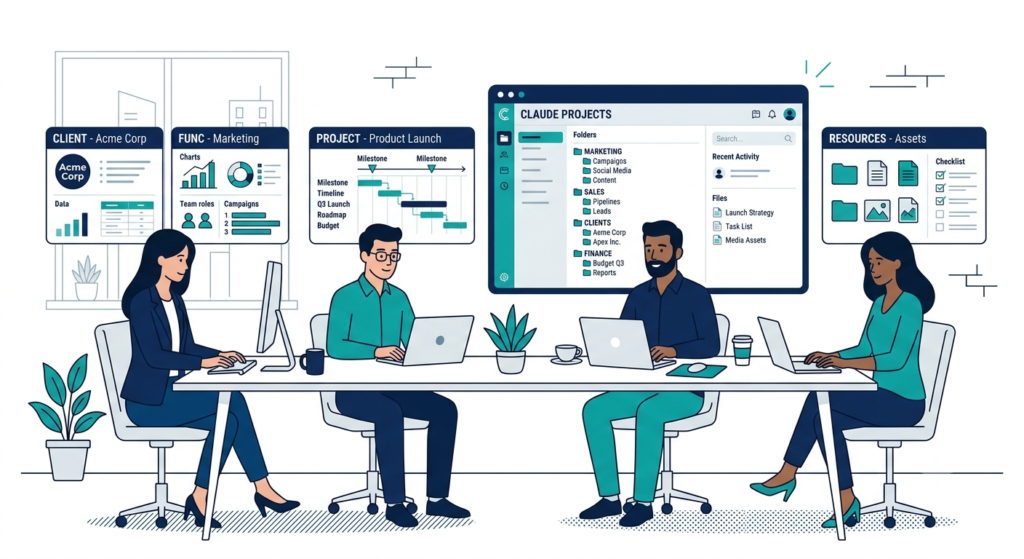
What Claude Projects Actually Are — and Why They Change How Teams Work
Learning how to use Claude Projects for business teams starts with understanding what you are working with at a mechanical level. A Project is not a folder. It is not a filing system. It is a persistent AI workspace built from three components that work together: a knowledge base, custom instructions, and an isolated conversation history that every team member inside the Project can contribute to and draw from.
The knowledge base is where you store the documents, files, and context Claude needs to do useful work for a specific client or function. You can upload PDFs, Word documents, spreadsheets, text files, and code. On paid Claude plans — Team or Enterprise — Project knowledge automatically scales through Retrieval Augmented Generation (RAG), expanding capacity by up to 10× when uploaded content exceeds the standard context window. In practice, this means you can load a full client engagement archive — past reports, brand guidelines, stakeholder interview transcripts — and Claude will draw from the most relevant portions based on each question.
Custom instructions are the system-level rules that govern how Claude behaves in every conversation inside that Project. You write these once, and they run silently in the background for every chat. Tell Claude to always write in the client’s brand voice, never make financial projections without caveats, respond in bullet format for operational reviews, or assume the reader is a C-suite executive with no time for preamble — Claude follows those rules consistently, across every team member’s conversations in that Project.
The conversation history is shared at the Project level on Team and Enterprise plans. Every chat a team member runs inside a Project is visible to others with “Can edit” or “Can use” permissions. This eliminates the silent duplication problem — two team members independently asking Claude the same research question in separate chats — and gives the team a shared record of AI-assisted work. A new team member joins a client engagement, opens the client’s Project, and immediately has access to everything Claude knows about that client. No two-hour briefing from a senior colleague required.
70% of Fortune 100 companies now use Claude (Anthropic, 2026), and the ones extracting the most value have moved beyond ad hoc prompting into structured, Project-based AI workflow organisation. Anthropic’s share of combined enterprise AI spending grew from roughly 10% at the start of 2025 to over 65% by early 2026 (AI Business Weekly) — a signal that organisations are consolidating their AI tooling around Claude because the Project architecture makes enterprise-scale use manageable.
Projects are available to all Claude users, including free accounts (up to five Projects). Collaboration and sharing features — where teammates join a shared Project and work from the same knowledge base — are exclusive to Claude for Work (Team and Enterprise) plans.
→ For the full business AI strategy context that Claude Projects slot into, read: How to Use Claude AI for Business: The Complete 2026 Guide
How to Organize Claude Projects by Client
How to organize Claude Projects by client is the most immediately valuable structure for consulting firms, agencies, law firms, and any business that manages ongoing work across multiple accounts. The principle is direct: one Project per active client engagement, with that client’s context fully loaded and no cross-contamination from any other client’s data.
When teams use shared chats without Projects, client context bleeds. A consultant who spent 90 minutes briefing Claude on a retail client’s inventory challenges switches to a manufacturing client’s procurement issue and opens the same chat. Claude has no guardrails. Outputs mix tone, context, and occasionally data points from the wrong engagement. Projects eliminate this entirely — each client exists in its own context bubble.
Here is the five-step setup for client-based AI project management:
- Create one Project per active client engagement. Name it consistently using the naming convention covered later in this article. If you manage 12 active clients, you should have 12 active Claude Projects. When an engagement ends, archive the Project rather than deleting it — you will want the record for future proposals or similar work.
- Load the knowledge base with client-specific documents. Every client Project should contain at minimum: the scope of work or engagement summary (in plain text Claude can scan easily), the client’s brand or style guide if you produce content for them, key stakeholder names and roles, past deliverables that define your quality benchmark, and a brief “client context” document you write yourself — two to three paragraphs summarising the engagement in plain language.
- Write custom instructions that make Claude behave like a client-aware colleague. This is where most teams underinvest. Do not just say “we work with [Client Name].” Tell Claude what this client values, what they are risk-averse about, what format they expect in deliverables, and what tone their internal communications use. Claude applies this to every conversation context in the Project without requiring you to repeat it.
- Assign permissions carefully on Team plans. Team members who work on that client should have “Can use” access at minimum. Leads who manage the knowledge base and instructions should have “Can edit.” Client data should never be visible in a Project that includes personnel who do not work on that account. The permission model on Claude for Work plans makes this enforceable — but only if someone actively configures it.
- Review and refresh the knowledge base quarterly. Knowledge bases go stale. New deliverables, updated stakeholder maps, and completed project phases should replace outdated versions. A stale AI knowledge base gives Claude inaccurate context — and that undermines every output the Project generates going forward.
The payoff of Claude Projects organised by client is that context-setting time drops to near zero. Your team opens the Project, asks their question, and Claude already knows who they are working with and what they are trying to achieve. Research on multi-session AI workflows suggests that Projects reduce repeated context-setting by approximately 70% compared to manual copy-paste methods (Toolpod, Claude Memory Continuity Guide) — a meaningful saving on work that extends across weeks or months of an engagement.
Claude Projects Team Function Structure: How to Build It Right
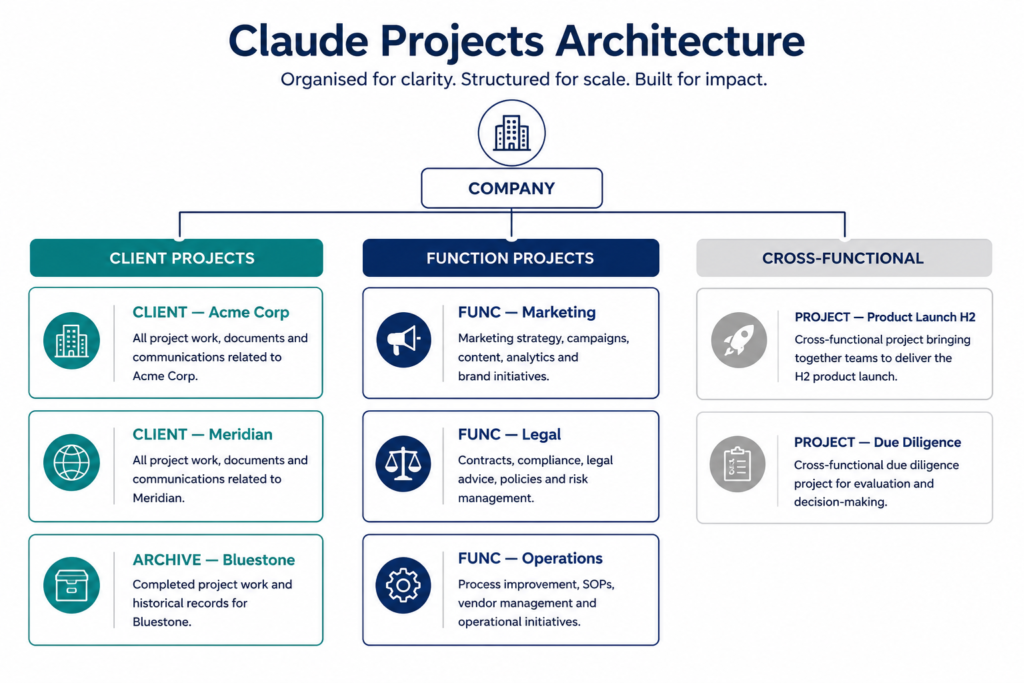
The Claude Projects team function structure is the right default architecture for internal teams — HR, finance, marketing, operations, legal, product — where work is organised by business function rather than by external client. Here, each function owns a Project loaded with the documents, policies, and conventions that Claude needs to support work in that specific area.
The foundation is one Project per function. This is not a rigid rule — some teams need sub-Projects for distinct use cases within a function — but it is the right starting point. Marketing gets a Marketing Project loaded with brand guidelines, campaign briefs, and audience personas. Operations gets an Ops Project with process documentation, SLA standards, and vendor contracts. Legal gets a Legal Project with template documents, regulatory references, and internal policy files. Each function’s Claude behaves differently because each Project carries different context.
Each Project needs an owner. This is non-negotiable for any business serious about AI governance. The Project owner writes and maintains the custom instructions, decides what gets added to the knowledge base, and is accountable for the quality of Claude’s outputs in that Project. The role is distinct from the Claude admin — who manages billing, access, and plan settings. Project ownership is a content and governance responsibility, not a technical one. Assign it to the most senior person who uses Claude regularly in that function.
Layer in cross-functional Projects where work overlaps. Some work does not belong to one function. A product launch spans marketing, product, legal, and operations. Rather than each function running their piece in their own Project with no shared AI context, create a time-limited cross-functional Project for the launch. Load it with the launch brief, timeline, messaging framework, and stakeholder map. Run it for the duration of the engagement, then archive it when the launch completes.
Review the function structure quarterly. Teams evolve. A function that needed its own Project six months ago may have merged, split, or changed scope. New business units need Projects; closed ones should be archived. Set a calendar reminder — Project architecture should be an active decision, not something that accretes silently. Gartner research on AI deployment readiness consistently identifies governance structure as a primary differentiator between high and low-ROI AI programmes — organisations that formalise who owns what in their AI tooling see measurably better adoption outcomes than those that leave it informal (Gartner).
The function structure also creates a natural onboarding asset. A new hire in the marketing team gets access to the Marketing Project and immediately has access to Claude configured for their function — brand voice baked in, output formats standardised, relevant company knowledge already uploaded. Day one productivity improves materially when the AI tool is already set up for the role.
Claude Projects vs Separate Chats for Team Work
The Claude Projects vs separate chats for team work question comes down to one variable: does this work continue across multiple sessions, multiple people, or both? If yes to either, a Project is the right tool. If you are asking Claude a one-off question unconnected to any ongoing work, a standalone chat is perfectly adequate.
Here is the direct comparison:
| Factor | Separate Chats | Claude Projects |
|---|---|---|
| Context retention | Resets after each session | Persists across all sessions |
| Knowledge base | Must re-paste documents every time | Uploaded once, available always |
| Custom instructions | Must re-brief in each chat | Set once, applied automatically |
| Team collaboration | Not possible | Shared conversation history |
| Client / function isolation | None | Fully isolated per Project |
| Briefing overhead per conversation | High — full context required | Near zero — context already loaded |
| Output consistency across team members | Low — each person briefs differently | High — same instructions for everyone |
The hidden cost of separate chats is not just time — it is consistency. When four team members each brief Claude independently for the same client, four different framings produce four different outputs. Projects standardise the briefing layer so every team member works from the same context regardless of when they open Claude or what question they are asking. That standardisation is what allows Claude Projects to produce output that a senior colleague can trust without re-checking every sentence.
When does a standalone chat make sense? When the task is genuinely isolated: a quick research question unrelated to any active project, a one-time translation, a creative ideation session that does not connect to client deliverables. Using Projects for everything introduces noise — Claude will try to apply the Project’s persistent context even when it is irrelevant to the question. The practical rule: if you would find yourself pasting the same document or briefing paragraph into Claude more than once, that content belongs in a Project knowledge base, not in a chat.
Claude Projects Naming Convention for Teams
A Claude Projects naming convention for teams solves a problem that only becomes visible once you have more than five or six Projects in the list: without a consistent system, “Marketing Q3”, “M — Campaign Briefs”, and “Mktg — Summer 2026” can all mean the same thing to different team members — and none tells a new person what the Project actually contains or who it belongs to.
The most functional convention uses two elements: a type prefix and a scope suffix. The template is:
[TYPE] — [Scope Description]
Client Projects:
CLIENT — Acme CorpCLIENT — Meridian PartnersARCHIVE — Bluestone (closed Q1 2026)
Function Projects:
FUNC — MarketingFUNC — Legal ReviewFUNC — People & Culture
Cross-functional and time-limited Projects:
PROJECT — Product Launch H2 2026PROJECT — Due Diligence: Target Co
Internal tools and reference Projects:
TOOLS — Proposal TemplatesTOOLS — Company Style & Brand
Capitalising the prefix is intentional — it makes Claude Projects scannable at a glance when you have 20 or more in the list. You can immediately distinguish active client work from function resources and archived Projects without opening them. Keep names under 40 characters: if a name requires more to be clear, the Project scope is probably too broad and should be split. Set this AI project naming convention from the start — retroactively renaming a chaotic Project list across a team of 15 is a coordination exercise nobody wants. The Claude Projects naming system is most effective when it is enforced as a team norm rather than a personal preference.
What to Upload to a Claude Project Knowledge Base
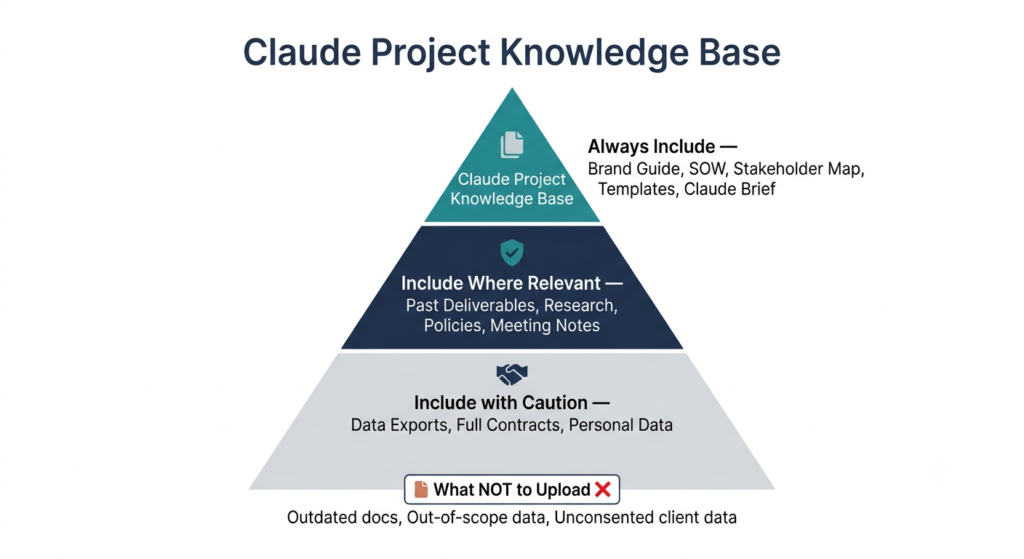
Understanding what to upload to a Claude Project knowledge base is where most teams either extract maximum leverage or lose it entirely. The Claude knowledge base is not a file dump. It is a curated context layer that shapes how Claude reasons, responds, and defaults across every conversation in that Project. What you put in determines what comes out — and what you leave out limits what Claude can usefully do.
Tier 1 — Always include
These are non-negotiable for any client or function Project:
- Brand or tone of voice guide — even a two-page summary is significantly better than nothing; Claude will apply it to every output in the Project as part of its persistent context
- Scope of work or engagement summary in plain text — write a concise paragraph explaining what this engagement is, what the client wants, and what your team is delivering; Claude reads this before answering every question in the Project
- Key stakeholder names, roles, and context — include decision-making preferences and communication styles where you know them
- Standard output templates — any format you consistently use for deliverables; Claude will match the structure across all team conversations in the Project
- A “Claude brief” document — a plain-text file you write once that summarises what this Project is for and what Claude should assume; think of it as a permanent AI briefing document
Tier 2 — Include where relevant
- Past deliverables (reports, proposals, presentations) that define the quality benchmark
- Research or data files Claude should draw on when answering questions
- Competitor intelligence or market data relevant to the engagement
- Internal policies, process documentation, or regulatory references (particularly valuable for function Projects in legal, ops, or compliance)
- Meeting transcripts or summaries from key client conversations
Tier 3 — Include with caution
- Large data exports — useful but context-intensive; use selectively and test whether Claude’s answers actually improve before loading everything
- Legal contracts in full — extract the relevant clauses into a summary document instead; full contracts are verbose and the key terms get diluted
- Personal data — avoid unless your data governance policy explicitly permits it and you are on a Team or Enterprise plan with contractual data protection
What NOT to upload
Confidential data outside the engagement scope. Outdated documents that contradict your current approach — Claude will use them. Files you are “keeping for reference” but that Claude will actively incorporate into answers, producing stale outputs. And never upload anything a client has not consented to you processing through a third-party AI system.
On paid Claude plans, the knowledge base supports RAG expansion. This scales to approximately 10× the standard context capacity on Pro, Max, Team, and Enterprise plans (Anthropic Help Center — RAG for Projects), meaning you can load significantly more material than the standard 200K context window would allow, and Claude retrieves the most relevant portions for each query. Review your knowledge base whenever you upload a new major deliverable or complete a significant project phase — the version you loaded in Week 1 of an engagement may directly contradict where things stand in Week 12.
Claude Projects Custom Instructions Examples for Business Teams
Claude Projects custom instructions examples for business teams are the most underused feature in any team’s Claude setup. Most teams either skip custom instructions entirely, or write something generic like “be professional and helpful” — which tells Claude nothing it does not already know. The teams getting the most value from Projects write instructions that encode real business context: who the audience is, what outputs look like, what constraints Claude must respect, and where its authority stops.
Here is what strong custom instructions look like across four common business team types:
Consulting / Professional Services
You are supporting a management consulting team working with mid-market financial services clients. All outputs should be executive-ready — concise, evidence-based, and structured for a C-suite audience. Use section headers and numbered lists for structured deliverables. Write in British English. Never make financial projections or cite statistics without qualifying them as directional estimates. If asked to draft a client-facing document, lead with the client’s business issue before any analysis or recommendations.
Sales Team
You are supporting a B2B sales team selling enterprise software to operations directors and CFOs. Assume the buyer is financially literate but not technical. When drafting outreach, lead with a business problem, not a product feature. Objection responses should be 3–5 sentences — concise, not defensive. When asked to personalise messaging for a specific account, draw from the account context in this Project’s knowledge base before adding external knowledge.
Marketing Team
You are an AI writing assistant for a brand marketing team. Brand voice: direct, optimistic, and jargon-free. Target audience: mid-career professionals in healthcare administration. Do not use superlatives (“best”, “leading”, “world-class”) without a supporting data point. All long-form content should follow this structure: hook, problem framing, solution narrative, supporting evidence, clear CTA. Social copy: 50–80 words per post maximum.
Operations / Internal Teams
You are supporting an operations team managing vendor relationships and process improvement projects. All recommendations must include an implementation step and an estimated timeframe. When summarising process documentation, use plain English and assume the reader is a frontline team member, not a manager. Never recommend changes to a vendor contract without flagging for legal review.
What these examples share is specificity. Each tells Claude who the audience is, what constraints apply, what the default output format should be, and where Claude’s authority ends. Generic instructions produce generic outputs. Enterprise deployment data consistently shows that organisations with structured AI governance — including team-level system prompts and clear output standards — report significantly higher satisfaction with AI output quality (IntuitionLabs, Claude Enterprise Guide 2026).
The practical rule for writing Claude custom instructions: if you find yourself giving Claude the same verbal briefing at the start of a conversation inside a Project, that briefing belongs in the custom instructions. Write it once. Stop saying it every time. When you or a colleague edits the instructions, the improvement applies to every subsequent conversation in that Project — not just the ones you personally run.
Audit your custom instructions every quarter. Teams change, client relationships evolve, and the constraints that applied to an engagement six months ago may no longer be accurate. Stale instructions are nearly as problematic as no instructions — they tell Claude something specific that is no longer true.
Claude Projects Security and Client Confidentiality
Claude Projects security and client confidentiality is the question leadership teams and legal departments raise before they raise anything else. The direct answer: Claude’s data handling depends entirely on which plan your organisation is on, and professional services firms and agencies need to make a deliberate plan-tier decision before loading sensitive client data into any Project.
What happens to your data by plan tier
Free plan: Conversations may be reviewed by Anthropic to improve future model performance. This plan is not appropriate for any client-confidential or commercially sensitive data.
Pro and Max plans (individual): Data is not used for model training by default. Suitable for solo professionals, but these plans do not include team sharing features — Projects exist only for individual use.
Team plan: Data is contractually excluded from model training. Team plans introduce shared Project access, which means your IT or security function needs to configure Project permissions before client data goes in. AES-256 encryption for data at rest and TLS 1.2+ for all data in transit are standard across all paid Claude plans (Anthropic Trust Center). Shared Projects on the Team plan require active permission management — access is not automatically revoked when team members change roles or leave.
Enterprise plan: Tighter data retention controls, SAML 2.0 and OIDC-based single sign-on, domain-level governance, and in qualifying configurations, zero data retention — meaning inputs and outputs are not stored after processing. For regulated industries handling genuinely sensitive client data (legal matters, financial modelling, health information), Enterprise is the appropriate tier. Data sovereignty and audit log access are also Enterprise features relevant to compliance-governed organisations.
Governance recommendations for professional service firms
Establish a data classification policy before deploying Projects. Decide what category of client data is permitted in Claude (working documents, research, brand guidelines), what requires case-by-case approval (financial models, personal data, privileged communications), and what is categorically excluded regardless of plan tier. Write this down and share it with every team member who uses Claude.
Assign Project-level ownership in writing. Every Project containing client data should have a named owner accountable for its contents and permission settings. The Claude admin is not automatically the Project owner — these are different roles with different responsibilities.
Review access permissions whenever team composition changes. A departing team member with “Can use” access to a sensitive client Project is a data governance gap. The permission model on Claude for Work plans makes this manageable — but only if someone is actively managing it. Build a Project permission review into your standard offboarding checklist.
Check your client contracts. Many enterprise service agreements include provisions about third-party AI processing of client data. If your contracts are silent on this, get clarity with your legal team before loading sensitive materials into Projects. Some clients — particularly in financial services, healthcare, and government — will have explicit requirements that need to be met before any AI tool can process their data.
The strongest safeguard is not a technical control — it is a clear AI data policy, applied consistently. The technical safeguards Claude AI security provides on Team and Enterprise plans are robust; the human governance layer is where most firms are still catching up. Organisations with formal AI governance policies are 2.5× more likely to report strong AI ROI than those without (McKinsey, State of AI Report) — the investment in governance is not an overhead; it is a multiplier on the productivity you get from Projects themselves.
Getting Started: Build Your First Claude Projects Structure This Week
Claude Projects for business teams are not a feature upgrade — they are a structural shift in how professional teams work with AI. The teams extracting real productivity from Claude are not the ones with the best prompts; they are the ones who did the setup work: built Projects by client and by function, loaded the right knowledge, wrote instructions that encode their actual standards, and assigned clear ownership.
The payoff compounds over time. Every conversation inside a well-structured Project adds to the team’s shared AI context. Every document uploaded reduces the briefing cost of the next task. Every iteration of custom instructions narrows the gap between Claude’s output and publish-ready quality. AI workflow organisation at the Project level turns Claude from a capable tool into a reliable team member who already knows the work.
Start with your two or three most active client engagements or internal functions. Build those Projects properly — knowledge base, custom instructions, permissions, naming convention. Run them for four weeks and compare the outputs to what your team was producing with standalone chats. The difference makes the case for the rest of the rollout better than any benchmark can.
More from CorporatePlaybookPro.com
→ How to Use Claude AI for Business: The Complete 2026 Guide
→ Google AI For Business Leaders : Maturity Assessment Guide
→ Agentic AI for Small Business: Use Cases & Roadmap
→ Top 10 AI Use Cases Transforming Small & Medium Business
→ Top 9 Affordable Agentic AI Platforms for Small Businesses
→ What is Agentic AI? Complete Guide with Real-World Examples
→ Types of AI Agents : Guide for Business Leaders
Frequently Asked Questions
What are Claude Projects?
Claude Projects are persistent AI workspaces that maintain their own knowledge base, custom instructions, and conversation history. Unlike standard chats, which reset each session, a Project retains the context you give it — uploaded documents, role-specific rules, and shared conversation history — so that every conversation in that Project starts with full context already loaded. Projects are available to all Claude users; collaboration and team-sharing features require a Team or Enterprise plan.
Can I use Claude Projects to collaborate with my team?
Yes — on Claude for Work plans (Team or Enterprise), Projects can be shared with other members of your organisation. Shared team members can see the knowledge base, instructions, and full conversation history within the Project. You can assign “Can use” permissions for general team members, and “Can edit” for leads who manage the Project’s content and settings. Collaboration features are not available on free, Pro, or Max individual plans.
How do I add documents to a Claude Project knowledge base?
Open the Project, navigate to the Knowledge section, and upload files directly — PDFs, Word documents, spreadsheets, text files, and code are all supported. On paid plans, Retrieval Augmented Generation (RAG) automatically handles knowledge bases that exceed the standard context window, scaling capacity by up to 10×. Documents you upload persist across all conversations inside that Project without requiring re-uploading.
Are Claude Projects private by default?
Yes. Projects are private to the creator by default. On Team and Enterprise plans, the Project owner can share a Project with specific individuals, with groups, or with the entire organisation — but sharing must be actively configured. No one in your organisation can see a Project’s contents unless the creator has explicitly shared it with them or made it organisation-wide.
How do I set up a Claude Project for a client without sharing their data across other projects?
Create a separate Project for each client, with that client’s documents uploaded only to their own Project. Claude’s knowledge base is fully isolated per Project — content uploaded to one Project is never accessible in another, regardless of how many Projects share the same team members. Assign “Can use” or “Can edit” permissions only to team members working on that client account. Do not upload a client’s documents to a general-purpose or shared Project.
What custom instructions should a consulting team write for their Claude Project?
Effective consulting team custom instructions specify the client type and industry, the expected output format (executive-ready, bulleted, formal), language conventions (British vs American English, active voice, no jargon), financial and legal caveats Claude must include, and where Claude’s authority ends (flagging rather than recommending on legal or regulated matters). Avoid generic instructions like “be professional” — write the specific briefing you would give a new analyst joining the engagement.
How many Claude Projects should a small business team have?
Start with one Project per active client or function, with a practical maximum of 10–15 for most small teams. Too few Projects means context bleed between clients or roles; too many creates a management overhead that outweighs the benefits. A five-person agency with six active clients should have six client Projects and one or two internal function Projects (e.g., proposals and marketing). Free accounts are limited to five Projects; paid plans have no published cap.
Can I use Claude Projects to onboard new team members faster?
Yes — this is one of the most underappreciated benefits. A well-structured Project functions as a living onboarding document: new team members open the Project and immediately have access to the knowledge base, past conversations, and custom instructions that define how Claude works for that client or function. Context that typically takes days of briefing to transfer is immediately accessible. The quality of onboarding through Projects depends entirely on how well the knowledge base is maintained.
How do Claude Projects compare to ChatGPT GPTs for business teams?
Both Claude Projects and ChatGPT GPTs create persistent AI workspaces with custom instructions and uploaded knowledge. The primary differentiators are context window size (Claude’s 200K token window is significantly larger than GPT-4o’s 128K), team sharing features (Claude’s Team plan permission model is more granular), and Anthropic’s constitutional AI approach which produces more reliable refusals of harmful requests. GPTs offer a broader plugin and action ecosystem for external integrations; Claude Projects excel in document-heavy, context-dependent professional workflows.
Is Claude safe for confidential business data?
On Team and Enterprise plans, Claude is contractually prohibited from using your data to train its models. Team plan includes AES-256 encryption at rest and TLS 1.2+ in transit. Enterprise adds zero data retention options, SAML/OIDC SSO, and tighter governance controls. The free plan is not suitable for confidential data. The key governance step for most businesses is establishing an internal data classification policy — deciding which categories of client or business data are permitted in Claude before any Projects go live.
How much does Claude for Work (Teams) cost?
Claude Team plan pricing is available on Anthropic’s website and is typically structured as a per-seat monthly subscription with a minimum team size. Enterprise pricing is custom and negotiated directly with Anthropic based on seat count, usage volume, and governance requirements. For the most current pricing, check anthropic.com/pricing directly — rates can change, and enterprise rates depend heavily on contract scope.