What is Agentic AI for small business?
The Agentic AI for small business represents a revolutionary shift in how small business leverage technology—moving beyond simple chatbots to autonomous AI agents that can independently make decisions, take actions, and complete complex tasks without constant human supervision. For small business owners juggling countless responsibilities, agentic AI for small business means finally having a tireless team member who works 24/7, learns from every interaction, and scales your operations without scaling your payroll.
Right now, while you’re reading this sentence, an AI agent somewhere is qualifying a sales lead, responding to a customer complaint, and scheduling next week’s social media posts—all simultaneously, all without human intervention. The question isn’t whether autonomous AI agents will transform small business operations. According to McKinsey’s latest research, 70% of companies will adopt at least one type of AI by 2030, with small businesses representing the fastest-growing segment. The real question is: will you be among the early adopters who gain the competitive edge, or will you watch from the sidelines as your competitors do more with less?
This guide cuts through the hype and gives you exactly what you need: a clear understanding of what agentic AI actually is, real examples you can relate to, and a practical roadmap to get started—even if you’ve never considered yourself “technical.” No jargon. No overwhelming tech specs. Just straight talk about how autonomous AI agents can become your most valuable team member.

Benefits of Agentic AI for Small Business
Let’s start with what agentic AI actually means, because the term sounds more complicated than it is.
Think about the AI tools you might already use—ChatGPT, grammar checkers, or basic chatbots. You ask them a question, they give you an answer. You tell them what to do, they do it. That’s helpful, sure, but it’s still you doing the thinking, the planning, and the decision-making. Now imagine if that AI could not only answer questions but actually do the work. Completely. From start to finish. Without you checking in every five minutes.
That’s agentic AI. Below paragragh defines Agentic AI at it’s core
Agentic AI refers to artificial intelligence systems designed to achieve specific goals with minimal human oversight. At the core are autonomous AI agents—intelligent models that simulate human-like decision-making to solve problems in real time. In a multi-agent setup, each agent handles a particular subtask, while their combined actions are aligned through AI orchestration, ensuring they work together seamlessly to accomplish the overall objective
The word “agentic” comes from “agency”—the ability to act independently and make decisions. When we talk about the agentic AI model of business, we’re describing a system where AI agents don’t just assist you; they operate with a level of autonomy that fundamentally changes how work gets done. According to Gartner’s 2024 AI report, 33% of enterprise software applications will include agentic AI by 2028, transforming them from passive tools into active participants in business operations.
Here’s the difference that matters to you as a business owner:
Traditional AI: You spend 20 minutes crafting the perfect email to a difficult customer, then ask AI to “make it sound more professional.” AI rewrites it. You review, edit, and send. You saved maybe 5 minutes.
Agentic AI: A frustrated customer emails at 11 PM. Your AI agent reads the email, checks their purchase history, identifies the issue, reviews your return policy, crafts a personalized response, processes a refund, and schedules a follow-up—all before you wake up. You saved 20 minutes and kept a customer.
See the shift? It’s not about having a better assistant. It’s about having an actual team member who works while you sleep.
The timing for small businesses is critical. A Boston Consulting Group study found that small businesses using AI automation see revenue increases of 10-15% within the first year, primarily from being able to scale operations without proportional cost increases. Meanwhile, businesses delaying AI adoption are experiencing a widening competitive gap—their competitors are simply doing more, faster, with the same resources.
But here’s what makes this moment different from every other “revolutionary technology” you’ve been pitched: autonomous AI agents don’t require a technical team to implement, six-figure budgets, or months of setup time. The barrier to entry has collapsed. According to Salesforce’s Small Business Trends Report, 67% of small businesses now have access to AI tools priced under $100 per month—a number that was virtually zero just three years ago.
So when we talk about why small business owners should care about agentic AI right now, it’s not about keeping up with trends. It’s about survival economics. Your competitors—maybe the shop down the street, maybe someone launching a business from their spare bedroom—are discovering they can operate with the efficiency of a company three times their size. They’re responding to customer inquiries instantly. They’re running marketing campaigns that used to require an agency. They’re processing orders, managing inventory, and following up with leads while they sleep.
And they’re doing it all without hiring a single additional employee.
That’s the agentic AI model of business. And it’s available to you starting today.
The core of Agentic AI for Small Business : How Agentic AI Helps?
You’ve probably heard a dozen buzzwords thrown around about AI—intelligent, smart, automated, predictive. But what specifically makes AI “agentic”? What’s actually happening under the hood that transforms a helpful tool into an autonomous worker?
Let’s break down the five core capabilities that distinguish agentic AI from everything else you’ve encountered, and more importantly, why each one matters to your bottom line.
1. Autonomous Operation (It Works When You Don’t)
Here’s what autonomous really means: you set the goal, the AI figures out how to achieve it without asking for permission at every step.
Traditional automation follows rigid scripts: “If customer says X, respond with Y.” The moment something unexpected happens, the whole system breaks down and flags a human for help. According to IBM’s Automation Index, traditional automation systems require human intervention in 35-40% of processes, essentially making them glorified checklists.
Agentic AI operates differently. You tell it “handle customer service inquiries and maintain our 24-hour response standard,” and it figures out the path. Customer has a question about a return? The agent checks the policy. Customer wants a refund? It processes the transaction. Customer’s issue is ambiguous? It asks clarifying questions. Customer seems upset? It adjusts its tone. And yes, when something genuinely requires human judgment—like a complex complaint or a policy exception—it knows to escalate.
The practical difference: Forrester Research found that businesses using autonomous AI agents reduce human touch-points by 60-70% compared to traditional automation, freeing up your team for work that actually requires human creativity and judgment.
2. Proactive Action (It Sees Problems Before You Do)
Most AI waits for instructions. Agentic AI takes initiative.
Your inventory is running low on a popular item? The AI agent doesn’t wait for you to notice during your weekly stock check. It identifies the trend, checks your reorder rules, contacts your supplier, and places the order—sending you a notification, not a request for permission. A customer who bought from you three months ago just browsed your website twice this week? The agent doesn’t wait for you to see that buried in your analytics dashboard. It recognizes a re-engagement opportunity and triggers a personalized email.
Deloitte’s AI adoption study revealed that proactive AI systems identify revenue opportunities 40% faster than reactive systems, with small businesses seeing the most dramatic impact because they typically lack dedicated teams monitoring every data point.
3. Goal-Oriented Reasoning (It Understands Intent, Not Just Instructions)
This is where agentic AI starts feeling less like software and more like a colleague who “gets it.”
You don’t tell an employee “Send email A to list B at time C.” You say “We need to increase repeat purchases from last quarter’s customers.” A good employee figures out the approach: segment the customers, analyze what they bought, craft relevant offers, test subject lines, and schedule sends for optimal times.
That’s goal-oriented reasoning, and it’s what separates agentic AI from basic automation. Research from MIT’s Computer Science and Artificial Intelligence Laboratory shows that goal-oriented AI systems complete complex tasks with 50% fewer human-specified steps because they can reason about the objective rather than just executing commands.
4. Adaptive Learning (It Gets Better Without You Teaching It)
Every customer interaction. Every email campaign. Every resolved support ticket. Your AI agent is learning what works and what doesn’t.
Not in a creepy “AI taking over” way—in a practical “getting better at the job” way. It learns that customers respond better to friendly language than corporate speak in your industry. It discovers that leads who download your pricing guide are 2.3 times more likely to convert than those who just browse your blog. It recognizes that Tuesday mornings get better email open rates for your audience than Friday afternoons.
According to Harvard Business Review’s analysis of AI implementation, adaptive AI systems improve task performance by 15-25% quarter-over-quarter without additional programming or human training, essentially giving you a team member who continuously upskills themselves.
5. Multi-Step Task Execution (It Handles Entire Workflows, Not Just Single Actions)
Here’s where the compound value really kicks in.
A customer fills out a “Request a Quote” form on your website at 7 PM on a Saturday. Here’s what happens next with an agentic AI system:
- Agent receives the form submission (step 1)
- Checks if it’s a new or returning customer (step 2)
- Pulls their interaction history if returning (step 3)
- Analyzes the request against your service catalog (step 4)
- Generates a customized quote based on your pricing rules (step 5)
- Drafts a personalized email response (step 6)
- Schedules a follow-up task for Monday if no response (step 7)
- Updates your CRM with the new opportunity (step 8)
- Notifies the relevant team member (step 9)
That’s nine sequential steps happening automatically, with decision points at each stage. McKinsey estimates that end-to-end workflow automation delivers 5-7 times more value than point-solution automation because it eliminates all the gaps where work traditionally falls through the cracks.
These five capabilities working together create something that didn’t exist in the accessible small business technology stack until recently: a system that doesn’t just make your job easier, but actually does significant portions of your job while you focus on growth, strategy, and the work only you can do.
How The Agentic AI Works
You don’t need to understand the technical architecture of agentic AI any more than you need to understand fuel injection to drive a car. But knowing the basic cycle of how these agents operate will help you set them up effectively and trust them to do their work.
Think of an AI agent as operating in a continuous loop—like a really efficient employee who never takes a coffee break. Here’s that cycle in plain English:
The Agent’s Work Cycle
Perception → Reasoning → Decision-Making → Execution → Learning
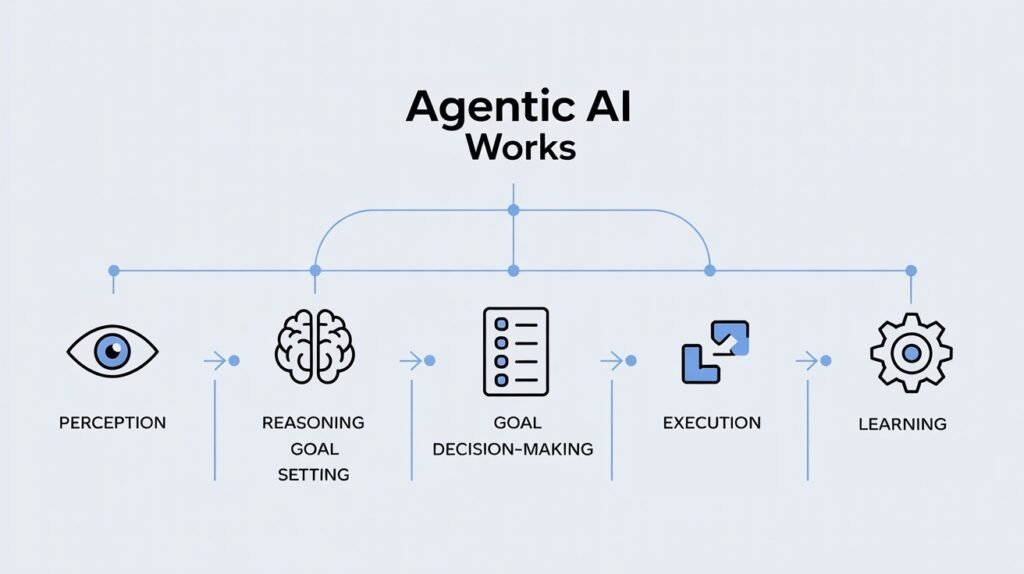
Let’s walk through a real scenario to make this concrete. A potential customer named Sarah lands on your website at 2 AM and starts browsing your product pages.
Perception (Gathering Information)
The AI agent “sees” Sarah’s behavior: which pages she visited, how long she stayed, what she clicked. It also accesses contextual data—is she a new visitor or returning? Did she come from an ad, search, or social media? Is she on mobile or desktop? According to Segment’s State of Personalization Report, 49% of consumers have made impulse purchases after receiving a more personalized experience, and perception is where that personalization starts.
Reasoning (Analyzing the Situation)
The agent processes what Sarah’s behavior means. She viewed three different product pages, lingered on pricing, but didn’t add anything to cart. She opened the FAQ page. The agent reasons: she’s interested but has unanswered questions or concerns about pricing. This isn’t someone casually browsing; this is someone in the consideration phase who needs a nudge.
Decision-Making (Choosing the Best Action)
Based on your business rules and learned patterns, the agent decides on the optimal action. Should it trigger a chatbot? Send an email? Offer a discount? Based on data showing that 67% of cart abandonment is due to unexpected costs (Baymard Institute), the agent decides to proactively offer help through a chat window: “Hi Sarah! I noticed you were comparing our Premium and Pro plans. Would you like help finding the best fit for your needs?”
Execution (Taking Action)
The agent deploys the chat message, monitors for Sarah’s response, and adapts in real-time. She asks about the difference in features. The agent provides a comparison. She asks about billing flexibility. The agent explains options and offers to email her a detailed breakdown. She seems ready to purchase but mentions she needs to “check with her team.” The agent schedules an automatic follow-up for the next business day and adds her to a nurture sequence.
Learning (Getting Better Over Time)
Sarah eventually converts three days later after receiving the follow-up email. The agent logs this outcome: visitor who showed this specific behavior pattern, received this intervention, and converted after this timeline. That pattern gets reinforced. The next time a visitor shows similar behavior, the agent applies the learned approach with even higher confidence.
According to Accenture’s AI research, AI systems that complete this full perception-to-learning cycle show performance improvements of 20-30% month-over-month, compared to static systems that simply execute pre-programmed rules.
What Agentic AI for Small Business Means
The beautiful part? You don’t manage this cycle. You don’t sit there clicking “analyze this” or “make that decision.” You set the parameters once—your business rules, your brand voice, your approval thresholds—and the agent runs this cycle continuously, automatically, for every customer interaction, every lead, every support request.
A Salesforce study found that high-performing small businesses check their AI agent dashboards for 15 minutes per day on average, compared to the 2-3 hours daily they previously spent on the tasks those agents now handle. That’s not because the work disappeared—it’s because the AI is doing the work while they monitor the outcomes.
Think of it this way: you’re shifting from being the worker to being the manager. And unlike human employees, these AI agents are perfectly happy reporting to you while handling the routine execution themselves.
Agentic AI for Small Business: Use Cases& Real-World Examples
Enough theory. Let’s talk about Agentic AI use cases for small business i.e what agentic AI actually does in real small businesses right now. These aren’t future predictions or enterprise-only applications—these are use cases that businesses with 5 to 50 employees are implementing today.
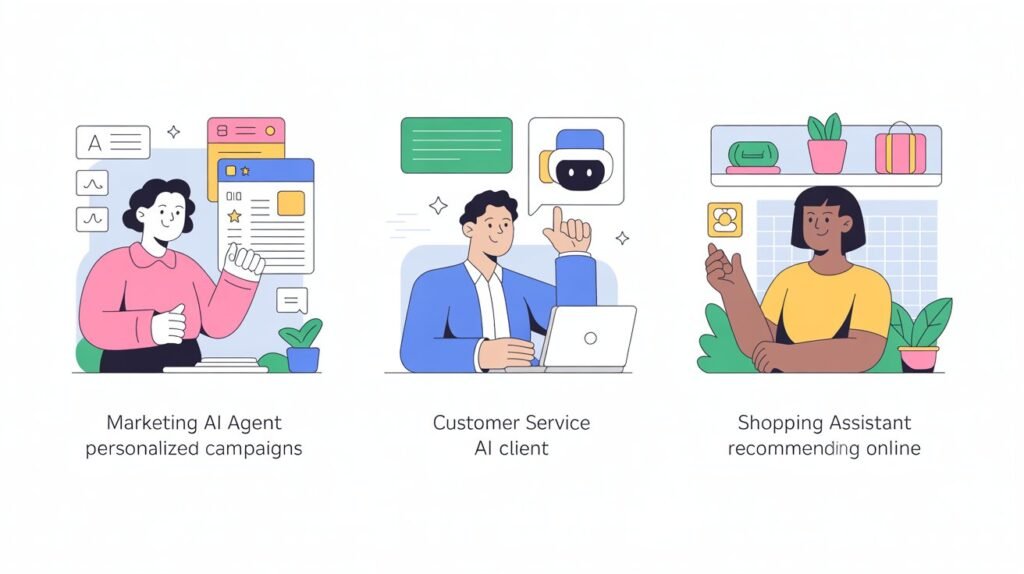
Marketing Automation AI Agents for Small Businesses
Remember when “marketing automation” meant scheduling a few emails in advance? Those days are done.
Modern marketing automation agents operate entire campaigns autonomously. They create content, distribute it across channels, analyze performance, and optimize on the fly—all without you logging into five different platforms.
Here’s how it works in practice:
Your AI agent analyzes your past blog posts and social media to understand your brand voice. It monitors your industry for trending topics. Every Monday morning, it generates 3-5 social media posts aligned with your content calendar, schedules them for optimal engagement times (which it’s learned from your audience data), and publishes them across LinkedIn, Facebook, and Instagram.
But it doesn’t stop there. It monitors engagement in real-time. That post about “5 ways to streamline invoicing” is getting 3x more clicks than usual? The agent recognizes the pattern, creates a follow-up post diving deeper into the topic, and adjusts the content calendar to produce more invoicing-related content. Meanwhile, that post about your company anniversary got minimal engagement? The agent notes it, deprioritizes that content type, and doesn’t waste your budget promoting it.
According to HubSpot’s 2024 Marketing Report, small businesses using autonomous marketing agents see a 45% increase in content output and a 28% improvement in engagement rates compared to manual management—essentially getting the output of a full marketing team with a fraction of the cost.
Real impact: A boutique consulting firm with three employees implemented a marketing automation agent. Within 90 days, their social media engagement increased by 67%, website traffic grew by 43%, and most importantly, inbound leads doubled—all while the owner spent less than an hour per week on marketing oversight instead of her previous 8-10 hours of manual posting and monitoring.
Customer Service AI Agents for Small Businesses
This is where agentic AI delivers immediate, measurable ROI—because customer service inquiries are predictable, high-volume, and time-consuming.
A customer service AI agent doesn’t just answer FAQs. It handles complete customer journeys across multiple channels simultaneously.
Customer emails at 11 PM asking about their order status? The agent checks your order management system, sees the package is in transit, provides the tracking link, and sends a personalized response—all in under 60 seconds. Customer messages on Facebook asking about return policies? The agent responds there, in the platform they chose, with your exact policy plus a direct link to initiate a return if needed.
But here’s where it gets powerful: the agent remembers context. That same customer follows up two hours later saying “Actually, I’d rather exchange it for a different size.” The agent doesn’t ask them to repeat their issue. It already knows the conversation history, processes the exchange request, generates a return label, and confirms the new size is in stock—a complete 4-step transaction without human involvement.
Zendesk’s Customer Experience Trends Report found that 72% of customers expect immediate responses regardless of time, yet most small businesses only have staffed support during business hours. Autonomous AI agents solve that gap—they’re the 24/7 team member you can’t afford to hire.
Click here to Read our detailed guide on Agentic AI for Customer Service
Real impact: A specialty e-commerce store selling athletic wear implemented an ai customer service agent. Their average response time dropped from 8 hours to 3 minutes. Customer satisfaction scores increased by 31%. And here’s the kicker: 60% of inquiries were fully resolved by the AI without any human touch—freeing the owner to focus on sourcing new products and building supplier relationships instead of answering “Where’s my order?” emails.
Sales and Lead Management AI Agents for Small Businesses
If you’re like most small business owners, leads slip through the cracks. Someone fills out a contact form, you’re in back-to-back meetings, you forget to follow up until three days later, and they’ve already gone with a competitor who responded in 20 minutes.
Sales AI agents eliminate that problem entirely.
A lead downloads your pricing guide at 4 PM on Friday. The agent immediately sends a personalized email: “Hi Jennifer, thanks for your interest in our Premium package. I noticed you’re in the healthcare industry—we’ve helped several healthcare companies solve [specific problem]. Would Tuesday at 10 AM or Wednesday at 2 PM work for a 15-minute call to discuss your specific needs?”
Jennifer clicks “Tuesday at 10 AM.” The agent checks your calendar, books the meeting, sends confirmations to both of you, and adds the lead to your CRM with notes about her industry and the content she downloaded. Tuesday at 8 AM, the agent sends you a briefing: “Your 10 AM call with Jennifer – She’s the Operations Manager at a 50-person healthcare company, engaged with pricing content, likely budget is in the $X-Y range based on company size.”
Now you walk into that call prepared, professional, and positioned to close—while the agent is simultaneously qualifying three other leads, scheduling follow-ups with two past prospects, and nurturing a pipeline of warm contacts.
InsideSales.com research shows that leads contacted within 5 minutes are 21 times more likely to convert than leads contacted after 30 minutes. Most small businesses can’t maintain that response time manually. AI agents can, consistently, for every single lead.
Real impact: A B2B software consultant running a solo practice implemented a sales agent. Lead response time went from an average of 6 hours to under 5 minutes. Her meeting booking rate increased from 12% to 34%. Most surprisingly, the quality of meetings improved because the AI agent was pre-qualifying leads and only scheduling calls with prospects who matched her ideal customer profile, saving her from wasting time on dead-end conversations.
Operations and Administrative AI Agents for Small Businesses
This is the unsexy stuff that eats your day—invoicing, payment follow-ups, inventory checks, data entry. It has to get done, but it doesn’t grow your business.
Operational AI agents are built for exactly this kind of repetitive, rules-based work.
An invoice goes unpaid past its due date? The agent automatically sends a friendly reminder email. Still unpaid after 7 days? It sends a second notice with slightly firmer language. At 14 days, it escalates to you with a flag that this account needs personal attention—but only then, after the agent has handled the first two touches automatically.
Your best-selling product drops to 10 units in stock? The agent checks your reorder rules, sees that you typically restock at 15 units, calculates lead time from your supplier, and either automatically places the reorder (if you’ve given it that authority) or sends you an approval request with all the details populated—supplier, quantity, cost, expected delivery date—so you can approve with one click instead of spending 15 minutes gathering information.
A new employee starts Monday? The agent triggers your onboarding workflow: sends welcome email, creates accounts in your key systems, schedules training sessions, assigns first-week tasks, and checks in at day three with “How’s it going?” messages—a complete 12-step process you used to manually coordinate through multiple emails and calendar events.
Automation Anywhere’s research found that administrative tasks consume 20-30% of a typical small business owner’s time, with minimal strategic value. Operational AI agents can automate 60-80% of those tasks, essentially giving you back a full day per week.
Real impact: A small manufacturing company with 12 employees implemented operational agents for invoicing and inventory management. Days Sales Outstanding (the time to collect payment) decreased by 11 days, improving cash flow significantly. Stockouts—when they ran out of popular items—decreased by 78%. The operations manager estimated the agents saved her 10-12 hours per week, which she redirected toward process improvement initiatives that actually moved the business forward.
How to Choose Your First Autonomous AI Agent
Here’s the question every small business owner asks: “Okay, I’m convinced. But which AI should I actually use?”
And here’s the frustrating answer: it depends on what you need it to do.
I know, I know—you wanted me to say “Use Platform X, it’s perfect for everyone.” But the truth is, the “best” AI for small business owners is the one that solves your specific problems, integrates with your existing tools, fits your budget, and doesn’t require your team to get computer science degrees.
Let’s build a framework to help you evaluate options intelligently.
The Pre-Built vs. Custom Spectrum AI Agents
At one end, you have pre-built AI agents—ready-to-use solutions designed for specific tasks. Customer service chatbots. Social media scheduling agents. Email marketing automations. These are like buying a car—you pick a model that fits your needs, maybe customize a few features, and you’re on the road quickly.
At the other end, you have custom-built AI agents—flexible platforms where you (or a developer) build exactly what you need. These are like building a car from parts—complete control, perfect fit, but significantly more complex and expensive.
For most small businesses, pre-built agents are the right starting point. According to Gartner’s AI adoption research, 82% of successful small business AI implementations start with pre-built solutions before expanding to custom development, if ever.
Why? Because pre-built agents let you prove value quickly, learn what works in your business, and avoid spending months (and tens of thousands of dollars) building something custom that might not deliver the ROI you expect.
Integration: The Non-Negotiable Factor
Here’s what kills most AI implementations: the agent can’t talk to your other systems.
Your AI agent needs to be able to respond to customer inquiries? It needs to access your order management system, your knowledge base, your return policy documentation. It needs to update your CRM when it qualifies a lead. It needs to pull from your inventory system when answering product availability questions.
An AI agent that operates in isolation—requiring you to manually transfer information between systems—isn’t an agent. It’s just another tool creating more work.
Before evaluating any AI solution, make a list of your core systems: CRM (Salesforce, HubSpot, etc.), email platform (Gmail, Outlook), e-commerce platform (Shopify, WooCommerce), accounting software (QuickBooks, Xero), project management tools (Asana, Monday), communication platforms (Slack, Teams).
Then ask: “Does this AI agent integrate natively with these systems, or will I need custom development to connect them?”
Zapier’s State of Business Automation report found that small businesses using integrated AI systems see 3x higher ROI than those using standalone solutions, simply because integrated systems eliminate manual data transfer and create seamless workflows.
Pricing Models For AI Agents That Make Sense for Small Businesses
AI pricing is all over the map—per user, per conversation, per task, flat monthly fee, usage-based, freemium-to-premium. It’s designed to be confusing, honestly.
Here’s how to evaluate AI pricing as a small business owner:
Calculate your “cost per hour saved.” If you’re spending 10 hours per week on customer service inquiries, and an AI agent costs $150/month to handle 80% of those inquiries, you’re paying $150 to save 8 hours of your time per week (32 hours/month). If your time is worth more than $4.69 per hour ($150 ÷ 32 hours), it’s a no-brainer investment.
Most small business-focused AI agents price between $50-$300 per month for core functionality. According to Salesforce’s Small Business Trends Report, businesses investing in AI at this tier see average ROI of $3.50 for every $1 spent within the first year, primarily from time savings and increased capacity.
Watch out for hidden costs: some platforms charge separately for “conversations,” “automations,” “users,” and “integrations.” A tool advertised at $99/month can quickly balloon to $300+ when you add the features you actually need.
Ease of AI Agent Setup: The “Non-Technical Business Owner” Test
This is where most AI vendors lie to you. They’ll say “No coding required! Anyone can set it up!” Then you log in and face a dashboard that looks like you need a PhD in computer science to navigate.
Here’s my recommendation: before committing to any AI platform, ask for a trial or demo specifically focused on setup complexity. Can you configure a basic agent in under an hour? Are there templates for common use cases? Is the interface visual (drag-and-drop) or does it require writing code?
Research from Harvard Business Review found that 63% of small business AI pilots fail not because the technology doesn’t work, but because implementation is too complex for resource-constrained teams. Choose simplicity over power, especially for your first agent.
Scalability: Growing With You
Your first AI agent might handle 50 customer inquiries per week. Six months from now, maybe it’s 200. A year from now, maybe you want to add a second agent for sales, a third for operations.
Does the platform scale gracefully, or will you hit limits that force you to migrate to a new solution (losing all your training and configuration)?
Look for platforms that offer clear upgrade paths—where moving from a basic to advanced tier is seamless, where adding new use cases doesn’t require starting from scratch, where your agents get better as the platform improves without you having to rebuild them.
The Short List of Evaluation Criteria for Agentic AI
When you’re comparing AI agent platforms, score them against these factors:
✓ Solves a specific, high-value problem in your business
✓ Integrates natively with your existing systems
✓ Pricing aligns with clear ROI (cost per hour saved)
✓ Setup takes hours, not weeks
✓ Scales as your needs grow
✓ Support is accessible (community, documentation, human help)
✓ Trial or demo available to test before buying
The “best AI for small business owners” isn’t the one with the most features or the biggest brand name. It’s the one you’ll actually implement, that solves a real problem, and that delivers measurable results in your first 30 days.
Start there. Everything else is just noise.
How to Get Started with Agentic AI in Your Small Business ?
Alright, you’re convinced that agentic AI makes sense for your business. The natural next question: “Where do I start?”
The good news? You don’t need to transform your entire operation overnight. You don’t need to hire consultants. You don’t need a six-month implementation plan. You need a systematic, low-risk approach that delivers quick wins while building your confidence.
Here’s the exact roadmap, step by step.
Step 1: Identify Time-Consuming Tasks That AI Agents Can Handle
Before you shop for solutions, you need to know what problem you’re solving. And the best place to start is with an honest audit of where your time actually goes.
Grab a notebook (or open a doc) and spend the next week tracking tasks that fit these criteria:
Repetitive – You do it the same way every time
High-volume – It happens multiple times per day or week
Rules-based – There’s a clear process or decision tree
Time-consuming – It eats 30+ minutes of your day
Common examples that surface in small businesses:
- Responding to the same customer questions repeatedly
- Scheduling appointments or meetings
- Following up with leads who downloaded content
- Posting to social media accounts
- Sending invoice reminders for overdue payments
- Checking inventory levels and placing reorders
- Updating CRM records after customer interactions
- Qualifying inbound leads before sales calls
- Creating basic content (social posts, product descriptions)
- Monitoring email for specific triggers (order confirmations, support requests)
McKinsey’s research found that 60% of all occupations have at least 30% of activities that could be automated, and for small business owners specifically, that number jumps to 40-50% of their daily tasks. You’re probably sitting on a goldmine of automation opportunities.
Pro tip: Don’t just think about tasks you do. Ask your team (if you have one) the same question: “What takes up your time that feels repetitive and could be systematized?” Often, the best automation opportunities are the ones that frustrate your team daily but aren’t visible to you because you’re not doing them.
Once you have your list, prioritize using this simple 2×2 framework:
High Impact, Easy Implementation → Start here
High Impact, Complex Implementation → Second phase
Low Impact, Easy Implementation → Maybe, if capacity allows
Low Impact, Complex Implementation → Ignore for now
Your goal is to identify 2-3 high-impact, easy-implementation tasks as your starting point. These are the quick wins that build momentum and prove the concept.
Step 2: Prepare Your Data (It’s Easier Than You Think)
Here’s where people panic: “But my data is a mess! I need to clean everything up first!”
Let me save you months of unnecessary work: you don’t need perfect data to start with agentic AI. You need sufficient data, organized well enough for the agent to access it.
Think of it like hiring a new employee. Do they need to know every detail of your business on day one? Of course not. They need access to the key information relevant to their specific role, and they learn more as they go.
Same with AI agents.
If you’re implementing a customer service agent, it needs access to:
- Your most frequently asked questions and answers
- Your product documentation or service descriptions
- Your policies (returns, refunds, shipping, etc.)
- Customer order history (if handling order-related inquiries)
That’s it. You don’t need every piece of data in your business perfectly categorized and tagged.
Practical steps to get data-ready:
Centralize key information: If your return policy lives in an email, your product specs are in a spreadsheet, and your FAQs are in your head, consolidate them into a single, accessible location. A simple Google Doc or Notion page works fine to start.
Document your processes: For the task you’re automating, write down the step-by-step process as if you’re training a new employee. “When a customer asks about X, first check Y, then do Z.” This becomes the blueprint for your AI agent’s decision-making logic.
Connect your core systems: Make sure your AI platform can integrate with the systems it needs. If you’re automating lead follow-up, connect your CRM. If you’re automating customer service, connect your order management system and help desk.
According to IBM’s Data Readiness Report, small businesses that spend 2-3 weeks on focused data preparation see 35% faster time-to-value with AI implementations compared to those who either skip preparation or get stuck in “analysis paralysis” trying to perfect everything.
The reality: Your AI agent will surface gaps in your data as it operates. A customer asks a question the agent can’t answer? That’s an opportunity to add that information to the knowledge base. The agent makes a wrong decision? That’s feedback to refine the rules. You improve iteratively, not perfectly upfront.
Step 3: Starting with a Pilot Agentic AI Project for your Business
Here’s the single biggest mistake small businesses make with AI: trying to do too much, too fast.
They decide “We’re going to automate customer service, marketing, sales, and operations all at once!” Six months later, nothing is actually working, everyone is frustrated, and AI gets labeled a failure. Don’t be that business.
Start with one narrowly defined use case. One workflow. One agent. One measurable outcome.
Why? Because small wins build confidence, teach you how AI actually works in your business, and create momentum. According to Forrester Research, businesses that start with focused AI pilots are 4.5 times more likely to expand successfully compared to those attempting broad implementations.
Here’s how to structure an effective pilot:
Choose an Agentic AI use case with the following characteristics:
- High pain, low complexity: It bothers you daily but isn’t technically complicated
- Measurable results: You can track time saved, tasks completed, or customer satisfaction
- Contained scope: Failure won’t crash your business
- Quick feedback loop: You’ll see results within days or weeks, not months
Perfect Agentic AI pilot Project Examples:
- Automate responses to the 10 most common customer inquiries
- Schedule social media posts for the next month
- Send follow-up emails to leads who downloaded your pricing guide
- Process and categorize incoming support tickets
- Send payment reminders for invoices 7+ days overdue
Set a clear success metric before you start. Not “We want this to work better” but “We want to reduce customer service response time from 4 hours to 30 minutes” or “We want to follow up with 100% of leads within 5 minutes instead of our current 40%.”
Give it a defined timeline. “We’ll run this pilot for 30 days, measure results, then decide whether to expand, adjust, or pivot.” Pilots that drag on indefinitely never deliver the learning you need to make informed decisions.
Involve your team early. If you have employees who’ll be affected by the AI agent, bring them into the planning. According to Deloitte’s workforce studies, 71% of AI implementation resistance comes from employees feeling blindsided, while early involvement increases adoption rates by 60%.
Frame it as: “This AI agent is going to handle the repetitive parts of your job so you can focus on the interesting, high-value work.” Because that’s the truth. Your customer service rep who spends 5 hours a day answering “Where’s my order?” emails will be thrilled to redirect that time to handling complex customer issues that actually require human judgment.
Step 4: Configure and Train Your AI Agent (No Coding Required)
“Training” sounds intimidating, like you need to teach a robot to think. But in practical terms, training an AI agent for small business use is much more straightforward: you’re providing context and setting boundaries.
Most modern AI platforms designed for small businesses use conversational interfaces or visual builders—you’re essentially filling out forms and selecting options rather than writing code.
Here’s what the setup process of Your First Agentic AI Project typically looks like:
Define the Ai agent’s purpose and scope
“This agent handles customer service inquiries related to order status, returns, and product questions. It does NOT handle refund approvals over $100 or technical support issues—those escalate to a human.”
Clear boundaries prevent the agent from operating outside its competency, which builds trust (yours and your customers’).
Provide your knowledge base
Upload or link to the information the agent needs: FAQs, product descriptions, policy documents, process guides. Modern AI agents can ingest this information and reference it when responding—you don’t need to manually script every possible conversation.
Set your brand voice and tone
Most platforms let you define personality parameters: “Professional but friendly,” “Casual and conversational,” “Formal and technical.” You might even provide example responses that capture your brand voice, which the ai agent uses as a model.
Configure decision rules and escalation triggers for your Ai Agent
“If a customer uses words like ‘angry,’ ‘unacceptable,’ or ‘lawyer,’ escalate immediately to a human.” “If a refund request is under $50, process automatically. If over $50, flag for approval.” These rules encode your judgment into the system.
Test the AI Agent with real scenarios
Before going live, run the agent through 10-20 realistic scenarios. Feed it the types of inquiries you actually receive and see how it responds. Does it access the right information? Does it make appropriate decisions? Does it escalate when it should?
A study from MIT’s Sloan School found that businesses that invest 5-10 hours in comprehensive pre-launch testing reduce post-launch issues by 65% and achieve target performance 40% faster than those who rush to deployment.
Iterate based on real interactions
Once live, monitor early conversations closely. You’ll quickly see patterns: questions the agent handles perfectly, questions where it struggles, edge cases you didn’t anticipate. Use these insights to refine the knowledge base, adjust rules, and improve responses.
Think of the first two weeks as “supervised autonomy.” The agent is handling tasks, but you’re watching closely and making adjustments. By week three or four, you’ll have enough confidence to let it operate with minimal oversight.
Pro tip: Start with review-before-send mode if your platform offers it. The agent drafts responses, but you approve them before they go to customers. This lets you build trust gradually while training the agent with real-world feedback. After 50-100 successful interactions, switch to full autonomy with occasional spot-checks.
Step 5: Monitor Agentic AI Performance and Expand Gradually
Your AI agent is live, handling real work. Now what?
This is where small businesses often make one of two mistakes: they either monitor obsessively (checking every interaction, undermining the whole point of automation) or they set it and forget it (missing issues until they become problems).
The right approach is structured, periodic monitoring focused on key metrics.
Track these core metrics weekly:
Volume metrics:
How many tasks is the agent handling? (Should increase as you gain confidence)
Accuracy metrics:
What percentage of tasks are completed correctly without human intervention? (Target: 85%+ after the first month)
Efficiency metrics:
How much time is being saved? (Compare pre-agent vs. post-agent time investment)
Satisfaction metrics:
If customer-facing, what’s the feedback? (CSAT scores, complaint rates, compliments)
Escalation metrics:
How often does the agent correctly identify when it needs human help? (Should be consistent, not trending up)
Salesforce’s AI Performance Research found that high-performing AI implementations review metrics weekly for the first 90 days, then shift to monthly reviews—striking the balance between oversight and autonomy.
When to intervene:
✗ Accuracy drops below 80% for more than two consecutive days
✗ Customer complaints mention the AI specifically
✗ The agent is escalating more than 20% of interactions (might need better training)
✗ The agent is escalating less than 5% of interactions (might be overconfident)
When to celebrate and expand:
✓ Accuracy consistently above 85% for three consecutive weeks
✓ Time savings meet or exceed projections
✓ Team reports satisfaction with how the agent is performing
✓ Customer feedback is neutral to positive
Once your first agent is humming along successfully, that’s when you expand. But here’s the key: expand to a new use case, not just more volume on the existing one.
Why? Because your learning compounds. Your second agent will take half the time to implement because you understand the platform, the training process, and how to set appropriate boundaries. Your third agent will be even faster.
According to McKinsey’s automation research, businesses that implement AI agents sequentially—pilot, prove, expand—achieve 73% success rates, compared to 31% success rates for businesses attempting simultaneous, broad implementations.
A realistic expansion timeline:
Month 1-2: First pilot agent deployed and optimized
Month 3: Performance proves value, team confidence is high
Month 4-5: Second agent deployed (different use case)
Month 6: Both agents running smoothly, identify third opportunity
Month 7-9: Third agent deployed, begin exploring advanced features
Month 10-12: AI agent ecosystem operating, focus shifts to optimization
By the end of year one, you could have 3-5 AI agents handling significant workflows across your business—customer service, marketing, sales, operations—without ever hiring additional staff or building custom software.
That’s not a future possibility. That’s the current reality for thousands of small businesses already on this journey.
Common Challenges of Implementing Agentic AI (Risk & Mitigation)
Let’s be honest about something: implementing agentic AI isn’t always smooth. You’re going to hit friction points. You might get frustrated. You might wonder if it’s worth the effort.
Spoiler alert: it is. But only if you anticipate the common challenges and have a plan to work through them.
Here are the five obstacles that trip up most small businesses, and more importantly, how to overcome them without giving up.
Challenge 1: “My Data Isn’t Ready”
The fear: “I can’t start with AI until I’ve cleaned up my CRM, organized all our documentation, standardized our processes, and migrated to a modern tech stack.”
The reality: You’re using this as an excuse to avoid starting.
Yes, organized data helps AI agents work better. But according to Gartner’s research, only 8% of businesses have “fully optimized” data infrastructure, yet 33% are successfully using AI. The gap between perfection and “good enough to start” is huge.
The solution: Start with minimum viable data for your specific use case. If you’re automating customer service inquiries, you don’t need your entire company database perfect—you need your FAQs, policies, and product information accessible. That might take an afternoon to organize, not three months.
Action step: Identify the smallest dataset required for your pilot project. Spend one week getting just that information organized. Then start. You’ll discover what other data you need as the agent operates, and you can add it incrementally.
A Harvard Business Review study found that businesses practicing “data minimalism”—organizing only what’s immediately needed—achieve 40% faster AI adoption than those attempting comprehensive data overhauls before starting.
Challenge 2: “My Team Will Resist This”
The fear: “If I bring in AI to automate tasks, my employees will think I’m trying to replace them.”
The reality: Your team’s biggest frustration is probably the repetitive, tedious work that AI is perfect for automating.
Here’s what actually happens in most small businesses: The receptionist who’s been manually scheduling appointments for five years is thrilled when an AI agent takes that over. The customer service rep who’s been answering “What’s your return policy?” 20 times a day is relieved to redirect that energy to complex customer issues that actually require human empathy and judgment.
According to Deloitte’s Future of Work research, 87% of employees are more positive about AI when it’s positioned as “handling repetitive tasks” vs. “improving efficiency” (which sounds like code for “doing your job”).
The solution: Involve your team early in selecting what to automate. Ask them: “What parts of your job feel repetitive and frustrating?” They’ll tell you exactly where AI can help, and they’ll feel ownership over the decision.
Action step: Hold a 30-minute meeting before implementing any AI agent. Explain what it will do, what it won’t do, and how it frees them up for more interesting work. Give them veto power over ideas that feel threatening. Most importantly, commit that no one loses their job because of AI—this is about capacity expansion, not headcount reduction.
Frame it simply: “We’re bringing on an AI teammate to handle the boring stuff so you can focus on what you’re actually good at.”
Challenge 3: “What if It Makes a Mistake?”
The fear: “An AI agent might say something wrong to a customer, process a refund incorrectly, or make a decision that damages our reputation.”
The reality: Humans make mistakes too. Every day. And unlike humans, AI agents get more accurate over time and can be programmed with strict safety boundaries.
Yes, your AI agent will make mistakes, especially early on. It might misunderstand a customer question. It might pull incorrect information. It might make a decision you wouldn’t have made.
But here’s what research shows: According to IBM’s AI Accuracy Studies, well-trained AI agents operating within defined boundaries achieve 90-95% accuracy rates—which is often higher than human performance on the same repetitive tasks, especially during high-volume periods when humans get fatigued.
The solution: Implement guardrails and oversight appropriate to the risk level.
For low-risk tasks (scheduling social media, sending follow-up emails), give the agent full autonomy from day one. The downside of mistakes is minimal.
For medium-risk tasks (customer service responses, lead qualification), start with review-before-send mode for the first 50-100 interactions, then shift to autonomy with spot-checking.
For high-risk tasks (processing refunds, making purchasing decisions), require human approval for actions above certain thresholds. The agent prepares everything, but you click “Approve.”
Action step: Map your AI agent’s tasks by risk level and set appropriate boundaries. Make sure the agent knows when to escalate: “If you’re uncertain, ask a human” should be a core operating principle.
One e-commerce business owner told me: “My AI agent made a mistake in its second week—gave a customer a $50 discount code we weren’t actively promoting. I was initially frustrated, but then I realized: my staff had made that exact same mistake four times the previous month, and nobody freaked out. We adjusted the agent’s rules, and it never happened again. With humans, I’d had the same conversation four different times.”
Challenge 4: “What About Cost and ROI?”
The fear: “AI platforms are expensive, and I’m not sure we’ll see returns that justify the investment.”
The reality: The cost structure of AI for small businesses has collapsed in the past two years.
Enterprise AI solutions used to cost $50,000+ annually with long-term contracts. Today, small business-focused AI agents start at $50-200 per month with month-to-month terms. That’s the cost of a junior employee working 4-8 hours at minimum wage.
Let’s do real math. You’re spending 10 hours per week on customer service inquiries. Your time is worth $50/hour (conservative for a business owner). That’s $500/week or $26,000/year in opportunity cost.
An AI customer service agent costs $150/month ($1,800/year) and handles 80% of those inquiries, giving you back 8 hours/week. That’s $400/week saved or $20,800/year. Your ROI is 1,055%.
According to Salesforce’s Small Business ROI Study, the median small business sees $3.50 returned for every $1 invested in AI automation within the first year, with payback periods of 3-6 months.
The solution: Calculate your specific ROI before buying anything. Use this simple formula:
(Hours saved per week × Your hourly rate × 52 weeks) ÷ Annual AI cost = ROI multiple
If that number is above 3x, it’s a no-brainer. If it’s 1.5-3x, it’s a solid investment. Below 1.5x, you might be automating the wrong task or using an overpriced platform.
Action step: Before purchasing any AI platform, run this calculation with real numbers from your business. Be conservative with time savings estimates—if you think it’ll save 10 hours, model it as 6 hours. If the ROI still works, proceed.
Challenge 5: “I Don’t Know Enough About Technology”
The fear: “I’m not technical. I don’t understand how AI works. I’m going to mess this up or get taken advantage of by vendors promising things they can’t deliver.”
The reality: You don’t need to understand how AI works any more than you need to understand how engines work to drive a car.
The AI platforms designed for small businesses are specifically built for non-technical users. They have visual interfaces, pre-built templates, and step-by-step guidance. If you can use email and navigate a website, you can set up an AI agent.
According to Accenture’s Digital Skills Research, 78% of small business owners who successfully implemented AI rated their technical skills as “beginner” or “intermediate” before starting. Technical expertise wasn’t the differentiator—clarity about business needs and willingness to learn were.
The solution: Start with platforms that offer comprehensive onboarding and support. Look for video tutorials, active user communities, and responsive customer service. Avoid platforms that require coding or assume technical knowledge.
Action step: During your evaluation phase, ask vendors: “Can you show me the actual setup process?” Not a polished demo, but the real interface you’ll use to configure an agent. If it looks intimidating or confusing, keep looking. The right platform will feel approachable.
One business owner summed it up perfectly: “I was terrified to start with AI because I barely know how to use Excel formulas. But the platform I chose had a template for customer service chatbots that I just customized with my business info. It took me two hours to set up, and it’s been running for six months with minimal adjustments. I was overthinking it massively.”
Agentic AI as Your Growth Partner: The Bottom Line
Here’s what we’ve covered: what agentic AI is, how it works, real examples across business functions, how to choose the right solution, a step-by-step implementation roadmap, and honest answers about the challenges you’ll face.
But let’s zoom out for a moment and talk about what this really means for your business.
You started your business because you saw an opportunity, had a skill, wanted independence, or believed you could do something better than the competition. You didn’t start it to spend 60 hours a week answering the same customer questions, manually scheduling social media posts, chasing late invoices, or doing data entry.
Yet that’s where most small business owners end up—trapped in operational quicksand, working in the business instead of on the business.
Agentic AI is fundamentally about buying back your time and focus.
Not through hiring (which is expensive, slow, and comes with management overhead), not through traditional automation (which is rigid and breaks constantly), but through autonomous agents that handle the repetitive, rules-based work while you focus on strategy, growth, and the work only you can do.
The businesses thriving right now aren’t necessarily the ones with the most resources or the biggest teams. They’re the ones operating with disproportionate efficiency. They’re answering every customer inquiry within minutes. They’re following up with every lead instantly. They’re running sophisticated marketing campaigns. They’re optimizing operations in real-time.
And they’re doing it with the same 5-10 person teams they’ve always had.
According to Boston Consulting Group’s research, early AI adopters in the small business segment are growing revenue 2.3 times faster than their peers, not because AI magically generates revenue, but because it removes the capacity constraints that previously limited growth.
When you’re not spending 10 hours a week on customer service, you can spend that time building partnerships. When you’re not manually following up with leads, you can focus on closing deals with qualified prospects who are actually ready to buy. When you’re not doing administrative busywork, you can think strategically about where your business is heading.
This is the shift from scarcity to abundance thinking.
For decades, small business owners operated under constraints: “I can only do so much with limited time and budget.” Agentic AI removes those constraints. Suddenly, you can operate with the responsiveness and scale that previously required teams three times your size.
The competitive gap is widening right now. The businesses that embrace agentic AI in 2025 will spend the next three years compounding their advantage—getting better data, training better agents, optimizing workflows, and scaling without friction. The businesses that wait will spend those same three years watching competitors serve customers faster, close deals quicker, and operate more efficiently.
Here’s my challenge to you: Don’t let this be another article you read, nod along with, and then do nothing about.
Commit to taking one action this week:
✓ Spend two hours auditing your time to identify your best automation opportunity
✓ Research three AI platforms that solve your specific problem
✓ Schedule demos and ask the hard questions about integration, setup, and support
✓ Run the ROI calculation with your real numbers
✓ Start a 30-day pilot with clear success metrics
The businesses that will win the next decade aren’t the ones with the biggest budgets or the most technical teams. They’re the ones willing to experiment, learn, and adapt.
Agentic AI isn’t magic. It’s not going to solve every problem in your business. But it will handle the repetitive, time-consuming work that’s preventing you from focusing on what actually grows your business.
And that, for a small business owner stretched thin, might be the most valuable thing you could invest in.
The technology is ready. The pricing is accessible. The implementation is straightforward.
Frequently Asked Questions (FAQs):
What exactly is agentic AI?
Agentic AI refers to autonomous artificial intelligence systems that can independently plan, make decisions, and take actions to achieve specific goals without constant human oversight. Unlike traditional AI that simply responds to prompts, agentic AI uses reasoning capabilities to break down complex tasks, interact with tools and software, learn from outcomes, and adapt its approach—functioning more like a digital employee than a passive assistant.
What is agentic AI for small business?
Agentic AI for small business refers to AI agents that act independently, automate tasks, and make decisions without constant human input. It helps small businesses save time and reduce costs which translates to handling end-to-end workflows such as customer service, data analysis, scheduling, and operations management, working autonomously to complete objectives while freeing human teams to focus on strategic priorities.
Is ChatGPT an agentic AI?
ChatGPT in its standard form is not fully agentic AI—it’s a conversational AI assistant that responds to user prompts but doesn’t autonomously plan or execute multi-step tasks independently .While ChatGPT serves as a powerful AI copilot for small businesses, dedicated agentic AI systems and autonomous agents offer deeper workflow automation, proactive task management, and the ability to operate independently over extended periods to achieve complex business outcomes.
How does agentic AI differ from generative AI or standard automation?
Generative AI creates content—such as text, images, code, or videos—based on user prompts, excelling at producing outputs but requiring human direction for each task. Examples include tools like ChatGPT for writing, DALL-E for images, and Midjourney for design. Agentic AI, on the other hand, goes beyond content generation to autonomously plan, decide, and execute complex workflows toward specific goals without constant human input.
While generative AI acts as a creative assistant that responds to requests, agentic AI functions as an autonomous agent that can break down business objectives, use multiple tools, interact with software systems, learn from results, and adapt its strategy over time
What is the difference between LLM and agentic AI?
An LLM (Large Language Model) is the underlying AI technology that processes and generates human-like text by predicting patterns from vast amounts of training data—it’s essentially the “brain” or engine powering AI applications. Examples include GPT-4, Claude, and Llama. Agentic AI, however, is a complete system built on top of LLMs that adds autonomous capabilities like goal-setting, planning, tool usage, and decision-making to accomplish tasks independently
What is the 30% rule in AI?
The 30% rule in AI is a practical guideline suggesting that businesses should aim to automate approximately 30% of repetitive, rule-based tasks using AI and automation technologies to achieve optimal efficiency gains without over-reliance on technology or displacing the human workforce entirely. This principle helps small businesses strike a balance between leveraging agentic AI for operational improvements and maintaining essential human oversight, creativity, and relationship management. By targeting 30% automation, companies can focus AI agents on high-volume, time-consuming activities
What are the main benefits of agentic AI for small business?
Agentic AI offers small businesses significant advantages including 24/7 autonomous operations, reduced labor costs, and the ability to scale without adding headcount. AI agents independently handle repetitive tasks like customer support, scheduling, data entry, and invoicing—freeing your team to focus on strategy and growth. Key benefits include dramatically improved operational efficiency, faster response times, fewer errors, and enhanced customer experience through consistent service delivery. Small businesses gain enterprise-level automation capabilities at a fraction of traditional costs, better decision-making through real-time data analysis, and competitive advantages previously available only to larger companies.
What are some real use cases of agentic AI in small businesses?
Agentic AI handles autonomous customer support, appointment scheduling, lead qualification, and sales outreach. Common applications include automated bookkeeping and invoice processing, inventory management with automatic reordering, email management and response drafting, social media content creation and scheduling, and HR tasks like candidate screening and employee onboarding—all operating independently to save time and costs.
What types of AI agents can small businesses use?
Small businesses can deploy several autonomous AI agents including customer service agents for support automation, sales agents for lead generation and outreach, administrative agents for scheduling and data entry, marketing agents for content creation and campaign management, financial agents for bookkeeping and expense tracking, and workflow agents that integrate multiple systems to automate end-to-end business processes across departments.
What tools or platforms support agentic AI for small business?
Leading agentic AI platforms for small businesses include automation tools like Zapier and Make for workflow integration, AI agent builders such as LangChain and AutoGPT, customer service platforms like Intercom and Zendesk with AI agents, sales automation tools including HubSpot and Salesforce Einstein, and specialized solutions like Relevance AI and Agent.ai that enable small businesses to build custom autonomous agents without coding expertise.
How do I prepare my data for an agentic AI system?
Preparing data for agentic AI requires organizing and centralizing business information into accessible formats. Start by cleaning and standardizing data across systems, digitizing paper records, establishing clear data structures and naming conventions, integrating disparate software platforms through APIs, documenting workflows and business processes, ensuring data security and access permissions, and creating knowledge bases that AI agents can reference to make informed autonomous decisions.
How do I get started with agentic AI in my business?
Start by identifying repetitive, time-consuming tasks suitable for automation, then choose one high-impact use case like customer support or scheduling. Select an appropriate agentic AI platform, integrate it with existing business systems, train the AI agent with your processes and data, test thoroughly in controlled scenarios, monitor performance closely, and gradually expand automation to additional workflows as you gain confidence and measure results.
What are the risks or challenges of using agentic AI in small businesses?
Key challenges include data security and privacy concerns, potential errors in autonomous decision-making, initial implementation costs and technical complexity, over-reliance on AI without human oversight, integration difficulties with legacy systems, employee resistance to automation, lack of transparency in AI reasoning, regulatory compliance issues, and the need for ongoing monitoring and maintenance to ensure AI agents perform accurately and align with business goals.
How do you measure ROI from agentic AI projects?
Measure agentic AI ROI by tracking time saved on automated tasks, labor cost reductions, increased revenue from improved sales processes, faster customer response times, error rate decreases, customer satisfaction improvements, and employee productivity gains. Compare implementation and maintenance costs against these benefits, calculating payback period and ongoing cost savings to determine total return on investment for your autonomous AI agents.
Can a small business afford agentic AI?
Yes, agentic AI is increasingly affordable for small businesses with many platforms offering subscription-based pricing starting at $20-$100 monthly. Cloud-based AI agent solutions eliminate expensive infrastructure costs, no-code platforms reduce implementation expenses, and rapid ROI through labor savings and efficiency gains often pays back initial investments within months, making autonomous AI accessible even for budget-conscious small businesses.
Is agentic AI ready today, or is it still experimental?
Agentic AI is commercially available and actively used by businesses today, though maturity varies by use case. Proven applications like customer service automation, scheduling, and data processing are production-ready, while complex autonomous decision-making remains evolving. Small businesses can safely deploy established agentic AI solutions now, starting with well-defined workflows and expanding capabilities as the technology continues advancing rapidly.