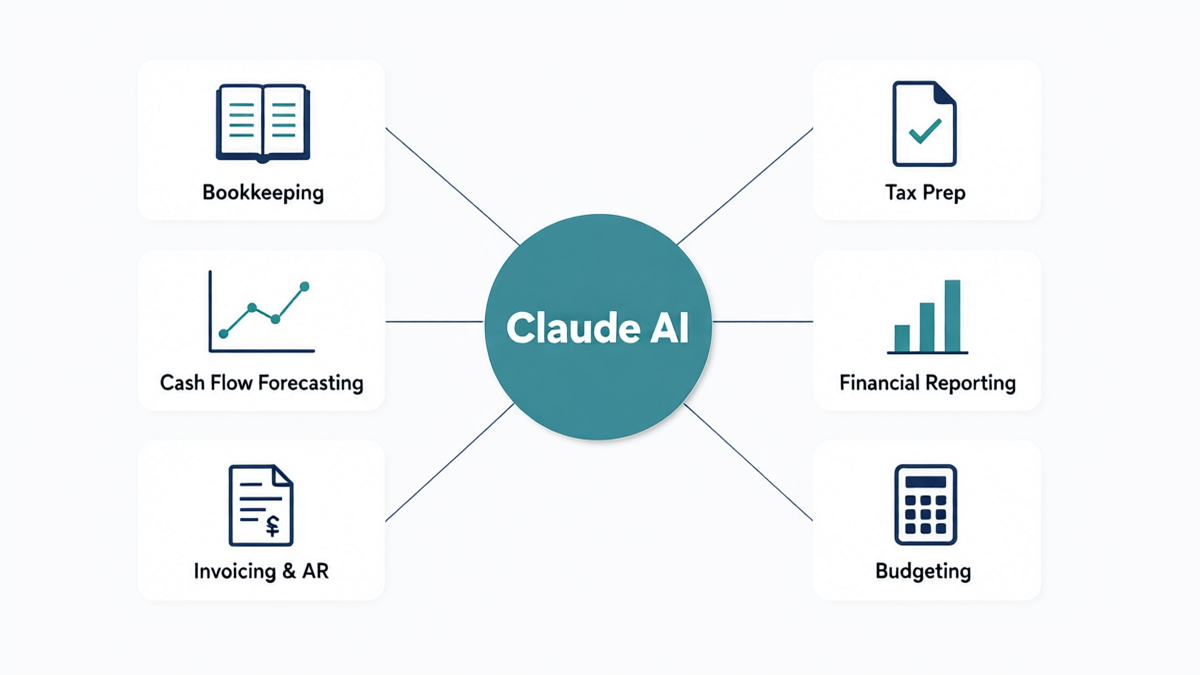
Claude AI applications in finance refer to the use of Anthropic’s Claude large language model to automate, streamline, and enhance financial workflows within a business. For small business owners, this means using Claude to handle tasks like bookkeeping, invoice processing, cash flow forecasting, tax document organization, and financial reporting—functions that previously required dedicated accounting staff or expensive software. Claude processes natural-language instructions and structured financial data to produce analysis, reports, and automation workflows without requiring coding expertise or a finance degree.
Running a small business means wearing every hat at once. You’re the CEO, the sales rep, the customer service team—and for most small business owners, you’re also the accountant. Financial management consumes an estimated 20 hours per week for the average small business owner, yet 82% of small businesses that fail cite cash flow problems as a primary cause. That’s not a talent problem. It’s a time and visibility problem.
Claude AI doesn’t replace your accountant or your judgment. What it does is eliminate the manual, repetitive financial tasks that consume your time and obscure your financial picture. In 2026, with Anthropic’s official launch of Claude for Small Business and expanded integrations with tools like QuickBooks, Xero, and FreshBooks, the barrier to entry for AI-powered finance has essentially disappeared. This guide walks you through every major finance use case for Claude AI—what it can actually do, how to set it up, and where to draw the line.
What Is Claude AI and Why Does It Matter for Small Business Finance?
Claude is a large language model (LLM) developed by Anthropic, an AI safety company founded in 2021. Unlike narrowly scoped financial tools that do one thing—like categorizing expenses or generating invoices—Claude is a general-purpose AI that can understand context, process documents, generate structured outputs, and execute multi-step reasoning. That flexibility is exactly what makes it valuable in small business finance, where no two workflows are identical.
In 2026, Anthropic released Claude for Small Business, a dedicated tier with pre-built agents for finance, HR, sales, and operations. The finance agents handle tasks like invoice chasing, payroll planning, cash flow modeling, and month-end close—workflows that previously required expensive enterprise software or a full-time bookkeeper. For small businesses operating on thin margins, this changes the economic calculus entirely.
Claude AI vs. Traditional Finance Software: Key Differences
Traditional accounting software like QuickBooks, Xero, or Wave automates transaction recording and produces standard reports. They’re excellent at what they do—but they require you to interpret the outputs and decide what to do next. Claude AI works differently. Instead of presenting you with a balance sheet, Claude can read your balance sheet, identify concerning trends, and write a plain-English summary of what you should do about it.
| Feature | Traditional Accounting Software | Claude AI |
|---|---|---|
| Transaction recording | Automated | Via integration / prompts |
| Report generation | Template-based | Natural language, customizable |
| Analysis and interpretation | Manual (you do it) | AI-generated with explanations |
| Invoice follow-up | Basic reminders | Personalized, context-aware emails |
| Tax document prep | Export only | Document review + deduction identification |
| Financial forecasting | Requires manual modeling | Natural language scenario modeling |
The Real Cost of Manual Finance Management for Small Businesses
Before exploring what Claude can do, it’s worth understanding what manual finance management actually costs. A U.S. bookkeeper averages $22–$35 per hour. A small business that requires 15–20 hours of bookkeeping per month is spending $330–$700 monthly just on basic record-keeping—before accounting fees, tax prep, or financial planning consultations. Claude AI, at the cost of a professional subscription (Claude Pro or Claude for Small Business), handles a large portion of these tasks at a fraction of the cost. The real return isn’t just financial; it’s the clarity and speed at which you can make business decisions when your financial data is always current and interpreted for you.
Claude AI for Bookkeeping: Automating Your Financial Records
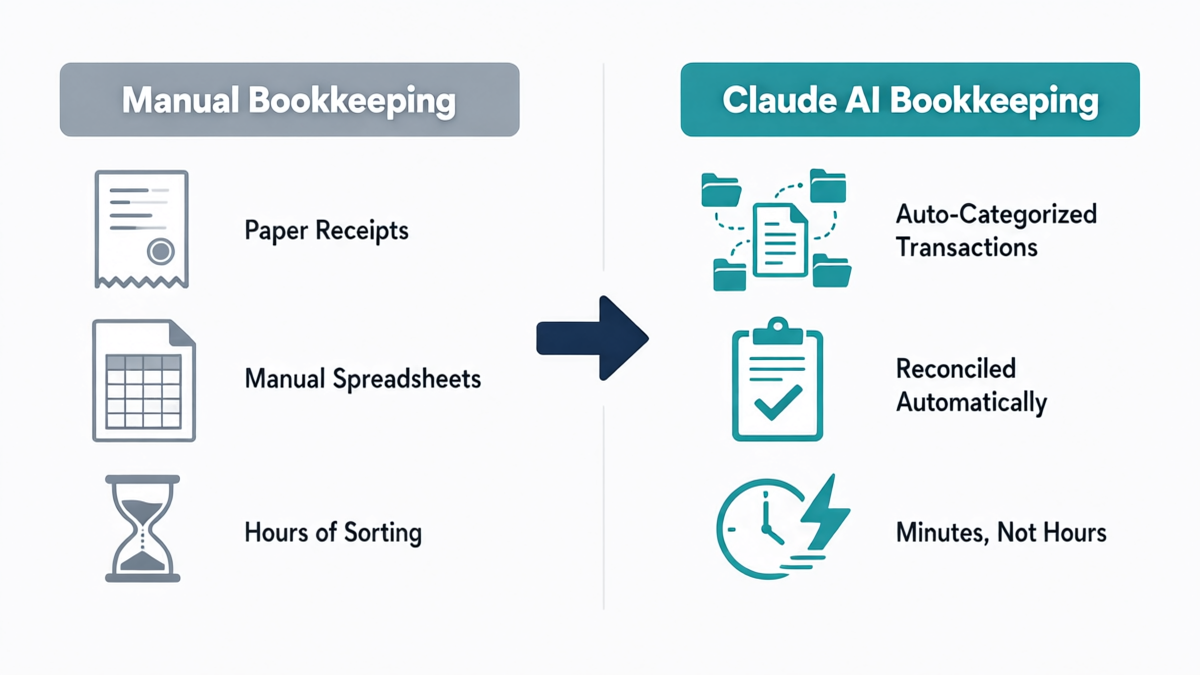
Bookkeeping is the foundation of every financial function in your business. Without accurate, current books, every other financial decision you make—from budgeting to tax prep—is built on sand. Claude AI brings intelligence to bookkeeping in ways that traditional software simply can’t match.
How Claude AI Reads and Processes Bank Statements
One of Claude’s most immediately useful finance capabilities is its ability to process bank statements, CSV exports, and financial documents and extract structured data from them. You can upload a monthly bank statement directly to Claude and ask it to categorize every transaction by expense type, flag unusual items, and generate a summary by category. What would take a bookkeeper two hours takes Claude a few minutes.
A simple prompt like this works reliably:
“Here is my bank statement for August. Please categorize each transaction by business expense type (e.g., supplies, marketing, payroll, utilities, travel), flag any transactions over $500 as high-value, and provide a summary table showing total spend per category.”
Claude will return a structured, categorized breakdown that you can copy directly into your accounting software or share with your bookkeeper. This is particularly valuable for businesses that haven’t set up automatic categorization rules in QuickBooks or Xero—or for reconciling months that fell behind.
Setting Up Claude for Daily Bookkeeping Tasks
For ongoing bookkeeping support, the most effective approach is to create a Claude Project (available in Claude Pro and Claude for Small Business) specifically for your finances. Within this project, you store your chart of accounts, your categorization rules, and any business context Claude needs to make accurate judgments. Once configured, every new bank export or receipt you feed into that project gets processed according to your established rules—consistently, without fatigue, and without the errors that creep into manual processes.
Businesses using this workflow report reducing monthly bookkeeping time by 60–75%. The remaining time is spent on review and exception handling—the genuinely judgment-dependent work that benefits from a human eye.
Receipt Management and Expense Categorization
Claude can read photos of receipts (when using the Claude app or Claude API with vision capabilities) and extract the vendor, date, amount, and likely expense category. This is particularly useful for businesses with multiple team members submitting expenses. You can build a simple workflow where employees photograph receipts, upload them to a shared folder, and Claude processes the batch into a structured expense report—eliminating the receipt-sorting backlog that plagues many small businesses at month-end.
Cash Flow Forecasting with Claude AI
Cash flow forecasting is the single most important financial function for small business survival—and the one most consistently neglected. Most small business owners know roughly how much is in their account right now. Far fewer know what their cash position will be in 8 weeks. Claude AI bridges this gap without requiring a financial modeling background.
Building a 13-Week Cash Flow Model Using Claude AI
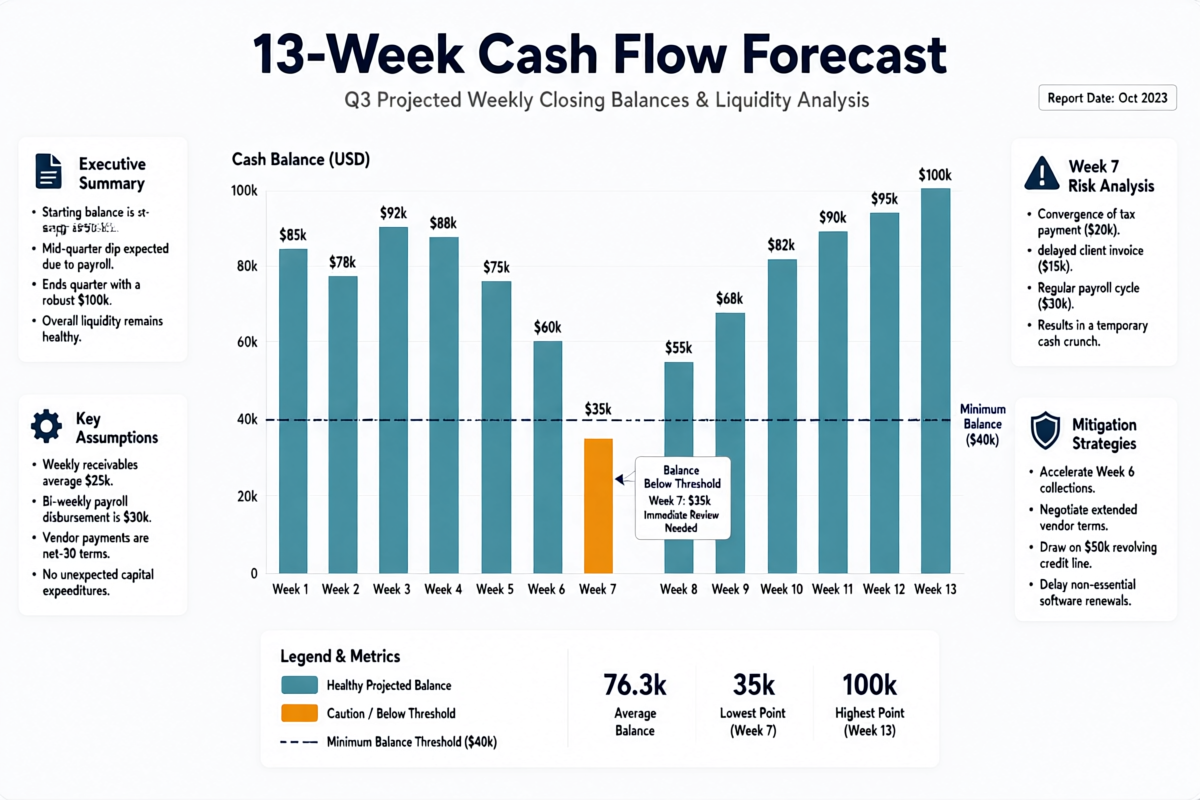
A 13-week cash flow model is the gold standard for short-term financial visibility. It maps out every dollar you expect to receive and pay over a 90-day window, giving you early warning of cash gaps so you can take action—whether that’s accelerating collections, deferring a purchase, or drawing on a line of credit—before the gap becomes a crisis.
To build one with Claude, you provide your current bank balance, your receivables aging report (which customers owe you and when they typically pay), your fixed monthly expenses (rent, payroll, subscriptions), and any known one-time payments coming up. Claude builds the model, presents it in a week-by-week table, and flags any weeks where your projected balance drops below a threshold you specify.
Sample prompt:
“I’m building a 13-week cash flow forecast. My current bank balance is $47,000. I’ve attached my accounts receivable aging report showing $31,000 due in the next 30 days and $18,000 due in 31–60 days. My fixed monthly costs are $22,000 (rent $5,500, payroll $14,000, software $2,500). I have a $12,000 equipment payment due in week 7. Please build a week-by-week cash flow projection and flag any week where my projected balance drops below $15,000.”
Claude returns a formatted table with beginning balance, inflows, outflows, and ending balance for each of the 13 weeks—and highlights the weeks where you need to act. What would take a CFO 3–4 hours to model takes Claude 60 seconds.
Identifying Cash Flow Gaps Before They Become Problems
Beyond the 13-week model, Claude is excellent at cash flow scenario analysis. You can ask it to model what happens if your largest customer pays 30 days late, or if you hire two new employees next quarter, or if a major expense comes in 20% over budget. This kind of sensitivity analysis—what CFOs call “what-if modeling”—used to require spreadsheet expertise. With Claude, you describe the scenario in plain English and get the analysis back in minutes.
Claude can also review your historical cash flow patterns (if you provide the data) and identify recurring seasonal gaps, helping you plan financing or payment timing proactively rather than reactively.
Claude AI for Invoicing and Accounts Receivable
Late payment is the silent killer of small business cash flow. The average small business in the U.S. waits 30–60 days beyond invoice due dates to receive payment, and many business owners avoid following up because the process feels awkward and time-consuming. Claude AI removes both barriers.
Automating Invoice Creation with Claude AI
Claude can generate professional invoices from minimal input. You provide the client name, project details, line items, and amounts—Claude produces a polished, professional invoice in whatever format you specify (plain text, HTML, or structured data for import into your accounting software). For businesses that bill project-based fees, Claude can also help structure invoices based on project scope documents or time logs.
With Claude Projects, you can set up an invoice template once and reuse it across clients. Claude remembers your payment terms, your bank details for wire transfers, your late fee policy, and your preferred tone. Each new invoice generation takes seconds rather than minutes.
Following Up on Overdue Invoices with Claude AI
Invoice follow-up is one of the highest-ROI uses of Claude AI in small business finance. Most business owners avoid chasing payments because crafting the right message—firm but professional, persistent but not aggressive—takes emotional energy they don’t have. Claude handles the entire sequence.
You can set up a three-stage follow-up workflow:
- Day 1 after due date: Friendly reminder (“just checking in” tone)
- Day 14: Firm follow-up referencing the original invoice and payment terms
- Day 30: Final notice with late fee notification and escalation language
Claude generates each email in your voice—you provide a few examples of how you typically write, and it matches the tone. For businesses with 10–20 outstanding invoices at any time, this alone can reduce debtor days by 15–20 days and improve cash flow by tens of thousands of dollars annually.
Tax Preparation and Compliance with Claude AI
Tax preparation is the finance function small business owners dread most. The combination of complexity, high stakes, and the looming deadline creates significant stress. While Claude AI cannot file your taxes or provide legal tax advice, it can dramatically reduce the preparation burden and help you arrive at your accountant’s office organized, informed, and ready.
Organizing Tax Documents with Claude AI
The most time-consuming part of tax preparation isn’t the filing—it’s finding and organizing everything your accountant needs. Claude can help you build a systematic document checklist based on your business type, generate a folder structure and naming convention for your tax documents, and review uploaded documents to confirm they’re complete and correctly categorized.
You can also use Claude to draft the information summary your accountant typically needs: a narrative of significant business events during the tax year (new employees, equipment purchases, changes in business use of home office, etc.), which accelerates the accountant relationship and reduces billable hours spent gathering context.
Identifying Potentially Deductible Expenses Using Claude AI
Claude is not a CPA and should not be used as a substitute for professional tax advice. However, it can serve as an excellent first-pass reviewer of your expense categories to surface items that may qualify for deductions—items you might otherwise miss or overlook. Common small business deductions that Claude can help you identify and document include home office expenses, vehicle use for business purposes, software subscriptions, professional development costs, and equipment depreciation.
A useful prompt at year-end: “Here are my expense categories for the year. Please flag any categories that commonly qualify for small business tax deductions in the U.S. and suggest what documentation I should gather for each.” This gives you a structured checklist to review with your accountant—saving meeting time and reducing the risk of missing legitimate deductions.
Quarterly Estimated Tax Planning
For self-employed individuals and small businesses not subject to payroll withholding, quarterly estimated taxes are a recurring obligation with significant penalties for underpayment. Claude can help you estimate quarterly tax liabilities based on year-to-date income and known deductions, model different scenarios (good quarter vs. bad quarter), and set calendar reminders for payment deadlines. While Claude’s calculations should always be verified by a tax professional, having a working estimate prevents the end-of-year surprise of an unexpected five-figure tax bill.
Financial Reporting and Analysis with Claude AI
Financial reports are only valuable if you can read them. For many small business owners who didn’t study accounting, the standard profit-and-loss statement or balance sheet is a wall of numbers that tells them very little. Claude transforms financial reports from data dumps into actionable intelligence.
Generating Plain-English Financial Report Summaries
The most impactful thing Claude can do with your financial reports is translate them. You export your monthly P&L from QuickBooks, upload it to Claude, and ask: “Summarize this report in plain English. What are the three most important things I should know? Where did we spend more than budgeted? Where did revenue fall short?” Claude responds with a concise, narrative summary that highlights what matters—not a recitation of every line item.
This is particularly powerful for business owners who review their financials monthly but find themselves glazing over the numbers after the first few rows. With Claude’s summary in hand, you can make faster, better-informed decisions about where to cut costs, where to invest, and what to discuss with your accountant or advisors.
Month-over-Month and Year-over-Year Trend Analysis
Trend analysis—comparing this month to last month, or this quarter to the same quarter last year—is how you identify whether your business is genuinely improving or just riding seasonal fluctuations. Claude can take three to twelve months of P&L data and produce a trend analysis that surfaces patterns, anomalies, and trajectories. It can tell you that your gross margin has eroded by 4 percentage points over six months, or that your marketing spend increased 30% but revenue only grew 8%—the kind of insight that often gets buried in spreadsheet rows.
Key Financial Ratio Analysis for Small Businesses
Financial ratios like gross margin, current ratio, debt-to-equity, and accounts receivable turnover give you a standardized view of business health that’s comparable across time periods and industries. Claude can calculate these ratios from your financial statements and explain what each ratio means for your specific business—including whether your numbers are healthy relative to typical benchmarks for your industry. This level of financial intelligence was previously available only to businesses with a CFO or financial advisor on retainer.
Budgeting and Financial Planning for Small Businesses
An annual budget is the financial roadmap for your business—but fewer than 40% of small businesses operate with a formal written budget. The reasons are predictable: budgeting feels time-consuming, the future feels unpredictable, and the process of building a budget from scratch is daunting without financial modeling experience. Claude addresses all three barriers.
Creating an Annual Budget with Claude AI
Claude can guide you through building a complete annual budget in a single working session. You start by providing your prior year actuals (or your best estimates if you’re a newer business), your revenue targets, any known changes in cost structure (new hires, lease renewals, equipment purchases), and your strategic priorities for the year. Claude uses this information to draft a full budget model with monthly breakdowns, identifies assumptions that need to be validated, and highlights areas where your targets may be unrealistic based on historical patterns.
The output is a structured budget you can import into Excel, Google Sheets, or your accounting software—not just a conversation. Claude can generate the budget as a formatted table, a CSV, or a narrative document depending on how you plan to use it.
Variance Analysis: Budget vs. Actual with Claude AI
A budget only creates value if you review it regularly and understand why your actual results differ from your plan. Variance analysis—the process of comparing budgeted figures to actual figures and explaining the difference—is typically done monthly or quarterly. Claude makes this process straightforward: you provide your budget and your actual P&L, and Claude produces a variance report that quantifies every difference, calculates the percentage variance, and provides a plain-English explanation of what drove the variance and whether it warrants a corrective response.
For example, if your marketing budget was $8,000 and you spent $11,500, Claude won’t just flag the $3,500 overage—it will prompt you to think about whether the overspend generated incremental revenue, whether it was a one-time event or a recurring commitment, and whether you need to revise your budget going forward. This kind of structured thinking is what separates businesses that use financial information from those that merely collect it.
Claude AI Integrations: QuickBooks, Xero, and Beyond
Claude AI works most powerfully when it’s connected to your existing accounting infrastructure. In 2026, Claude integrates directly with several major small business accounting platforms, either through native integrations, third-party automation tools like Zapier and Make, or through Claude’s API with custom connectors.
Connecting Claude AI to QuickBooks
The Claude + QuickBooks integration—popularized through MindStudio’s finance agent pack and supported natively in Claude for Small Business—allows Claude to pull transaction data, run reports, and push categorized entries back into QuickBooks without manual export/import cycles. For a solo business owner, this means your books can be updated and analyzed in minutes, not hours. A common use case: Claude pulls the last 30 days of uncategorized transactions from QuickBooks, applies your categorization rules, and pushes the categorized entries back—all via a conversational prompt.
The Claude + QuickBooks month-end close workflow is particularly impressive. Users report completing what used to be a 4–6 hour month-end process in under 20 minutes: Claude reconciles accounts, flags discrepancies, generates the standard month-end reports, and produces a summary memo ready to share with stakeholders.
Xero, FreshBooks, and Wave Integration
Similar integrations exist for Xero (particularly popular with service businesses and international small businesses), FreshBooks (widely used by freelancers and agencies), and Wave (the free accounting tool popular with micro-businesses). The integration approach varies: some are native, some require a Zapier connection, and some work through Claude’s file-based workflow where you export from your accounting tool and upload to Claude. In all cases, the workflow follows the same pattern: export data → feed to Claude → receive analysis or structured outputs → import back into your accounting system.
Automating the Month-End Close Process
The month-end close is the recurring financial ritual that ensures your books are accurate and your reports are reliable. For most small businesses, it’s a painful process: reconciling bank statements, reviewing and categorizing transactions, running standard reports, and confirming that everything adds up. Claude AI, connected to your accounting software, can handle 80–90% of this process automatically—leaving you with the exception-handling and judgment calls that genuinely require human oversight. Businesses that implement the Claude month-end close workflow report saving 3–5 hours per month, every month.
Payroll Planning and HR Finance with Claude AI
Payroll is typically the largest single expense in a service business. It’s also one of the most sensitive: errors cause trust damage with employees, and missed payroll tax deposits trigger IRS penalties. Claude AI doesn’t replace your payroll software—it adds intelligence around payroll planning and the financial modeling that informs hiring decisions.
Where Claude adds value in payroll and HR finance is in the planning layer. You can ask Claude to model the full cost of a new hire—including salary, payroll taxes (employer’s share of FICA, state unemployment insurance), benefits, equipment, and onboarding costs—and then show you what revenue increase is needed to break even on that hire. This is the kind of analysis that many small business owners skip because it feels complicated. Claude makes it a 5-minute conversation.
Claude is also useful for structuring commission and bonus plans. You describe your sales targets, your margin structure, and your desired incentive outcomes, and Claude models different commission structures—showing you the total payout at different performance levels and helping you find a structure that motivates performance without undermining profitability.
Best Practices: Using Claude AI Safely in Your Finance Operations
Claude AI is a powerful tool, and like any powerful tool, using it well requires understanding its boundaries. There are several important limitations and best practices every small business owner should understand before embedding Claude into their financial workflows.
What Claude AI Can and Cannot Do in Finance
Claude can analyze, summarize, model, draft, and automate. It cannot file taxes, provide legally binding financial advice, guarantee the accuracy of regulatory calculations, or access your accounts directly without an integration you’ve explicitly set up. Treating Claude as a brilliant financial analyst who works for you—rather than a licensed CPA who signs off on your returns—keeps expectations calibrated correctly.
Key areas where Claude should support but not replace professionals:
- Tax filing: Claude can help you prepare and organize, but a CPA or enrolled agent should review and file
- Legal financial structures: Entity structuring, S-Corp elections, partnership agreements—always attorney-reviewed
- Audited financial statements: Claude cannot produce GAAP-compliant audited statements
- Financial advice: Investment decisions, retirement planning, insurance needs—licensed advisor territory
Data Security When Using Claude AI for Finance
Financial data is sensitive. Before feeding bank statements, tax documents, or customer financial information into Claude, understand the data handling policies. Anthropic’s Claude Pro and Claude for Business accounts are governed by a privacy-respecting data handling policy that does not use conversation content to train models by default. However, you should always:
- Use Claude’s business or team tier (not the free tier) for financial data
- Redact personally identifiable information from customer financial data before uploading
- Review Anthropic’s current data retention and processing policies before uploading sensitive documents
- Use Claude Projects with access controls when multiple team members are involved
For businesses in regulated industries (healthcare, financial services), additional compliance review may be required before using any AI tool for financial data processing.
Real-World Use Cases: Small Business Finance with Claude AI
Theory is useful. Real examples are better. Here are two illustrative scenarios showing how small businesses are using Claude AI to transform their finance operations.
Use Case 1: Retail Business Month-End Close
A retail boutique with three employees and $1.2M in annual revenue was spending 8–10 hours per month on bookkeeping and month-end close. The owner, who had no accounting background, found the process stressful and error-prone. After implementing a Claude workflow connected to QuickBooks, the process works as follows: on the first business day of each month, the owner exports the previous month’s transactions as a CSV from QuickBooks, uploads it to a Claude Project pre-loaded with the store’s chart of accounts and categorization rules, and asks Claude to categorize, reconcile against the bank statement, flag exceptions, and generate the month-end summary report.
The entire process now takes 45 minutes. The owner reviews Claude’s output, handles the three or four exceptions that require judgment, and has clean books and a complete summary by 10 AM on the first of every month. The time saved—7–8 hours per month—has been redirected to buying decisions and customer relationship building. Claude’s fee: less than $100/month.
Use Case 2: Service Business Cash Flow Management
A marketing agency with eight employees and a project-based revenue model was consistently surprised by cash flow crunches, despite being profitable on paper. The owner understood intuitively why this happens (project revenue is lumpy; payroll is fixed) but couldn’t find time to model it properly.
After setting up a 13-week cash flow model with Claude, updated weekly with new invoice data and payment receipts, the owner could see cash gaps forming 6–8 weeks in advance. Armed with this visibility, the agency accelerated collection on two large invoices before a tight week, deferred a non-essential software subscription, and avoided drawing on its line of credit for the first time in two years. The Claude subscription paid for itself within the first month.
Conclusion
Claude AI applications in finance represent one of the highest-ROI opportunities available to small business owners in 2026. The technology has matured to the point where setup is straightforward, integration with existing accounting tools is practical, and the time savings are immediate and measurable. From bookkeeping automation to cash flow forecasting, invoice management, tax preparation support, and financial reporting, Claude handles the financial tasks that consume your time and obscure your decision-making—returning both hours and clarity to the people who need them most.
The financial advantage of a Claude AI workflow isn’t just about cost. It’s about speed of insight. When you can see your cash position 13 weeks out, understand your P&L in plain English, and follow up on every overdue invoice with a professional message—automatically—you make better decisions, move faster, and sleep better. That’s the real value proposition of Claude AI in small business finance.
To understand how Claude AI fits into your broader business technology stack—not just finance, but sales, operations, HR, and beyond—visit our complete guide: How to Use Claude AI for Business.
Frequently Asked Questions About Claude AI in Small Business Finance
What is Claude AI and how does it help with small business finances?
Claude AI is a large language model developed by Anthropic. For small business finance, it helps by automating repetitive financial tasks (bookkeeping, invoice generation, expense categorization), generating financial analysis from your data, and producing clear reports and summaries that help you make better decisions faster. It works through natural-language conversation—no coding or accounting expertise required.
Can Claude AI replace my accountant or bookkeeper?
No—and you shouldn’t want it to. Claude AI is most valuable as a force multiplier: it handles the high-volume, repetitive tasks that consume your bookkeeper’s time, freeing them to focus on higher-value advisory work. For tax filing, compliance, audited statements, and professional financial advice, always use licensed professionals. Claude helps you arrive at those conversations better prepared, with organized data and clearer questions.
Is it safe to upload financial data to Claude AI?
Claude Pro and Claude for Business accounts use data handling policies that do not train on conversation content by default. That said, you should always use a paid business-tier account for financial data (not the free tier), redact customer personally identifiable information before uploading, and review Anthropic’s current data handling policy for your account type. For regulated industries, consult your compliance officer before using any AI tool with financial data.
What accounting software does Claude AI integrate with?
Claude AI integrates with QuickBooks, Xero, FreshBooks, and Wave through a combination of native integrations (available in Claude for Small Business), third-party automation tools like Zapier and Make, and file-based export/import workflows. The depth of integration varies by platform, but all major small business accounting tools can be connected in some form. Check Anthropic’s integration documentation for the current state of native integrations, as this space is evolving rapidly.
How much does Claude AI cost for small business finance use?
Claude Pro is available for approximately $20/month per user as of 2026. Claude for Small Business (which includes pre-built finance agents) is priced at a higher tier—check Anthropic’s current pricing at anthropic.com. For comparison, a part-time bookkeeper costs $400–$1,400/month. Most small businesses that implement Claude for financial workflows find the payback period measured in days, not months.
Can Claude AI file my taxes?
No. Claude AI cannot file taxes, sign tax returns, or provide legally binding tax advice. It can help you organize your tax documents, identify potentially deductible expenses for review with your CPA, estimate quarterly tax liabilities, and prepare the narrative summary your accountant needs. Tax preparation with Claude reduces your accountant’s billable time—it doesn’t replace them.
How do I use Claude AI for cash flow forecasting?
Start by providing Claude with your current bank balance, your accounts receivable aging report, your fixed monthly costs, and any known one-time payments. Ask Claude to build a week-by-week cash flow model for the next 13 weeks and flag any weeks where your projected balance drops below a minimum threshold you specify. Update the model weekly by feeding in new payment data. Most business owners who establish this workflow do so in a single 30-minute session with Claude.
What’s the difference between Claude AI and QuickBooks for small business finance?
QuickBooks is a transaction recording and reporting system—it stores your financial data and generates standard reports. Claude AI is an intelligence layer on top of that data—it reads, interprets, analyzes, and generates insights from your financial information. Most small businesses use both: QuickBooks holds the books, Claude makes sense of them. The two tools are complementary, not competitive.
Can Claude AI help me build a business budget?
Yes. Claude can guide you through building a complete annual budget using your prior year actuals, your revenue targets, and any known changes in your cost structure. It produces a structured month-by-month budget model in table format that you can import into Excel, Google Sheets, or your accounting software. Claude can also run variance analysis on an existing budget—comparing your actuals to your plan and explaining the differences in plain English.
How does Claude AI help with invoice follow-up?
Claude generates personalized, professional invoice follow-up emails at each stage of the collections cycle: friendly reminder on day 1, firm follow-up at day 14, and final notice at day 30. You can customize the tone to match your voice, and Claude will generate each message in seconds. Businesses that implement this workflow consistently report reducing their average debtor days by 15–20 days—a significant cash flow improvement for businesses with substantial receivables.
What are the biggest limitations of using Claude AI for finance?
The main limitations are: (1) Claude cannot directly access your accounts without integrations you set up; (2) its outputs should be reviewed, not trusted blindly—like any tool, it makes mistakes; (3) it cannot provide legally binding financial or tax advice; (4) it requires quality input data to produce quality outputs (garbage in, garbage out applies); and (5) for complex financial modeling, highly regulated businesses, or situations with significant legal or tax implications, professional human judgment remains essential.
How do I get started using Claude AI for my small business finances?
Start small and build confidence. The best entry point is bookkeeping: export last month’s bank transactions as a CSV, upload them to Claude, and ask Claude to categorize them by expense type and generate a summary. Once you’ve seen how Claude handles that task, expand to cash flow forecasting, then invoice follow-up, then financial report interpretation. Most business owners who start with one task find they’ve automated 70–80% of their routine finance work within 30–60 days.