The Claude AI for sales ecosystem is Anthropic’s complete set of products — Claude.ai, Claude Cowork, Claude Projects and Skills, MCP connectors, Claudeforce, and Claude for Small Business — applied specifically to the tasks that make or break a small business sales cycle: prospecting, outreach, discovery, proposals, pipeline management, and renewals. Understanding this ecosystem matters not because it’s interesting technology, but because it directly changes how many people you need on your sales team. A founder or solo seller running their own pipeline doesn’t have a sales ops analyst, a content team drafting outreach sequences, or a CRM administrator keeping records clean. Those functions have to fit somewhere, and right now they either fall on the quota-carrier or they don’t happen at all.
This guide picks up where the “Claude AI Product Ecosystem Application in Sales” section of our companion guide, How to Use Claude AI for Business: The Complete 2026 Guide, leaves off — and goes significantly deeper. By the time you finish reading, you’ll know exactly which Claude product to reach for at each stage of your sales process, what a realistic rollout looks like for a one-to-twenty-five person team, and how the two major 2026 announcements — Claude for Small Business (launched May 13, 2026) and Claudeforce (announced August 2026) — change the calculus for small business sales operations specifically.
Nothing in this guide requires engineering support, a custom API integration, or a six-figure software budget. The workflows here assume a business with somewhere between one and twenty-five people who carry a sales function, working from whatever CRM, spreadsheet, or inbox they already use today.
What the Claude AI Product Ecosystem Means for a Small Business Sales Team
The claude AI product ecosystem for sales is not a single tool — it is a layered set of four product capabilities that cover different depths of automation and different points in the sales cycle. This distinction matters because most people pick one Claude product, use it for a few tasks, and miss the other eighty percent of what’s available. Understanding the layer model tells you where to start, where to invest next, and what you can realistically automate without an IT team.
The first layer is Claude.ai — the chat and Projects interface that most people interact with first. This is where you write prompts, run one-off tasks, build persistent knowledge bases in Projects, and use the desktop app and Claude in Chrome extension. It is the interactive desk work layer. You direct it, it responds, and you apply the output. For a small business, this layer alone covers a significant chunk of daily sales work: account research, email drafts, discovery prep, proposal sections, and objection script refinement.
The second layer is Claude Cowork — the autonomous and scheduled task environment. Where Claude.ai requires you to initiate each task, Cowork can run unattended: a pipeline review summary waiting for you every Monday morning, a follow-up email drafted overnight and queued for your approval, a lead triage report assembled while you were in a different meeting. Cowork is the recurring-work layer.
The third layer is MCP connectors, Claude’s API, and Claudeforce — the integration layer that connects Claude to your existing tools. When Claude can read your CRM, pull deal notes, write back updates, and trigger actions across connected apps, the output quality improves dramatically because the model is working from real data rather than what you’ve pasted into a chat window. Claudeforce, the August 2026 Salesforce/Anthropic partnership, sits at this layer.
The fourth layer is Claude for Small Business — a packaged bundle of 15 prebuilt workflows and 15 reusable skills with out-of-the-box connectors into tools small businesses already use. Think of it as the integration layer with the engineering work already done for you.
The 2026 Product Map: Four Claude Tools, One Sales Stack
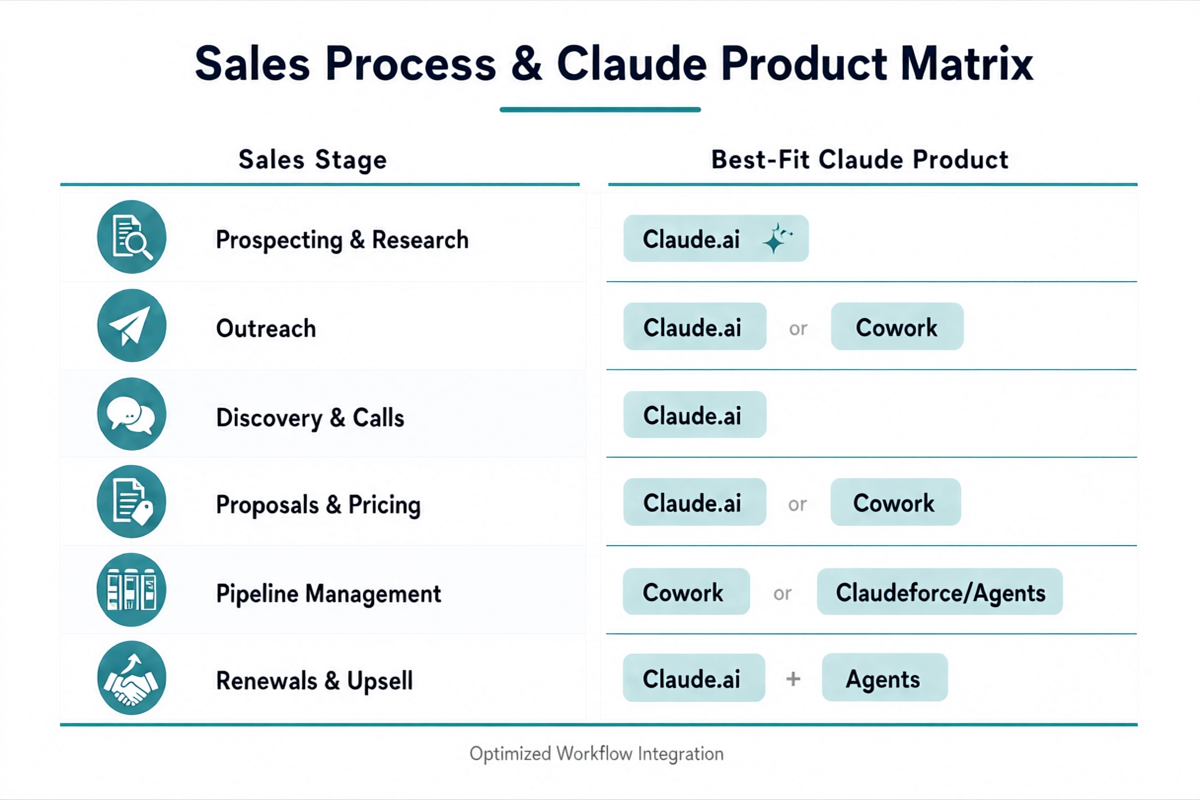
Before getting into specific use cases, here is how these four product layers map to the sales cycle. This table is the reference point for the rest of this guide — think of it as the claude product ecosystem answer to the question every small business sales person should ask: which tool for which job?
| Sales Stage | Claude.ai | Claude Cowork | MCP / Claudeforce | Claude for Small Business |
|---|---|---|---|---|
| Prospecting | Account research, ICP scoring, list enrichment | Scheduled lead triage reports | Pull prospect data from CRM | Lead triage workflow |
| Outreach | Cold email drafts, sequence writing, personalization | Scheduled follow-up email drafts | Write outreach to CRM contacts | Campaign planning (HubSpot connector) |
| Discovery | Call prep, talk track, background research | Pre-call brief delivered morning-of | Pull deal history and notes pre-call | Customer pulse analysis |
| Proposal | Proposal drafting, pricing narrative, RFP response | Proposal assembly on trigger | Pull deal context and product data | Canva connector (pitch decks), DocuSign connector |
| Pipeline Management | Deal review, stuck-deal analysis, next-step drafting | Weekly pipeline summary, deal health alerts | Claudeforce deal health scoring | Campaign performance reporting |
| Renewals / Upsell | Health check drafts, upsell angle scripting | Renewal reminder with draft outreach | Claudeforce renewal risk scoring | Customer pulse analysis |
According to a 2026 Salesforce State of Sales report, sales representatives spend only 30% of their working week actually selling — the remaining 70% goes to CRM data entry, internal reporting, email administration, and meeting preparation. (Salesforce State of Sales) The table above maps Claude’s product ecosystem to exactly that 70% — with a layer for each level of automation you’re ready to implement.
Claude.ai for Sales: Use Cases and Prompt Templates Across the Cycle
Claude AI for sales starts with Claude.ai — the starting point for every small business sales team coming to the platform for the first time. It requires no setup beyond an account, no connectors, and no IT involvement. The five use cases below are sequenced by the sales cycle — start with prospecting and add use cases as your confidence with the tool grows.
Prospecting and Account Research
Sales prospecting research with Claude AI turns what used to be a 45-minute per-account manual process — LinkedIn browsing, Google research, news monitoring, industry triangulation — into a 5-minute structured brief. The key is pairing Claude.ai with a Claude Project that holds your ideal customer profile, your product’s key value propositions, and any industry context you’ve built up over time.
A working prompt template for prospecting research: “I’m researching [Company Name] as a potential account. They are in [industry], size approximately [employee count], and their LinkedIn shows recent activity around [theme]. Based on my ICP (loaded in this Project), rate their fit on a scale of 1–5, identify the two most likely pain points they’re experiencing, and suggest the best entry point for an initial outreach.” The output gives you a structured brief, not a wall of raw research, and the Project context means you’re not re-explaining your ICP every session. A five-person sales team running this for fifty accounts a week saves an estimated eight to twelve hours of non-selling research time monthly.
Cold Outreach and Follow-Up Email Sequences
Claude AI sales email outreach personalization without an enterprise CRM first proved its value for small business teams by solving genuine personalization at scale — not mail merge first-name substitution, but emails that reference a specific company challenge, a recent news item, or a role-specific pain point. Claude.ai in a Project scoped to your outreach sequence handles this for a list of twenty-five accounts in roughly fifteen minutes: paste the company name, role, and one context signal; Claude produces a first draft calibrated to that signal.
Follow-up sequences are where most small business sellers lose deals not because the prospect wasn’t interested, but because the follow-up never happened. A three-touch sequence — value-add email three days after initial outreach, case study reference at day seven, soft close at day fourteen — can be drafted for an entire pipeline in one Claude.ai session. Store the sequence template in your Project, then refresh it per account with just a few context details. For automating the send scheduling itself, that’s where Cowork steps in (covered in the next section).
Building a Follow-Up Sequence Step by Step with Claude AI
- Open a Claude Project scoped to your company’s value proposition and target persona.
- Paste the initial email you sent (or plan to send) into a new conversation.
- Prompt: “Write a three-touch follow-up sequence for this initial email. Tone: peer-level, not pitchy. Touch 1 (Day 3): lead with a useful insight or stat relevant to their challenge. Touch 2 (Day 7): reference a case study or result with a specific number. Touch 3 (Day 14): soft next step ask — 15-minute call, not a demo request.”
- Review all three; edit the specific data point and company reference in Touch 2 to match this account.
- Save the approved sequence to your CRM or email tool. If you use Cowork, schedule Touch 2 and 3 as scheduled tasks rather than calendar reminders.
Discovery Call Preparation
How to use Claude AI for sales discovery call preparation: a well-prepared discovery call — where you already know the prospect’s likely objections, their company’s recent challenges, and the questions that will surface the real buying criteria — converts at measurably higher rates than a cold call regardless of how good your pitch is. The problem for small business sellers is that prep takes time that comes directly out of prospecting or deal advancement.
A discovery prep prompt that consistently produces useful output: “I have a 30-minute discovery call tomorrow with [Name], [Role] at [Company]. They’re currently using [competitor/current solution] and came inbound from [source]. Build me: (1) a five-question talk track targeting the gap between what they’re doing now and what I can offer, (2) three likely objections and a crisp response to each, (3) two unexpected angles I could explore if the conversation stalls.” The resulting brief takes less than two minutes to scan before a call and eliminates the ten minutes of mental warm-up time most sellers need to get sharp on an account.
If you’re running Cowork (covered next), this brief can be scheduled to arrive in your inbox automatically at 7 AM on the morning of the call — pulled from your calendar and CRM context through an MCP connector, assembled by Claude overnight.
Objection Handling Scripts
Claude AI sales objection handling for B2B small teams works best when it is built as a reusable library rather than improvised per call. Objection handling is the part of the sales process that most benefits from iteration, not improvisation — and iteration is exactly what Claude AI does well. Instead of ad-libbing a response to “your price is too high” in a live deal conversation, build a library of objection responses in a Claude Project and refine them after each loss review.
The prompt structure for objection script development: “Here is an objection I keep hearing in late-stage deals: [objection verbatim]. My product is [brief description]. Our most common alternative comparison is [competitor]. Write three different responses: one that reframes the objection, one that validates and bridges to value, and one that surfaces the real underlying concern. For each, give me a one-line version under ten words and a fuller two-sentence version for calls where I have more time.” Build this for your top five objections, store the responses in a Project, and your entire team has a shared, evolving objection library rather than six people improvising individually.
Proposal and Statement of Work Drafting
Claude AI sales proposal writing for freelancers, consultants, and small business teams converts the highest per-hour cost in the sales cycle — proposal drafting — from a three-to-five-hour manual effort to a twenty-to-thirty-minute editing task. A well-structured proposal that speaks directly to the prospect’s stated pain points, references their specific situation, and frames ROI in their language closes at rates that generic templates never match.
A McKinsey study found that top-performing B2B sales organizations take 40% less time to produce their first draft proposals than median performers — and that the time difference comes almost entirely from how they structure the research-to-draft handoff, not from how fast they type. (McKinsey B2B Sales) Claude AI for sales proposal workflows collapse that handoff entirely.
A proposal prompt that consistently outperforms templates: “I’m writing a proposal for [Company] to [describe project scope]. From our discovery call: their core challenge is [challenge], their budget is approximately [range], their timeline is [timeline], and the business outcome they care most about is [outcome]. Write a proposal with: (1) an executive summary that leads with their outcome, not my credentials; (2) a scope of work section with three tiers — good, better, best; (3) an ROI framework quantifying what [outcome] is worth to a business of their size; (4) a next steps section with a specific call to action.” The first draft from this prompt typically needs twenty to thirty minutes of editing — not three to five hours of writing from scratch.
Claude Cowork for Sales: Automating the Admin Work That Kills Quota Time
Claude Cowork recurring sales workflow automation for small business moves the Claude AI for sales toolkit from responsive (you ask, Claude answers) to autonomous (Claude acts on a schedule, with or without you at the keyboard). For a small business sales team — where every hour not spent in front of a prospect is a cost — Cowork’s ability to run recurring tasks unattended is its core value proposition. The four workflows below are the highest-ROI starting points for a small sales team.
Weekly Pipeline Review — Automated and Waiting Every Monday
A claude cowork weekly pipeline review automated summary for small business runs automatically every Monday at 6 AM — reviewing every open deal, flagging deals stuck longer than your average sales cycle, identifying the two or three accounts most at risk of going cold, and drafting a recommended next action for each. This is not a futuristic scenario; it is a Cowork scheduled task that a solo seller can configure in under an hour.
The setup requires a Cowork scheduled task that pulls your pipeline data (either from a CRM via MCP connector, or from a weekly Google Sheet export you paste into Cowork’s context at setup), runs an analysis prompt against that data, and emails you the summary. The task runs while you’re sleeping. Sellers using Cowork’s pipeline review workflow have reported saving two to three hours of Monday morning administrative time per week, equivalent to roughly $1,500–$2,000 in productive sales time monthly at a senior seller’s effective hourly rate. The ROI math on a Cowork subscription becomes obvious after the first week.
Follow-Up Sequence Automation on a Schedule
Claude AI sales follow-up automation for small business and solopreneurs handles the single most common failure mode in small business sales: the follow-up that was planned but not executed because something more urgent came up. Instead of relying on a CRM reminder, Cowork can draft the follow-up email for you, calibrated to where the deal is in your cycle, and deliver it to your outbox at the right time for your review and send — or, if you’ve approved automated sends for that sequence stage, send it directly.
The workflow: schedule a Cowork task that runs every Tuesday and Thursday at 8 AM, checks a list of accounts in the “Follow-Up Due” stage of your pipeline tracker (a Google Sheet works fine), and produces a customised draft email for each account due for a touchpoint that day. You wake up to a queue of three to seven ready-to-review drafts — not to a blank screen and a list of names you need to remember context for. Approval stays with you; the draft work happens without you.
Lead Triage and Qualification Summaries
How to use Claude AI for B2B sales lead qualification without CRM: lead qualification without a dedicated sales development representative is one of the most common growth bottlenecks for small businesses that start getting consistent inbound. When five to fifteen leads come in per week from different channels — form fills, LinkedIn messages, referrals, warm introductions — the time to triage, research, and prioritise them correctly often doesn’t exist at the busiest point in the week.
A Cowork lead triage task scheduled to run every evening at 7 PM can take the day’s new leads (from your CRM or a connected form), run each one against your ICP criteria stored in the task’s context, score them on fit and urgency, and produce a prioritised list with a one-paragraph brief on the highest-fit leads — ready for you first thing the following morning. The model is doing the ICP-fit evaluation work that you would otherwise spend thirty to forty-five minutes doing manually for each batch. Claude for lead qualification through the Small Business HubSpot connector makes this automatic from the moment a form is submitted.
Monthly Sales Reporting Without a Sales Ops Team
Claude AI for sales pipeline management and monthly reporting is the task that founders and small business sales leads consistently describe as the thing that happens at 10 PM on the last Sunday of the month under deadline pressure — because it’s genuinely time-consuming and produces nothing that helps close deals. Claude sales pipeline reporting via Cowork automates the data assembly and narrative generation so you spend twenty minutes reviewing and editing rather than two hours building from scratch.
A Cowork monthly report task pulls your pipeline CSV or CRM export at month-end, calculates close rates, average deal size, stage distribution, and top-account movement, then drafts a narrative report — “here is what happened, here is what drove it, here is what to watch next month” — in the voice and format you’ve set in the task’s system prompt. The output reads like something a sales ops analyst wrote, not like a spreadsheet dump. For a five-person team presenting to investors or a board, this single Cowork automation saves three to four hours per month and produces a more consistent output than manual reporting.
Claude Projects and Skills: Your Persistent Sales Brain
Claude projects sales knowledge base and custom skills setup is the mechanism that turns Claude from a tool you explain yourself to every session into a system that already knows your business when you open it. A Claude Project scoped to your sales process can hold your ICP definition, your product’s key differentiators, your pricing structure and negotiation guidelines, competitive intelligence on your top three alternatives, and any brand voice or communication style preferences — and that context loads automatically every time you start a new conversation in that Project.
For a small business sales team, a well-structured Sales Project eliminates roughly thirty percent of the prompt overhead that makes Claude feel slow in daily use. You stop typing “I sell [X] to [Y] and our differentiators are [Z]” at the top of every session. That context lives in the Project, and Claude treats it as the ground state for every conversation in that workspace.
Custom Skills extend the Project with reusable, one-click tasks. A “Weekly Prospect Research Brief” Skill, a “Proposal Executive Summary” Skill, a “Competitive Battle Card Update” Skill — each of these is a saved prompt template that any team member can trigger from the Claude interface without knowing how to write the underlying prompt. For a team of two to five sellers, Skills mean the entire team’s output quality is anchored to the best-performing prompts rather than varying by individual prompting ability.
The practical setup is: one main Sales Project (holding ICP, product, voice, competitive intel), one Sales Cowork Project (holding pipeline context, sequence templates, and recurring task configurations), and three to five custom Skills for the highest-frequency tasks your team runs daily. Initial setup takes a half-day. The productivity return — in reduced prompt overhead, consistent output quality, and faster onboarding for new team members — pays for that time in the first week.
Claude MCP Connectors and Claudeforce: Linking Claude to Your CRM
The claude MCP connector HubSpot Salesforce small business CRM sync integration layer is what separates a Claude setup that requires constant copy-pasting from one that connects to your actual business data. MCP connectors let Claude read from and write to external tools — your CRM, your calendar, your email client, your project management tool — inside a sanctioned, governed connection rather than an ad hoc paste into a chat window. The claude CRM integration MCP approach means Claude is working from your real deal data, producing output that is specifically accurate rather than generically useful.
MCP Connectors for HubSpot, Pipedrive, and Lighter CRMs
HubSpot and Salesforce each have native MCP connectors that allow Claude to read contact records, deal stages, activity history, and company data, and to write notes, update deal stages, and log activity — all within a Claude conversation. For a seller on HubSpot, this means you can ask Claude to pull all deals in the Proposal stage that haven’t had activity in more than seven days, generate a summary of each deal’s status, and draft a re-engagement email for each — without leaving Claude or opening HubSpot.
For small businesses not on HubSpot or Salesforce, lighter-weight options are viable. Pipedrive has a community-maintained MCP connector. Notion and Airtable, commonly used as lightweight CRMs for sub-10 person sales teams, can be connected via their respective MCP adapters — allowing Claude to read your deal board and update records based on conversation output. For teams running on Google Sheets, the Google Workspace MCP connector (included with Claude for Small Business) provides read-write access to spreadsheet-based pipeline trackers. The principle is the same regardless of the tool: Claude gains access to actual data rather than data you’ve manually described to it.
What Claudeforce Delivers for Small Business Sales Teams
Claudeforce Salesforce integration sales pipeline small business: the partnership announced by Salesforce and Anthropic in August 2026 positions Claudeforce as an “AI chief revenue officer” that reasons over your sales data rather than just retrieving it. The first product from that partnership, “Salesforce in Claude,” lets a seller pull CRM records, review deal health, generate meeting prep briefs, update pipeline records, and get proactive deal risk alerts — entirely from inside a Claude conversation, without opening the Salesforce interface. It ships with 37 prebuilt sales skills covering meeting prep, deal health scoring, competitive intelligence, and pipeline reviews.
For small businesses, the practical Claudeforce for small business value proposition is not the 37 skills out of the box — it’s the elimination of the CRM-maintenance burden that causes most small sales teams to let their Salesforce data go stale within six months of adoption. When updating a CRM record is as simple as saying “update this deal to Proposal stage, note that we’re competing against HubSpot, and set a follow-up task for October 15” inside a Claude conversation you’re already in, the friction is low enough that records actually stay current. Salesforce in Claude opened to pilot customers at announcement; wider beta was expected in September 2026.
When to Connect a CRM vs. When Claude.ai Alone Is Enough
Not every small business sales team needs MCP connectors or Claudeforce right away — and adding integration complexity before you have clear value from Claude.ai’s interactive layer is a reliable way to spend two days on setup rather than on deals. The practical claude AI CRM integration decision criterion: if you’re running fewer than fifteen active deals at a time, Claude.ai with a well-structured Project and manual context pasting delivers most of the benefit. The friction of copying deal notes from your CRM into a Claude conversation is acceptable at that pipeline scale.
When the overhead of manual context loading starts taking longer than the task itself — usually around fifteen to twenty-five active deals — connecting an MCP CRM integration pays for its setup time within a week. The signal is straightforward: if you’re spending five or more minutes preparing the context for every Claude task because the data lives in another tool, it’s time to connect the tools.
Claude for Small Business: The Sales-Specific Workflows Already Built for You
Claude for small business sales workflow launched on May 13, 2026, and is the most relevant product development for small business owners who want the integration layer without the engineering work. The bundle ships with 15 prebuilt agentic workflows and 15 reusable skills, all requiring human approval before taking a sensitive action, and six pre-built connectors into tools small businesses already use. The sales-relevant connectors are HubSpot, Canva, and DocuSign — three tools that, combined, cover the outreach-to-close portion of most small business sales cycles without touching the backend.
HubSpot Connector: Campaign Planning, Lead Management, and Pipeline Reporting
The claude for small business HubSpot sales lead management connector enables four workflows directly relevant to sales: campaign planning and execution (Claude reads campaign data, drafts next outreach steps, and writes back to HubSpot); lead triage (Claude scores new contacts against your ICP and updates lead status fields); customer pulse analysis (Claude reads recent interaction history and flags at-risk contacts before they go cold); and campaign performance reporting (Claude pulls HubSpot analytics, compares against benchmarks in its context, and produces a narrative report). All four require your approval before any write action executes — so Claude proposes, you confirm, HubSpot updates.
The practical workflow for lead management: when a new contact enters HubSpot via form fill, the claude HubSpot sales integration trigger evaluates the contact against your ICP, scores fit on a 1–5 scale, appends a two-sentence qualification summary to the contact record, and suggests an initial outreach approach — all before the new contact shows up in your review queue. You review a pre-triaged, pre-briefed lead rather than a raw form submission. For a small business receiving ten to thirty inbound leads per week, this eliminates roughly an hour of daily triage work.
Canva Connector: Proposal Decks and Pitch Assets Without a Designer
The claude for small business Canva connector for proposal pitch decks extends Claude’s proposal writing capability from text output to designed visual assets — without a graphic designer and without switching tools. Claude drafts the proposal narrative (as covered earlier in this guide), then triggers the Canva connector to populate a pre-approved proposal template with the drafted content, the prospect’s company details, and the correct pricing tier from your product library. The output is a formatted, brand-consistent proposal deck in Canva, ready for your review and export.
For small businesses that previously sent proposals as Word documents or plain PDFs, the quality perception gap between a Canva-formatted proposal and a competitor’s design-agency-produced deck closes significantly. Sales proposals with visual design elements — structured pricing tables, branded headers, clear before/after frames — are reported to be 30% more likely to receive a response than text-only proposals, according to Proposify’s 2026 State of Proposals report. (Proposify State of Proposals 2026) The claude Canva integration sales connector makes that quality level accessible without a design hire or a freelancer budget.
DocuSign Connector: Getting Contracts Signed Faster
The claude AI DocuSign connector contract signing sales workflow compresses the gap between a verbal yes and a signed contract — the stage where small business deals quietly die, not because the prospect changed their mind, but because contract drafting delays created time for doubt and competing priorities to creep in. Claude drafts the contract or statement of work based on the agreed scope and pricing, populates a DocuSign template, and routes it for signature with a follow-up timing that you specify. The entire process — from verbal close to signed contract in the prospect’s inbox — can be measured in hours rather than days.
For a small business running fewer than five new contracts per month, this claude DocuSign integration workflow alone justifies the time investment in Claude for Small Business setup. The DocuSign connector handles the administrative bottleneck that is almost entirely avoidable overhead.
Claude AI vs. Hiring a Virtual Assistant for Sales: The Real Comparison
The honest comparison that most small business owners face when evaluating Claude AI for sales is not “Claude vs. ChatGPT” — it is Claude AI versus hiring a virtual assistant for sales tasks. The real decision: spend $1,000–$2,000 per month on a person, or use Claude AI to cover the same administrative and support functions at a fraction of the cost?
Here is the comparison laid out practically, not as a product pitch:
| Capability | Part-Time Sales VA ($1,200/mo) | Claude AI (Pro/Team + Cowork) |
|---|---|---|
| Email drafting and outreach | Can handle, but requires briefing time and revisions | Instant, guided by Project context; no briefing overhead |
| CRM data entry and pipeline updates | Good at this; consistent and accurate | Via MCP connector; requires initial setup |
| Proposal drafting | With templates; quality varies by individual | Strong; quality improves with Project context depth |
| Research and account briefing | Thorough but slower; typically 1–2 hour turnaround | 3–5 minutes per brief at any hour |
| Scheduling and calendar management | Full capability | Limited — requires calendar MCP connector; not fully autonomous |
| Building relationships and trust | A good VA builds relationships over time | Claude does not build interpersonal relationships |
| Handling unexpected edge cases | Judgment and common sense | Inconsistent — depends heavily on prompt quality |
| Available hours | Part-time: typically 20–30 hrs/week | 24/7; no overtime |
| Monthly cost | $1,000–$2,500 | $60–$200 (Pro or Team + Cowork) |
The honest answer: claude AI vs virtual assistant for sales tasks comes down to where your VA’s value actually sits. Claude AI covers roughly 70–80% of what a sales VA does for administrative and content-generation tasks — at 10–15% of the cost. The remaining 20–30% that Claude does not cover well involves genuine relationship management, judgment under ambiguity, and tasks that require external autonomy (making phone calls, sending physical materials, representing you in a meeting). If your VA’s primary value is relationship management and judgment, Claude is not a replacement. If their primary value is drafting, research, pipeline administration, and report generation, Claude covers it at a cost that makes the comparison straightforward.
How to Roll Out Claude Across Your Small Business Sales Stack in Five Steps
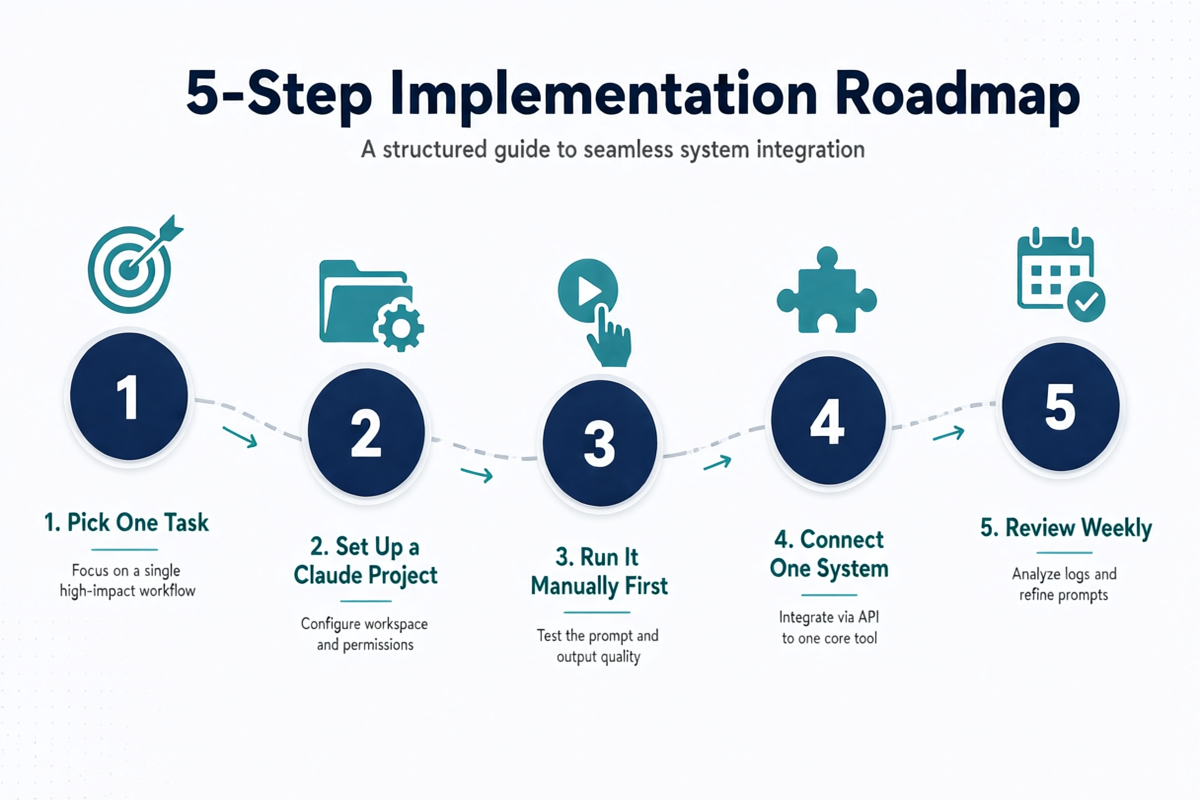
The most common mistake small business owners make with Claude AI for sales is trying to implement everything at once. The correct five step rollout Claude AI sales workflow small business approach is sequential, not simultaneous. Here is the sequence that produces consistent results without a week of setup time and zero output.
- Pick the one most painful recurring sales task and address it with Claude.ai first. Not the biggest opportunity — the one task that costs you the most time or creates the most friction every single week. For most small business sellers, this is either follow-up email drafting or proposal writing. Start there. One task, one Project, one week to prove value to yourself before adding anything else.
- Build your Sales Project context before writing any prompts. The quality of Claude’s output is a direct function of the context it holds. Spend two hours building a Project that includes your ICP, your product’s value propositions (including pricing), your top three competitive alternatives and how you differentiate, and your communication voice and tone. Every subsequent task will be better because of this foundation. Do not skip this step to save time.
- Add one Cowork scheduled task after two weeks of Claude.ai usage. Once you have a working Claude.ai workflow for your highest-pain task and a solid Project context, convert the highest-frequency version of that task to a claude sales workflow rollout via Cowork scheduled automation. One scheduled task. Run it for a week. Evaluate. Expand.
- Connect one external tool — your CRM, your calendar, or your email client — using an MCP connector. Do not try to connect all of them simultaneously. Pick the tool where Claude working from real data rather than pasted data would save the most time. For most small business sales teams, that’s the CRM. Set it up, test it with two or three tasks, and confirm it works before adding more connections.
- Review your Claude-assisted sales output weekly for the first month. Claude’s output quality on your specific tasks will improve as you refine your Project context based on what works and what misses. Treat the first month as calibration time, not production time. Every output that doesn’t quite hit the mark is a signal to add or refine a line in your Project context — not evidence that Claude isn’t capable of the task.
Most small business sales teams that follow this sequence are running a fully operational Claude-assisted sales workflow — with Claude.ai for interactive tasks, one or two Cowork automations, and a connected CRM — within four to six weeks. The investment is measured in hours of setup, not days of configuration, and the output from that point forward compounds with each refinement to the Project context.
Conclusion
The Claude AI for sales product ecosystem gives a small business sales team — including a team of one — access to the same AI-assisted workflow infrastructure that enterprise sales organizations are building with much larger IT budgets. The difference is that Claude’s product layers are accessible at a fraction of the cost, require no custom development, and can be deployed sequentially so you’re generating real output rather than running a multi-month implementation project.
The product map is straightforward: Claude.ai for interactive desk work, Cowork for recurring automation, Projects and Skills for persistent context and team consistency, MCP connectors and Claudeforce for CRM integration, and Claude for Small Business for prebuilt workflows with out-of-the-box connectors. Each layer adds leverage. You don’t need all of them to start, but understanding all of them tells you where your sales operation can go. For a deeper look at how Claude fits your entire business beyond sales, see the full guide: How to Use Claude AI for Business: The Complete 2026 Guide.
Frequently Asked Questions: Claude AI for Sales
Can Claude AI replace my CRM for small business sales?
No — and it is not designed to. Claude AI works alongside your CRM, not instead of it. If you are on HubSpot Free, Pipedrive, or even a Google Sheets pipeline, Claude reads and interprets that data through an MCP connector, then helps you act on it: drafting follow-ups, summarising deal health, or flagging stale opportunities. If you have fewer than 50 active leads and no team, Claude.ai alone can hold a lightweight account list inside a Project and serve as your working pipeline. Once you cross that threshold, connect a proper CRM and let Claude sit on top of it.
What Claude plan do I need to use Claude for sales workflows?
The Claude Pro plan (individual, ~$20/month) is the practical entry point. It gives you access to Projects — the persistent context layer where you store your ICP, product positioning, and deal notes — plus Claude Cowork for scheduled task automation. The free tier works for one-off prompts but lacks Projects, which means you lose context between conversations. Teams plans add multi-seat access and shared Projects, which matters once you have two or more people touching the same pipeline. Claude for Small Business (the connector ecosystem) layers on top of whichever plan you use.
How many hours per week can Claude save a small business sales team?
Based on current usage patterns, a solo founder or a two-person sales team can realistically save 8–12 hours per week. The biggest gains come from three places: cold email drafting and personalisation (1–2 hours/week), discovery call prep and post-call write-ups (1.5–2 hours/week), and proposal or SOW drafting (2–3 hours per proposal). Cowork scheduled tasks — weekly pipeline review, Monday lead triage, and monthly reporting — add another 2–3 hours of recovered time. That is roughly one full work day every week redirected from admin toward actual selling.
Is Claude AI safe to use for sales prospect data and client information?
Claude.ai on paid plans does not use your conversation content to train models, and Anthropic publishes a clear data usage policy at anthropic.com/legal/privacy. For sales use, the practical rules are: do not paste full PII databases or signed contracts into the chat window; use Claude Projects to store your ICP and positioning rather than raw contact lists; and for CRM-connected workflows via MCP, confirm your connector’s data-handling terms. Enterprise and Teams accounts include BAA-adjacent commercial agreements for more sensitive verticals. Most small business sales use cases — prospect research, email drafting, call prep — fall comfortably within standard privacy terms.
What sales tasks should I NOT use Claude AI for?
Three categories where Claude underperforms or creates risk: First, live deal negotiation — Claude lacks real-time context about tone, body language, and the specific dynamics of your relationship with a buyer. Second, pricing decisions with significant margin impact — Claude can draft pricing language but should not set prices without human review of your actual cost structure. Third, compliance-sensitive communications in regulated industries (financial services, healthcare, legal) — Claude does not know your firm’s specific compliance requirements unless you build a detailed system prompt around them, and even then you need human sign-off.
How do I set up a Claude AI prospecting research workflow for B2B sales?
Start by creating a Claude Project and loading it with your ICP definition (company size, industry, title, triggers) and your product’s value proposition for each ICP segment. Then use this prompt as your baseline: “I am targeting [company name]. Their recent press release / job postings / LinkedIn activity shows [observation]. Draft a one-paragraph account summary covering: what they do, likely pain points our product addresses, and a suggested outreach angle.” Run this for each new prospect, refine the output, and paste the result into your CRM notes. Once you have done this 10 times, Cowork can schedule the research step to run overnight on a batch of new leads.
Can Claude write personalised cold email sequences without an enterprise CRM?
Yes — this is one of Claude’s strongest no-CRM use cases. Paste a prospect’s LinkedIn headline, company description, and one recent trigger (funding round, new hire, product launch) into Claude and ask it to write a three-email sequence: an initial cold email under 100 words, a value-add follow-up with a relevant stat or resource, and a break-up email with a soft CTA. Store the winning templates in a Claude Project so they carry over across conversations. Claude cannot send emails automatically without an MCP connector (Gmail or Outlook), but drafting the full sequence takes under five minutes per account.
What is Claudeforce and how does it work with Salesforce for small business?
Claudeforce is the integration between Claude and Salesforce CRM, launched in partnership between Anthropic and Salesforce in August 2026. It brings Claude’s reasoning capabilities directly into the Salesforce interface, so you can ask natural-language questions about your pipeline (“which deals over $20k have had no activity in 14 days?”), generate follow-up emails pre-populated with Salesforce data, and run deal health summaries without switching tabs. For small businesses, the most practical entry point is through Salesforce Starter or Essentials plans, where Claudeforce adds AI drafting and pipeline analysis without requiring a Salesforce Einstein licence.
How does Claude Cowork automate sales follow-up sequences on a schedule?
Claude Cowork lets you create scheduled tasks that run autonomously at a set time — no manual trigger needed. For follow-up automation, the setup is: (1) Write a Cowork task that tells Claude to review your follow-up list (paste it as a table in the task or connect a Google Sheets MCP), (2) instruct it to draft a personalised follow-up for each contact based on their stage and last activity, (3) schedule the task to run every Tuesday and Thursday at 8am. Claude drafts the emails and delivers them to your inbox or Slack. You review and send — Claude handles the drafting work, you retain the send decision.
How do I use Claude AI for sales proposal writing as a freelancer or consultant?
Build a Claude Project with three documents: your service menu with scope descriptions and price ranges, three anonymised past proposal examples, and your standard SOW terms. When a new proposal is needed, open that Project and prompt: “Draft a proposal for [client name] covering [scope]. Budget is approximately $[X]. Use the structure from the examples stored here and adapt the scope section for their stated requirements.” Claude produces a near-final draft in minutes. Your edits should focus on the pricing section, the timeline, and any client-specific custom terms. Save each final proposal back into the Project as a new example to improve future outputs over time.
What is the difference between Claude Projects for sales and the Claude MCP connector for CRM?
Claude Projects stores static knowledge — your ICP, templates, past proposals, product positioning — and makes it available across all your conversations. It is the long-term memory layer. MCP connectors are live data bridges: they let Claude read from and write to external systems like HubSpot, Pipedrive, or Google Sheets in real time. Use Projects for the context that never changes (your sales playbook, your brand voice, your objection handling scripts) and MCP for the data that changes daily (current pipeline stage, contact activity, deal value). Most small business sales workflows need both: Projects for quality and MCP for freshness.
Can Claude AI help with B2B lead qualification without a CRM?
Yes — paste your lead list (company name, source, any notes) into Claude and provide your ICP scoring criteria, then ask Claude to score each lead A/B/C based on fit. A typical prompt: “Score these 15 leads A (strong ICP fit), B (partial fit), or C (poor fit) based on these criteria: [company size range, industry, title, trigger]. Add one sentence of reasoning per lead.” This gives you a triage output you can act on immediately. For recurring lead qualification, set this up as a weekly Cowork scheduled task that processes new leads from a shared spreadsheet and delivers the scored list to your inbox every Monday morning.