Most business leaders know Google has AI tools. Very few know the full scope of what those tools actually do — or how deeply they now run through every function in the organization.
This article is a complete breakdown of how to use Google Workspace AI tools for business, department by department, tool by tool. Not a product brochure. Not a feature checklist. A practical answer to the question every CTO and operations director is actually asking: “We already pay for Google Workspace — what can AI actually do for us right now, and where do we start?”
The short answer: significantly more than your team is currently using. As of 2025, Google reports that Gemini provides business users with over 2 billion AI assists every month. Yet in most organisations, fewer than 20% of employees use any AI feature consistently. The gap between what is available and what is being used is where your competitive opportunity lives.
This guide closes that gap — one department at a time.
What Does Google Workspace AI Do for Business? A Plain-Language Answer for Non-Technical Leaders
Google Workspace AI is not a single tool. It is an integrated layer of artificial intelligence running across the entire Workspace suite — Gmail, Docs, Sheets, Slides, Meet, Chat, Drive, Forms, and several standalone products — all powered by Google’s Gemini models.
In practical terms, the productivity applications your organisation already uses every day now have AI capabilities built directly into them. No new software to install. No separate login. No data migration. The AI is already in your environment, waiting to be activated and used.
The AI capabilities fall into three layers:
Layer 1 — Embedded AI (inside existing apps): Gemini as a side panel and smart assistant within Gmail, Docs, Sheets, Slides, Drive, Chat, and Meet. This is the layer most organisations have access to today on any paid Workspace plan — and the layer delivering the most immediate, measurable productivity gains.
Layer 2 — Standalone AI tools: NotebookLM (research and knowledge synthesis), Google Vids (AI-powered video creation), Gems (custom AI agents), and the Gemini app (conversational AI for complex tasks). Included in Business and Enterprise plans.
Layer 3 — Automation and agent infrastructure: Workspace Flows (no-code business process automation), AppSheet with Gemini (no-code app building and data automation), and Gemini Enterprise Agent Platform (custom agent deployment at scale). The most advanced — and most underused — capability in the suite.
Understanding which layer is relevant to each business function is the first step to building a practical adoption plan.
Is Google Workspace AI Included in My Current Plan — and What Does Each Tier Actually Unlock?
This is the most frequently asked question before any adoption conversation can proceed, and the answer changed significantly in early 2025.
Google made the decision to include Gemini AI in all Workspace Business and Enterprise plans without requiring a separate add-on. Organisations on Business Starter, Standard, Plus, and all Enterprise tiers now have access to Gemini embedded across Gmail, Docs, Sheets, Slides, Meet, Chat, and Drive — plus the Gemini app, NotebookLM, and Google Vids.
The pricing adjustment was minimal: a Business Standard customer previously paying $12/user/month now pays approximately $14/user/month — roughly $2 more per user for the full AI suite.
What each tier actually unlocks:
- Business Starter/Standard/Plus: Gemini in all Workspace apps, Gemini app, NotebookLM, Google Vids, Workspace Flows, AppSheet
- Enterprise Standard/Plus: All above plus advanced security controls, data residency, Vault compliance, enhanced admin governance over AI usage
- Google AI Ultra for Business (add-on): Highest model access tier, largest NotebookLM limits, priority access to newest features, watermark-free outputs
- Gemini Enterprise (separate Google Cloud product): No-code Agent Designer, custom agent deployment, Model Armor safety screening, HIPAA/FedRAMP compliance configurations
The practical takeaway: if your organisation is on any paid Google Workspace plan, AI capabilities are already included in what you pay for. The bottleneck is not budget — it is awareness and activation.
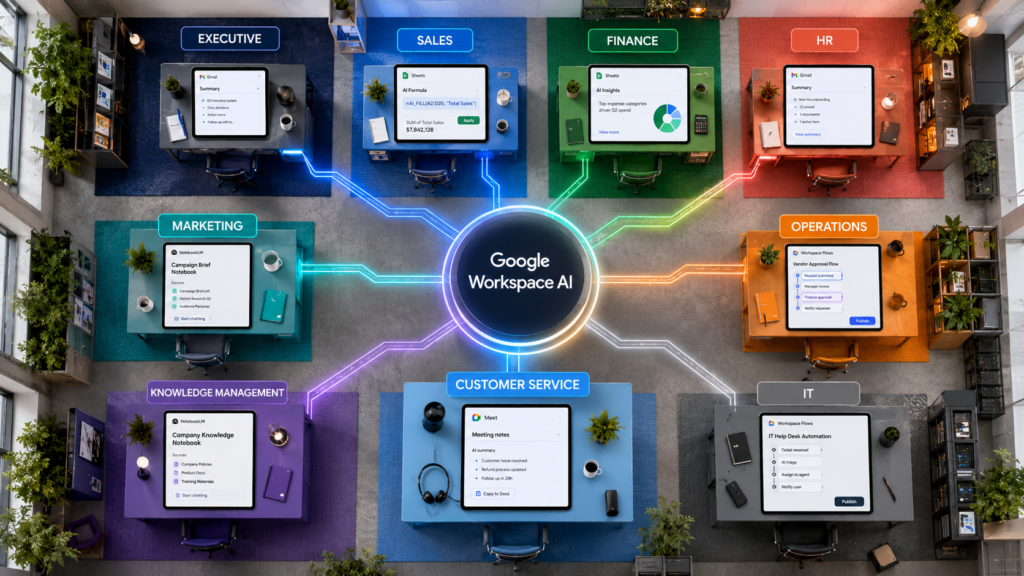
Google Workspace AI Features by Business Function: Complete Department Breakdown
How Does Gemini in Google Workspace Help Executive Leaders Save Time on Communications?
Every executive deals with the same core problem: too much communication, not enough signal. Google Workspace AI attacks this problem directly and measurably.
Gemini in Gmail is where most leaders experience the most immediate value. The AI summarises entire conversation threads — including those stretching across weeks and dozens of replies — into a concise briefing in seconds. It drafts context-aware replies based on the thread history. Prompting it to “summarise the last 10 unread emails and flag urgent action items” reduces a task that previously consumed 20–30 minutes of focused morning time to under two minutes.
Documented result: Mark Cuban’s Cost Plus Drugs reports employees save an average of five hours per week using Gemini in Gmail, with the additional benefit of streamlining transcription and compliance documentation.
→ Visit Google Gemini in Email
Gemini in Docs serves executives dealing with high volumes of written output. The “Help me create” feature allows a leader to describe what they need — a quarterly business review, a board briefing, an investor update — and Gemini synthesises a fully formatted first draft using context from Drive, Gmail, Calendar, and Chat simultaneously. The Match Writing Style feature unifies tone across documents where multiple collaborators have contributed, eliminating editing rounds to fix voice inconsistencies.
The Gemini app with Gems builds persistent, specialised AI agents tuned to specific leadership workflows. A “Board Prep Gem” structures outputs as executive summaries with three key decisions, supporting data, and risk flags. A “Competitive Intelligence Gem” synthesises updates on specific competitors automatically. Gems persist across sessions and can be shared across the leadership team.
→ 5 tips on getting started with Gems
How to Use Google Workspace AI to Write Sales Proposals and Follow-Up Emails Faster
Sales teams generate high volumes of repetitive text — proposals, follow-up emails, meeting summaries, call recaps — while simultaneously needing deep situational knowledge about every prospect. Google Workspace AI creates compounding time savings across all of these simultaneously.
NotebookLM as a pre-call research tool is one of the highest-impact, least-discussed sales applications in the suite. A sales professional uploads the prospect’s annual report, recent press releases, competitor landscape analysis, and internal product specs into a NotebookLM notebook. Before the call, they ask: “What are this company’s stated strategic priorities this year, and which of our solutions maps most directly to each?” NotebookLM produces a cited, grounded briefing drawn directly from the uploaded materials — not a hallucinated summary. Sales teams using this approach report significantly shorter prep times and meaningfully higher first-call relevance scores.
Gemini in Gmail accelerates the proposal and follow-up cycle. After a meeting, a rep prompts Gemini to draft a follow-up email summarising key points discussed, next steps agreed, and materials promised — pulling context from the calendar entry, meeting notes, and prior email history simultaneously.
→ Visit Google Gemini in Email
Gemini in Docs supports proposal generation from your own content. Rather than building from a blank page, salespeople prompt Gemini to create a first draft tailored to the specific prospect, drawing on internal pricing documents, case studies, and product descriptions from Drive.
Workspace Flows automates the follow-through. When a prospect submits a form, a Flow triggers a personalised draft email, creates a CRM task, and updates a tracking sheet — all without manual intervention. Salesforce, HubSpot, and Jira connectors extend the automation beyond Workspace.
→ Create your first flow in Google Workspace Studio
Can Google Sheets AI Replace a Data Analyst for Finance Teams?
For many finance teams, the =AI() function in Google Sheets is the highest-impact, lowest-friction Google Workspace AI feature in the entire suite — and consistently the most underused.
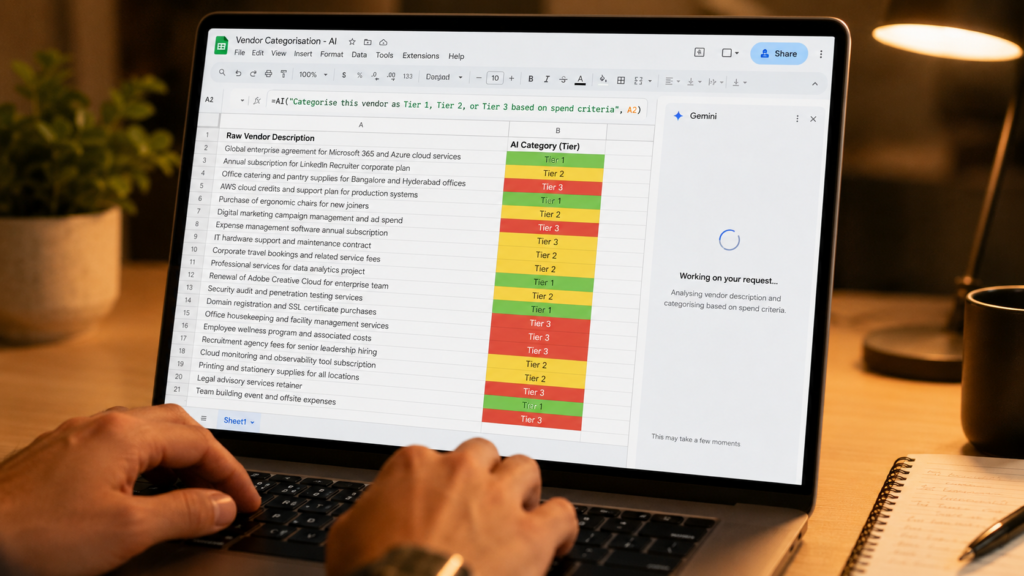
Gemini in Google Sheets with the =AI() function allows any team member to type a natural language instruction directly into a spreadsheet cell and have Gemini execute it across a specified range. Practical finance use cases include: categorising expense line items by type and policy compliance, summarising variance analysis commentary across reporting periods, generating plain-English narrative explanations for dashboard data, and flagging anomalies in accounts payable — all without building complex formulas or involving a data analyst.
For complex analytical tasks, Gemini handles natural language queries against operational data: “Which cost centre had the highest quarter-over-quarter increase in the last two quarters?” returns a direct answer without a pivot table. Optimisation problems — staffing cost scenarios, procurement allocation, budget distribution — are solved through natural language prompts powered by Google DeepMind’s OR-Tools.
Can it fully replace a data analyst? For routine categorisation, variance commentary, anomaly flagging, and natural language queries — it eliminates many analyst hours per week. For complex statistical modelling or custom analytical frameworks, a data analyst remains necessary. The highest ROI is in high-volume, repetitive data processing tasks where analyst time is measurably expensive.
AppSheet with Gemini handles the document side of finance operations. The AI Task automation extracts structured data from invoices, purchase orders, and expense receipts automatically — pulling line items, totals, vendor names, and GL codes from uploaded PDFs without manual data entry. Organisations using this report 60–80% reductions in accounts payable data entry time.
→ App development using AppSheet with Gemini
NotebookLM supports financial reporting workflows. Finance leaders upload quarterly reports, budget documents, and board presentations; the AI answers questions about trends, surfaces KPI movements, drafts executive commentary, and generates briefing outlines — all grounded in the source documents with no risk of fabricated figures.
Best Google Workspace AI Features for HR Teams: Hiring, Onboarding, and Knowledge Management
HR teams produce high volumes of documents while managing the organisational knowledge new employees most need access to. Google Workspace AI addresses both the creation and the distribution of that knowledge simultaneously.
Gemini in Docs compresses document creation time. Writing a job description from scratch typically takes 45–90 minutes of an experienced HR professional’s time. With Gemini, the same output takes 5–10 minutes — prompt the AI with the role title, level, key responsibilities, and reporting structure, and it produces a first draft for refinement. Offer letters, performance review templates, policy documents, and onboarding guides all follow the same pattern.
Google Vids addresses the training video production problem directly. Creating a professional onboarding video previously required production budget or compromising on screen recording quality. Google Vids provides AI-assisted video creation within Workspace — HR teams create narrated, visually structured training videos for new hire orientation, compliance training, and process walkthroughs without a designer or video editor.
How to use Google Vids to create internal training videos without a designer: Upload your training content or script, select a visual style, and use Gemini’s scripting assistance to generate narration. The AI handles visual composition, audio balancing, and layout. A 10-minute onboarding video that previously required a full production day is completed in under two hours by an HR professional with no video editing experience.
NotebookLM as an HR knowledge base is one of the most immediately deployable applications in the entire suite. HR teams upload the employee handbook, benefits documentation, leave policies, performance management framework, and onboarding checklists into a shared notebook. New employees query the knowledge base in natural language rather than hunting through PDF files. Questions like “What is the process for requesting parental leave?” return cited, accurate answers in seconds. Attache used this approach to achieve an 80% reduction in support calls from new employees.
Gemini in Google Forms closes the HR feedback loop. Pulse surveys, onboarding satisfaction assessments, and exit interviews processed through Forms are automatically summarised by Gemini — surfacing top themes and concerns from hundreds of responses without the HR director manually reading every reply.
How to Use Google Workspace AI for Marketing: Content Creation, Video, and Campaign Automation
Marketing teams need high-quality content at volume, consistent brand voice, and the speed to respond to market changes. Google Workspace AI accelerates all three without replacing the creative judgment that distinguishes great marketing.
Gemini in Docs for content creation pulls context from the organisation’s own Drive files — previous campaigns, brand guidelines, product documentation, customer research — rather than generating from a blank slate. The Match Writing Style feature ensures outputs match established brand tone rather than sounding generically AI-produced. Campaign briefs, blog drafts, email sequences, social copy, and press releases all benefit from AI-assisted first drafts that start from your own content rather than generic training data.
Google Vids compresses video production cycles. Marketing teams create polished, narrated, on-brand videos for product launches, social media, webinars, and customer communications within Workspace — reducing a multi-day production cycle to hours for standard content types.
Gemini in Slides adds AI-generated visuals and AI image editing directly within presentations. Marketing leaders prompt the AI to create a full deck for a product launch, campaign review, or agency briefing — with formatting, layout, and imagery generated from the brief rather than assembled manually.
Workspace Flows for marketing automation: When a prospect completes a lead form, a Flow drafts a personalised onboarding email, creates a CRM contact record, and notifies the relevant sales contact — all without manual intervention. HubSpot, Salesforce, and Asana connectors extend these automations across the full martech stack.
AlmapBBDO built a platform using Gemini models that simulates opinions from real consumer profiles in real time, allowing marketing teams to refine campaign concepts before production investment — an example of the advanced end of what Workspace AI infrastructure enables.
How Do I Automate Business Workflows With Google Workspace AI Without Coding?
Operations teams are the function where Google Workspace AI’s automation layer creates the most transformative impact — and where adoption is currently lowest because most operations leaders do not know these capabilities exist inside their current subscription.
Workspace Flows is a no-code automation builder embedded directly in Google Workspace. Flows connect triggers (form submission, email received, calendar event, Sheets update) to actions (send email, create document, update spreadsheet, post in Chat, create task in Jira or Asana). The AI layer understands natural language — describe a workflow in plain English and Flows structures the logic automatically. An operations team at a mid-size company can build 10–20 meaningful process automations in a single afternoon without any developer involvement.
Common no-code automations to deploy in week one:
- Automated meeting prep documents generated before every scheduled meeting based on attendee list and agenda
- Automated status report compilation from Sheets data sent to stakeholders on a fixed schedule
- Automated onboarding task creation in project management tools triggered when a new employee record is created
- Automated invoice routing from Gmail to the appropriate finance team member based on vendor name extracted by AI
What is Google Workspace Flows and how does it work? It is a trigger-action automation builder. You select a trigger (something that happens), connect it to one or more actions (something that happens in response), and the AI layer adds intelligence in the middle — classifying, drafting, summarising, or routing based on the content of the incoming data.
AppSheet with Gemini takes automation further for operations teams dealing with physical workflows, field teams, or document-intensive processes. AppSheet allows non-technical users to build mobile applications for field operations — inspection checklists, inventory tracking, work order management, incident reporting — by describing the process to Gemini in natural language. The AI Task automation layer extracts and categorises data from photos and documents automatically: a field technician photographs equipment and the system logs asset details, condition assessment, and maintenance flags without manual data entry.
Wayfair used this infrastructure to automate product catalogue enrichment, updating product attributes five times faster than the manual process.
The =AI() function in Sheets for operations: Type =AI("Categorise this vendor description as Tier 1, Tier 2, or Tier 3 based on our spend criteria", A2) and it executes across thousands of rows in seconds — eliminating hours of manual categorisation across procurement, logistics, supply chain, and vendor management workflows.
How to Use Google NotebookLM to Prepare for Board Meetings and Executive Research
Knowledge management is the function where organisational value is most consistently lost. Documents exist in Drive but are never found. Reports are written and immediately siloed. Expertise departs when people leave. Google Workspace AI addresses each of these failure modes directly.
Google Drive as an active knowledge base is the most significant architectural shift in how Drive now functions. Drive with Gemini performs semantic search across all organisational content. A team member asks “What decisions were made about our pricing strategy in Q3?” and Gemini surfaces the relevant documents, meeting notes, and email threads — not by keyword matching but by understanding the question’s intent across the full content corpus.
How to use Google NotebookLM to prepare for board meetings: Upload your sources — quarterly reports, strategy documents, competitor analyses, board minutes, investor presentations — to a NotebookLM notebook. Ask: “What are our three biggest strategic gaps versus the competitor analysis?” Every answer is cited back to the specific document it came from. Generate an Audio Overview for a 15-minute briefing during your commute. Create a Video Overview to share with board members as a pre-meeting preparation resource. This approach compresses board preparation from a two-day exercise to under two hours — with higher accuracy and zero hallucination risk.
The full NotebookLM capability set for business use:
- Written Q&A grounded in uploaded sources with full citations
- Audio Overviews — structured podcast-style discussions of your materials, ideal for research consumption during commutes
- Video Overviews — narrated explainer videos generated from documents, slides, and charts
- Mind Maps for visual exploration of topics across your content corpus
- Multiple output versions tailored to different audiences or languages
- Sources can include Google Docs, PDFs, Slides, text files, web URLs, YouTube URLs, and audio files — up to 500,000 words or 200MB per source
Rivian uses NotebookLM to help creative teams move from technical documentation to creative planning in minutes.
Gemini in Chat extends knowledge access into conversational workflows. Team members prompt Gemini to summarise documents, extract information from linked files, or synthesise responses from multiple sources — all within the conversation interface — making institutional knowledge accessible in the context of the workflow where it is needed.
How Does Google Workspace AI Reduce Customer Service Response Time and Support Costs?
Customer service teams face two compounding pressures: growing interaction volumes and rising expectations for faster, more personalised responses. Google Workspace AI addresses both without requiring a separate customer service platform investment.
Gemini in Gmail for customer-facing communications delivers the most consistently documented ROI of any Workspace AI feature. The AI drafts contextually accurate, brand-appropriate responses by analysing the email thread, available product documentation in Drive, and previous similar communications. Documented result: a Workspace customer reported a 30–35% reduction in time spent drafting customer service messages, with simultaneous improvements in response quality. The team shifted from 100+ static response templates to prompt-driven personalised responses.
→ Visit Google Gemini in Email
Workspace Flows enables automated first-response and triage. When a support email arrives, a Flow automatically classifies the enquiry type, creates a task in the relevant team’s tracker, sends an acknowledgement to the customer, and drafts a first-response suggestion for the agent — before any human has reviewed the email. For organisations managing high volumes, this eliminates the categorisation and queue management overhead entirely.
NotebookLM as a support knowledge base: Support teams upload product documentation, troubleshooting guides, policy documents, and a library of resolved support cases. Agents query in natural language during live customer interactions, retrieving accurate, cited answers in seconds rather than searching through documentation manually or escalating.
Attache achieved an 80% reduction in inbound support calls using this approach. Best Buy doubled its customer self-service resolution rate using Gemini Enterprise.
Is Google Workspace AI Safe for Confidential Business Data? Security and Compliance Explained
Data security is the question that most often slows enterprise AI adoption decisions — and in most cases is based on outdated assumptions about how Google handles business data.
Standard protection on all paid Workspace plans: Google does not use your business data to train AI models. Prompts and generated content stay within your organizational Workspace environment. The same enterprise-grade security controls that apply to all Workspace data — DLP policies, access controls, audit logs, data residency settings — automatically apply to AI interactions. Data is encrypted at rest and in transit.
Regulated industry configurations: Google Cloud AI supports HIPAA-eligible configurations, SOC 2 Type II, FedRAMP High, and GDPR data residency. Gemini Enterprise adds VPC Service Controls, Customer-Managed Encryption Keys, and Access Transparency for organizations requiring granular data sovereignty.
Governance and audit: Google Vault now supports Gemini prompt retention for compliance matters from January 2025. The Admin Console provides Gemini usage reports covering all AI activity across the organization. Gemini Enterprise includes Model Armor for proactive screening of unsafe AI interactions and centralized governance over all deployed agents.
What IT teams need to do: Standard commercial organizations proceed under existing Workspace controls without architectural changes. Healthcare, financial services, and government organizations should engage Google Cloud’s compliance team to map specific regulatory requirements to available configuration options before broad deployment.
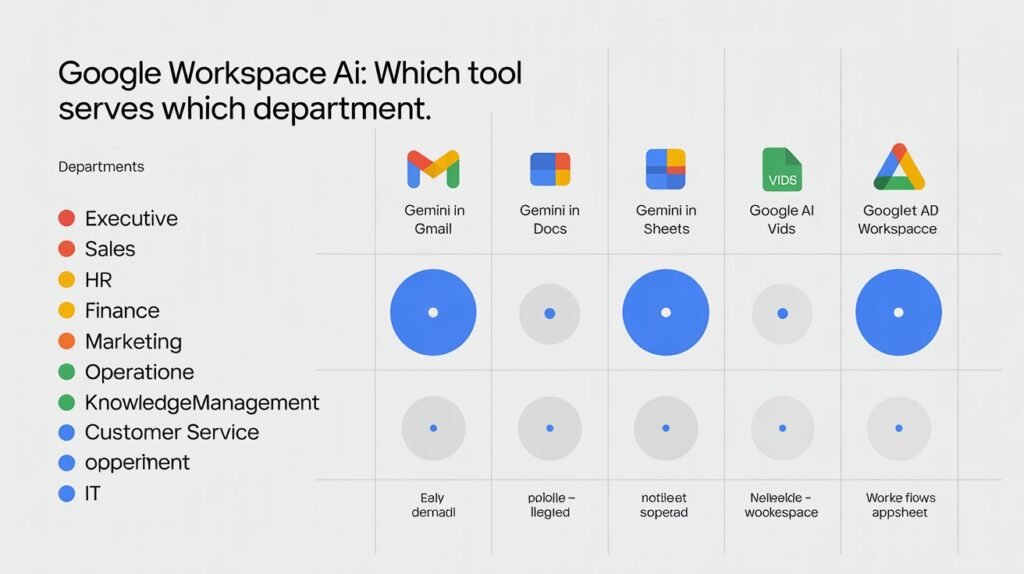
How Do I Get Started With Google Workspace AI in My Company? A 60-Day Activation Plan
The organizations that extract real value from Google Workspace AI are not the ones that ran the biggest launch announcement. They are the ones that started small, measured consistently, and built momentum from documented results.
Days 1–7: Audit what you already have. Pull the Gemini usage report from your Admin Console. Identify the percentage of your team that has used any AI feature in the last 30 days — in most organizations this is under 20%. This is your baseline. Ensure Gemini, NotebookLM, and Google Vids are enabled for all users in Admin Settings.
Days 8–14: Select one team, one problem, one metric. Choose a single department where a specific, measurable problem is clearest. Good candidates: communications team (email volume), finance team (manual Sheets work), HR team (document creation volume), sales team (proposal cycle time). Define the metric you will measure before and after.
Days 15–28: Run the pilot. Provide one 2-hour training session using Google Cloud Skills Boost materials, which are free. Identify one AI champion within the team. Have the champion document two or three specific use cases where AI produced a measurable improvement in week one.
Days 29–45: Measure and report. Even a 30-minute daily saving per person is compelling — at 10 people, that is 100+ hours per month. Document the specific metric. Report it to leadership with the connection to a business objective.
Days 46–60: Plan the next function. Use the pilot results to build the business case for the next department. A disciplined function-by-function rollout over six months produces organization-wide adoption that is genuinely embedded rather than nominally mandated.
How Can Google Workspace AI Reduce Business Operating Costs? Documented Results by Function
Business cases require specific numbers. These are documented outcomes from real Workspace customers:
Overall time savings: Users report saving an average of 105 minutes per week using Gemini’s embedded tools. At a loaded cost of $50/hour, 105 minutes per user per week across 100 employees produces approximately $455,000 in annual productivity value.
Executive communications: Five hours per week saved per user in Gmail alone (Cost Plus Drugs, documented).
Finance — document processing: 60–80% reduction in manual data entry time for accounts payable through AppSheet AI automation (consistent across documented deployments).
Customer service: 80% reduction in inbound support calls through AI knowledge base deployment (Attache, documented). 200% increase in customer self-service resolution (Best Buy, documented with Gemini Enterprise).
Sales: Mortgage underwriter productivity more than doubled in nine months through Gemini integration at United Wholesale Mortgage (documented).
Enterprise adoption benchmarks: Geotab (2,300 employees) reached 89% Gemini adoption with users averaging 40 queries per day within a single month. KPMG achieved 90% Gemini Enterprise adoption with over 100 AI agents deployed in the first month.
Is Google Workspace AI Safe for Enterprise Data? The Complete Security and Compliance Guide
Standard protection — all paid Workspace plans: Your data is not used to train Google AI models. Prompts and outputs remain within your organisational environment. Existing Workspace security controls — access permissions, DLP policies, audit logs — automatically apply to all AI interactions. Data is encrypted at rest and in transit.
Regulated industry requirements: Google Cloud AI supports HIPAA-eligible configurations, SOC 2 Type II, FedRAMP High, and GDPR data residency. Gemini Enterprise adds VPC Service Controls, Customer-Managed Encryption Keys (CMEK), and Access Transparency logs.
Governance and audit infrastructure: Google Vault supports Gemini prompt retention for compliance matters. Admin Console Gemini usage reports cover all AI activity organisation-wide. Gemini Enterprise Model Armor screens proactively for unsafe AI interactions.
What to do: Standard commercial organisations proceed under existing Workspace controls with no architectural changes required. Regulated industries engage Google Cloud’s compliance team before broad deployment.
How Does Google Workspace AI Compare to Microsoft 365 Copilot for Business?
This comparison appears in every enterprise AI evaluation. The honest answer depends almost entirely on your existing platform infrastructure.
Choose Google Workspace AI if: Your organisation runs on Gmail, Drive, and Google Workspace apps. Gemini is native to your environment and now embedded in your plan pricing. Gemini’s reasoning and multimodal capabilities are leading independent benchmarks as of 2025. BigQuery provides superior data infrastructure for analytics-heavy organisations.
Choose Microsoft 365 Copilot if: Your organisation runs on Outlook, Teams, SharePoint, and Microsoft 365 apps. Copilot’s Microsoft Graph integration — the organisational data layer connecting all M365 content — is currently more mature for enterprise-wide cross-system knowledge search.
What both platforms support: Third-party connectors for Asana, Jira, and Salesforce. Google’s Gemini Enterprise explicitly supports output generation in Microsoft 365 formats. For organisations with significant technical teams, Google’s multi-model flexibility within Vertex AI — supporting Gemini, Claude, Llama, and other models — offers a more open architecture.
The decision framework: evaluate against your existing platform investment, not against a generic AI feature scorecard. The best Google Workspace AI tool for business is the one your team will actually use within the workflows they already run every day.
What Is the Difference Between Gemini and NotebookLM for Business Use?
Gemini is Google’s AI model embedded across all Workspace apps and available as a standalone assistant. It draws on Google’s broad training data, real-time web search, and your Workspace context (Drive, Gmail, Calendar). It is a general-purpose AI assistant that becomes more powerful when connected to your organisational data.
NotebookLM is a specialised research and synthesis tool that creates a private AI model based only on the specific sources you upload to a notebook. Every answer is cited back to those sources. It never draws from general training data. This makes it ideal for situations where accuracy, source fidelity, and zero hallucination risk are critical — competitive analysis, board preparation, regulatory compliance, or any high-stakes context.
The practical rule: Use Gemini for creating, writing, analysing, and automating. Use NotebookLM when you need to interrogate, synthesise, and cite specific documents with precision that cannot tolerate AI fabrication.
Google Workspace AI Tools for Business: Start This Week, Not Next Quarter
The window for first-mover advantage with Google Workspace AI is not closing in years — it is closing in months. Geotab reached 89% organisational adoption in a single month of active rollout. KPMG deployed over 100 custom AI agents in four weeks. Best Buy doubled its customer self-service resolution rate.
The organisations establishing durable AI advantages are not building the most sophisticated strategy documents. They are identifying a specific, measurable problem this week, activating the correct Google Workspace AI tool, and reporting a specific result next month.
Your Google Workspace subscription almost certainly already includes everything needed to start. The Gemini usage report in your Admin Console shows who is using what. The training materials on Google Cloud Skills Boost are free. The first pilot can be running in 48 hours.
The question is not whether your organisation should use Google Workspace AI tools for business. It is which business problem you will attack first — and how quickly you will turn that result into the business case for the next one.
All Google Resources from the Article
→ Visit Google Gemini in Email
→ Visit Google Gemini in Docs
→ 5 tips on getting started with Gems
→ Learn to Use NotebookLM
→ Create your first flow in Google Workspace Studio
→ App development using AppSheet with Gemini
→ Google Drive As Knowledge Base
More from CorporatePlaybookPro.com
→ Agentic AI for Small Business: Use Cases & Roadmap
→ Top 10 AI Use Cases Transforming Small & Medium Business
→ Top 9 Affordable Agentic AI Platforms for Small Businesses
→ What is Agentic AI? Complete Guide with Real-World Examples
→ Types of AI Agents : Guide for Business Leaders
→ How to Use Claude AI for Business: The Complete 2026 Guide
→ Google AI For Business : Maturity Guide
Frequently Asked Questions
What Google Workspace AI tools are included in my current plan?
All paid Workspace Business and Enterprise plans include Gemini embedded across Gmail, Docs, Sheets, Slides, Meet, Chat, and Drive, plus the Gemini app, NotebookLM, and Google Vids. No additional add-on is required as of 2025. The pricing adjustment was approximately $2 per user per month for Business plans.
How does Gemini in Google Workspace help business teams save time on communications?
Gemini in Gmail summarises email threads, drafts contextually appropriate replies, surfaces urgent action items, and filters signal from noise in high-volume inboxes. Documented results include users saving an average of 105 minutes per week, with some organisations reporting five hours per day per user in communications-heavy roles.
How do I automate business workflows with Google Workspace AI without coding?
Workspace Flows is the no-code automation builder embedded in Workspace. Connect triggers (form submissions, email arrivals, calendar events) to actions (send email, update Sheets, create tasks in Jira or Asana, post in Chat) by describing the workflow in natural language. AppSheet with Gemini builds mobile and desktop apps for more complex operational processes — also without code.
Can Google Sheets AI replace a data analyst for finance teams?
For routine analysis — data categorisation, variance commentary, anomaly flagging, natural language queries against operational data — the =AI() function eliminates many hours of analyst time per week. For complex statistical modelling or custom analytical frameworks, a data analyst remains necessary.
Is Google Workspace AI safe for confidential business data?
Yes. Paid Workspace plans ensure your data is never used to train Google’s AI models. Prompts and outputs remain within your organisational environment. Existing Workspace security controls automatically apply to AI usage. Regulated industries configure HIPAA, FedRAMP, and GDPR-compliant environments through Google Cloud.
What is the best Google Workspace AI tool for HR teams?
NotebookLM (searchable knowledge base from policy documents), Gemini in Docs (drafting job descriptions, offer letters, onboarding materials), and Google Vids (training and onboarding videos without production resources) are the highest-impact tools for HR functions.
How do I build a no-code AI automation using Google Workspace Flows?
Open Workspace Flows from your Admin Console. Select a trigger — “When a form is submitted” or “When an email arrives from a specific sender.” Add actions — “Draft a reply,” “Create a task in Asana,” “Update a row in Sheets.” Describe the logic in natural language and Flows structures the automation. No code required at any stage.
What is the =AI() function in Google Sheets and how do businesses use it?
A native Gemini function executing AI instructions within a spreadsheet cell. Type =AI("instruction", cell_reference) and Gemini processes the data — categorising, summarising, rewriting, extracting, or analysing the content across the specified range. Finance, operations, and marketing teams use it most heavily for data categorisation and content generation at scale.
How to use Google NotebookLM for board meeting preparation and executive research?
Upload source materials (PDFs, Google Docs, Slides, URLs, YouTube videos, audio files) to a NotebookLM notebook. Ask questions, generate written summaries with citations, create Audio Overviews for commute-length briefings, produce Video Overviews for shared pre-meeting preparation, and build Mind Maps for visual topic exploration — with every answer cited back to the specific source document.
How does Google Workspace AI compare to Microsoft 365 Copilot for business?
The primary factor is existing infrastructure. Copilot is optimised for Microsoft 365 environments with strong cross-organisational search via Microsoft Graph. Gemini is the stronger choice for Google Workspace users, with leading capabilities in generative content creation, multimodal tasks, and BigQuery data infrastructure. Both support third-party connectors for Asana, Jira, and Salesforce.
How to use Google Workspace AI without IT department involvement?
All Layer 1 and most Layer 2 Workspace AI tools require zero IT involvement — Gemini is embedded in apps your team already opens, NotebookLM has a free tier accessible to any Google account, and Workspace Flows is built into the Admin Console without infrastructure changes. Enabling Gemini for all users requires admin credentials but no technical expertise.
What Google Workspace AI tools work best for remote and distributed teams?
Gemini in Meet provides meeting notes, catch-up summaries for late joiners, and in-meeting Q&A across time zones. Drive AI enables semantic search across the full organisational knowledge base regardless of file location. Workspace Flows automates cross-timezone handoffs. NotebookLM provides asynchronous access to briefings that previously required synchronous calls.
Is Google Workspace AI included for small businesses or only enterprise?
All paid Workspace plans — including Business Starter — include Gemini AI across Gmail, Docs, Sheets, Meet, and Drive, plus NotebookLM and Google Vids. Small businesses receive the same core AI capabilities as enterprises at the standard Business plan price point.
How does Gemini in Google Meet improve business meetings?
Gemini in Meet takes automatic structured notes, assigns action items to named participants, generates “What did I miss?” summaries for late joiners, and allows attendees to ask questions about decisions made earlier in the meeting in real time. After the meeting, it distributes recaps in the format specified.
What should I do first to start using Google Workspace AI tools for business?
Check your Admin Console Gemini usage report for your current adoption baseline. Ensure Gemini, NotebookLM, and Vids are enabled for all users. Choose one department, one specific problem, and one measurable metric. Run a 60-day pilot. Report the result. Let the result drive the next activation.